

Form 40 at a glance
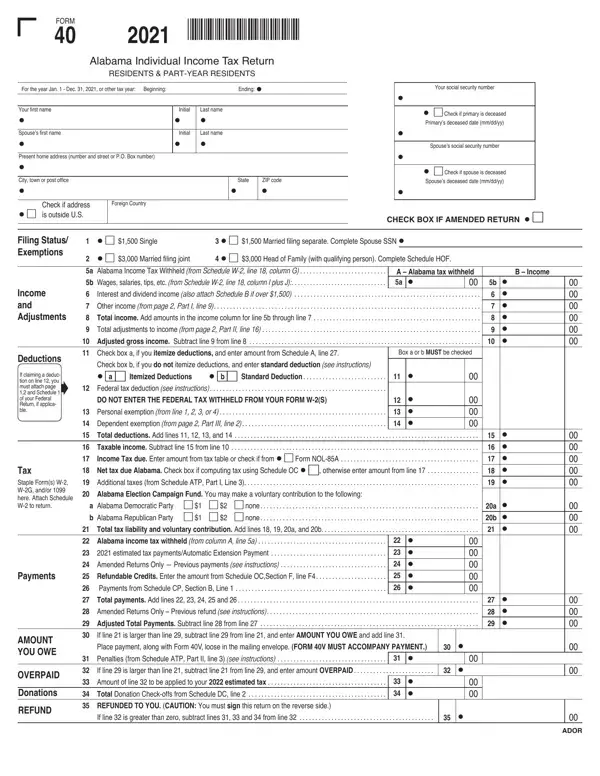
What it is: Form 40 is the Alabama 2025 Individual Income Tax Return for residents and part-year residents.
Who signs: Sign in black ink and keep a copy of this return for your records. If it is a joint return, BOTH spouses must sign.
What to bring and attach to Form 40
Staple Form(s) W-2, W-2G, and/or 1099 to the return, and attach Schedule W-2 to the return.
Schedule W-2 must be completed fully and included with your return in order to receive proper credit for your Alabama income tax withheld. Attach a copy of all withholding statements to your return.
A filled-in Form 40 example: a single wage earner reports her wages
How to fill out Form 40, box by box
Tap a group of boxes to open it, and a picture to see it full size.
Tax year, social security number and deceased boxes

Enter the tax year in the Beginning and Ending boxes: the form is for the year Jan. 1 - Dec. 31, 2025, or other tax year.
Enter your social security number and, if it is a joint return, your spouse's SSN.
Check the box if the primary is deceased or if the spouse is deceased, and enter the Primary's deceased date or Spouse's deceased date (mm/dd/yyyy).
Names, amended return and address

Enter your first name, initial and last name, and the Spouse's first name, initial and last name.
Check the box if this is an amended return.
Enter your present home address (number and street or P.O. Box number), then the city, town, or post office, State and ZIP code. Check the box if the address is outside U.S. and enter the Foreign Country.
Filing Status and Exemptions

Check the box for your filing status and exemption: 1 Single ($1,500); 2 Married filing joint ($3,000); 3 Married filing separate ($1,500), and complete Spouse SSN; or 4 Head of Family (with qualifying person) ($3,000), and complete Schedule HOF (checked October 19, 2026).
Income and Adjustments

Line 5a: enter the Alabama income tax withheld (from Schedule W-2, line 18, column G). Line 5b: enter wages, salaries, tips, etc. (from Schedule W-2, line 18, column I plus J).
Line 6: enter interest and dividend income. If you received more than $1,500 of interest and dividend income, you must complete Schedule B (checked October 19, 2026).
Line 7: enter other income (from page 2, Part I, line 8). Line 8: Total income. Add amounts in the income column for line 5b through line 7.
Line 9: enter total adjustments to income (from page 2, Part II, line 16). Line 10: Adjusted gross income. Subtract line 9 from line 8.
Deductions

Line 11: box a or b MUST be checked. Check box a, if you itemize deductions, and enter amount from Schedule A, line 27. Check box b, if you do not itemize deductions, and enter standard deduction (see instructions).
Line 12: Federal tax deduction (see instructions). If claiming a deduction on line 12, you must attach page 1,2 and Schedule 1 of your Federal Return, if applicable. Do not enter the federal tax withheld from your Form W-2(s).
Line 13: Personal exemption (from line 1, 2, 3, or 4). Line 14: Dependent exemption (from page 2, Part III, line 2).
Line 15: Total deductions. Add lines 11, 12, 13, and 14. Line 16: Taxable income. Subtract line 15 from line 10.
Income tax due and total tax liability

Line 17: Income Tax due. Enter amount from tax table or check if from Form NOL-85A. Line 18: Net tax due Alabama. Check box if computing tax using Schedule OC, otherwise enter amount from line 17. Line 19: Additional taxes (from Schedule ATP, Part I, Line 3).
Line 21: Total tax liability and voluntary contribution. Add lines 18, 19, 20a, and 20b.
Payments
Line 22: Alabama income tax withheld (from column A, line 5a). Line 23: 2025 estimated tax payments/Automatic Extension Payment.
Line 25: Refundable Credits. Enter the amount from Schedule OC, Section F, line F6. Line 26: Payments from Schedule CP, Section B, Line 1.
Line 27: Total payments. Add lines 22, 23, 24, 25, and 26. Line 29: Adjusted Total Payments. Subtract line 28 from line 27.
Amount you owe

Line 30: If line 21 is larger than line 29, subtract line 29 from line 21, and add line 31 and enter the amount you owe.
Place payment, along with Form 40V, loose in the mailing envelope. Form 40V MUST accompany payment.
Line 31: Penalties (from Schedule ATP, Part II, line 3) (see instructions).
Overpaid, donations and refund

Line 32: If line 29 is larger than line 21, subtract line 21 from line 29, and enter the amount overpaid. Line 33: Amount of line 32 to be applied to your 2026 estimated tax. Line 34: Total Donation Check-offs from Schedule DC, line 2.
Line 35: refunded to you. If line 32 is greater than zero, subtract lines 31, 33, and 34 from line 32. Caution: you must sign this return on the reverse side.
For Direct Deposit, check the box and complete Part V, Page 2.
Page 2, Part I, Other Income
Line 1: Alimony received. Line 2: Business income or (loss) (attach Federal Schedule C or C-EZ) (see instructions). Line 3: Gain or (loss) from sale of Real Estate, Stocks, Bonds, etc. (attach Schedule D). Line 4: Retirement Income (attach Schedule RS).
Line 5: Rents, royalties, partnerships, estates, trusts, etc. (attach Schedule E). Line 6: Farm income or (loss) (attach Federal Schedule F). Line 7: Other income (state nature and source, see instructions). Line 8: Total other income. Add lines 1 through 7. Enter that total in the line 8 box and also on page 1, line 7.
Part II, Total adjustments

Line 16: Total adjustments. Add lines 1 through 15. Enter the total in the line 16 box and also on page 1, line 9.
Part III, Dependents

Line 1: Total number of dependents from Schedule DS, line 1b.
Line 2: Amount allowed. Multiply total number of dependents claimed on line 1 by the amount on the dependent chart in the instructions. Enter the amount in the line 2 box and also on page 1, line 14.
Part IV, General Information

All taxpayers must complete this section. Line 1, Residency: check only one box, Full Year or Part Year (From 2025 through 2025).
Line 4: Enter the Federal Adjusted Gross Income and Federal Taxable Income as reported on your 2025 Federal Individual Income Tax Return.
Line 5: Do you have income which is reported on your Federal return, but not reported on your Alabama return (other than your state tax refund)? Check Yes or No. If yes, enter source(s) and amount(s) (other than state income tax refund).
Part V, Direct Deposit

For Direct Deposit of your refund, complete 1, 2, 3, and 4: 1 Routing Number; 2 Type, Checking or Savings; 3 Account Number; 4 Is this refund going to or through an account that is located outside of the United States? Yes or No. See instructions to see if you qualify.
Signature, declaration and preparer

Check the box if you authorize a representative of the Department of Revenue to discuss your return and attachments with your preparer.
Under penalties of perjury, you declare that you have examined this return and accompanying schedules and statements, and to the best of your knowledge and belief, they are true, correct, and complete.
Declaration of preparer (other than taxpayer) is based on all information of which preparer has any knowledge.
Enter your Signature, Date, Daytime Telephone Number and Occupation, and the same for the Spouse. The Paid Preparer's Use Only section is for the Preparer's Signature, Date, Preparer's SSN or PTIN, E.I. Number, Firm's Name, Daytime Telephone No., ZIP Code and Address.
More rules for Form 40
Schedule KRCC-I is used to calculate the recipient's tax liability generated from the qualifying project.
Before Form NOL-85A can be completed, you must first complete Form NOL-85 to determine the amount of net operating loss that may be carried back or forward.
Form 4952A is used to figure the amount of investment interest expense deductible for the current year and the amount, if any, to carry forward to future years.
Common questions about Form 40
What is an Alabama form 40?
Form 40 is the Alabama 2025 Individual Income Tax Return for residents and part-year residents.
Sources
[1] Form 40 (Rev. 5/25), Alabama 2025 Individual Income Tax Return, Alabama Department of Revenue (the Official source link on this page).