
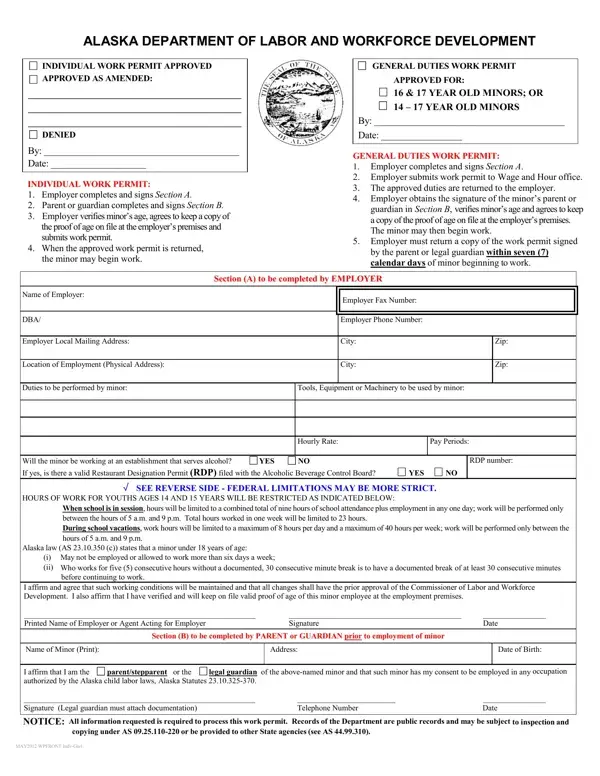
The employer verifies the minor's age and keeps a copy of the proof of age on file. Do not submit proof of age with the permit.
General Duties Work Permit: the employer returns a copy of the completed work permit to the Department within seven (7) days of the minor beginning work.
Occupations: the form lists occupations prohibited to all minors under 18, and additional occupations prohibited if under 16.
Tobacco: minors under 19 years may not sell tobacco or tobacco products in the course of their employment.
Notice: all information requested is required to process this work permit.
| Question | Answer |
|---|---|
| Form Name | Alaska Work Permit |
| Form Length | 2 pages |
| Fillable? | Yes |
| Fillable fields | 36 |
| Avg. time to fill out | 6 min |
| Edition | Rev 05/13/2026 |
| Issuing agency | Alaska Department of Labor and Workforce Development |
| Matches the agency's file | Yes, checked October 3, 2026 |
| Other names | Alaska Work Permit, Individual Work Permit, General Duties Work Permit, Alaska child labor work permit, work permit for minors Alaska |
| Official source | Alaska Work Permit (Rev 05/13/2026), Alaska Department of Labor and Workforce Development |
Alaska Work Permit Form isn’t the one you’re looking for?