
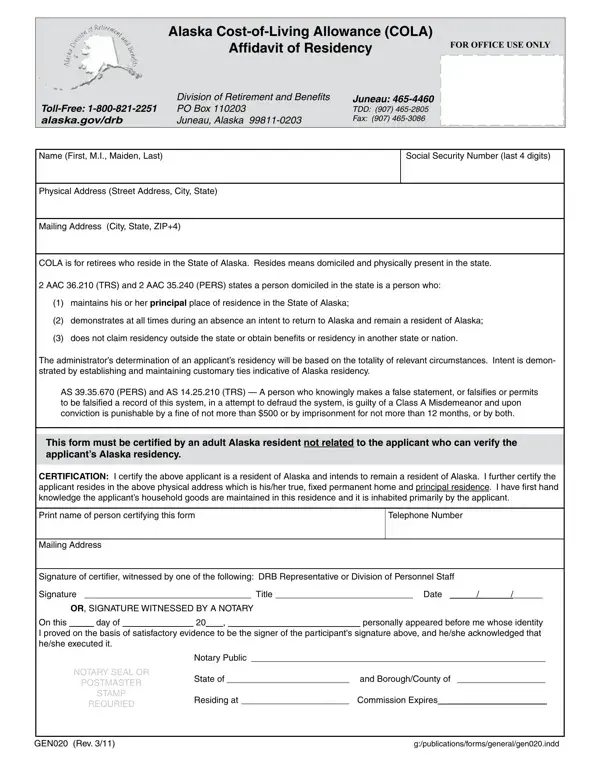
The Alaska GEN020 form must be filed annually by retirees enrolled in the Alaska Division of Retirement and Benefits who receive Cost-of-Living Allowance payments. This affidavit confirms your continued Alaska residency and intent to maintain domicile in the state. If you receive COLA benefits and have not filed your annual affidavit, your payments may be suspended pending verification.
To complete the GEN020, you need your full name, the last four digits of your Social Security Number, and both your physical and mailing addresses in Alaska. You must also provide the name of an unrelated adult Alaska resident who can certify your residency. The completed form must be witnessed by a Division of Retirement and Benefits representative, a Division of Personnel Staff member, or a notary public. See the Alaska Form 02-1890 for related state benefit documentation.
Alaska defines residency for COLA purposes as maintaining a principal place of residence within the state, demonstrating intent to return during any absence, and making no residency claims or benefit applications in other states. The Division requires customary ties to Alaska such as a permanent home address, voter registration, and vehicle registration as evidence of your intent to remain in the state.
Submitting false information on the GEN020 can result in a Class A Misdemeanor charge under Alaska law. Fraudulent affidavits may also require repayment of incorrectly received COLA benefits and result in permanent loss of eligibility. The Division investigates residency claims thoroughly, so ensure all information is accurate and current before signing.
| Question | Answer |
|---|---|
| Form Name | Alaska Form Gen020 |
| Form Length | 1 pages |
| Fillable? | No |
| Fillable fields | 0 |
| Avg. time to fill out | 15 sec |
| Other names | gen020 alaska affidavit of residency form |