
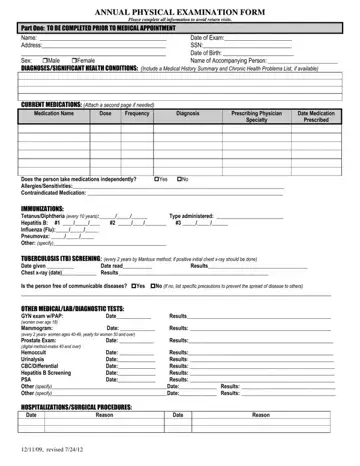
This form confirms that a provider properly documented an annual medical exam. In many care and residential settings, it becomes the primary record that shows compliance with health review requirements.
Agencies, providers, and reviewers often rely on the annual physical exam form to verify eligibility for services or check whether follow-up care is needed. Because of this, the way you complete this document affects both care planning and administrative timelines.
The layout follows the flow of a real appointment. Information collected before the visit gives the physician context on diagnoses, medications, and prior treatment. The examination section then records vital signs, system reviews, screening results, and clinical observations made during the visit. This structure makes it easier to compare current findings with prior years.
Reviewers examine certain sections more closely because those sections directly affect service decisions:
✔️ How medications are listed and whether the person manages them independently.
✔️ Immunization records and tuberculosis screening results.
✔️ Notes on communicable diseases and required precautions.
✔️ Documented activity limits or use of adaptive equipment.
✔️ Physician recommendations related to level of care or referrals.
From an administrative standpoint, the annual physical examination form becomes written proof that a licensed physician evaluated the individual and signed off on the findings.
A licensed physician completes the form during the annual medical exam. The individual, caregiver, or service provider fills out the background sections before the visit. Then, the physician records the examination findings and signs the form.
| Question | Answer |
|---|---|
| Form Name | Annual Physical Exam Form PDF |
| Form Length | 2 pages |
| Fillable? | Yes |
| Fillable fields | 110 |
| Avg. time to fill out | 20 min |
| Other names | general physical examination form PDF, form for physical exam, basic physical form, basic physical exam form PDF |
