Please rate Annual Report Form

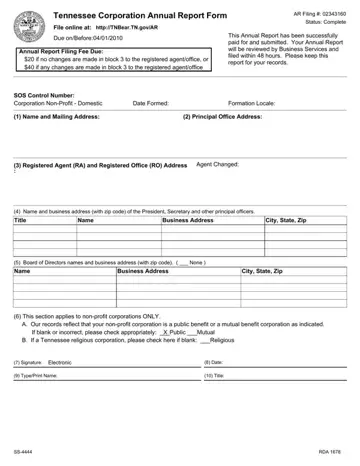
The Tennessee Corporation Annual Report Form AR, also called Form SS-4444, is a mandatory annual compliance filing for all for-profit and nonprofit corporations doing business in Tennessee. This form must be submitted to the Tennessee Secretary of State by April 1st each year. Missing the deadline puts your corporation at risk of administrative dissolution, so timely filing is essential.
The annual report captures the corporation's registered agent name and address, principal office location, names and addresses of all current officers and directors, and a nonprofit designation if applicable. The standard filing fee is $20. If you update the registered agent or registered office address at the same time, the fee increases to $40. Submissions go through the TNBear online portal, and the Business Services division reviews each filing within 48 hours. Corporations managing state filings in multiple jurisdictions may also need the Arizona annual report form, which has its own deadline and fee schedule. When forming or restructuring a Tennessee business, the Tennessee LLC operating agreement and the standard business registration form are closely related filings worth reviewing alongside your annual report obligations.
Officers and directors listed on the annual report form must reflect the current leadership as of the filing date. Any changes to the registered agent that are not reported on time can affect the corporation's legal standing and its ability to conduct business in the state.
| Question | Answer |
|---|---|
| Form Name | Annual Report Form |
| Form Length | 1 pages |
| Fillable? | No |
| Fillable fields | 0 |
| Avg. time to fill out | 15 sec |
| Other names | tn form ss 4444, tennessee corporation annual report form ss 4444, blank tennessee annual report form, tennessee annual report |
Annual Report Form isn’t the one you’re looking for?
Please rate Annual Report Form
