
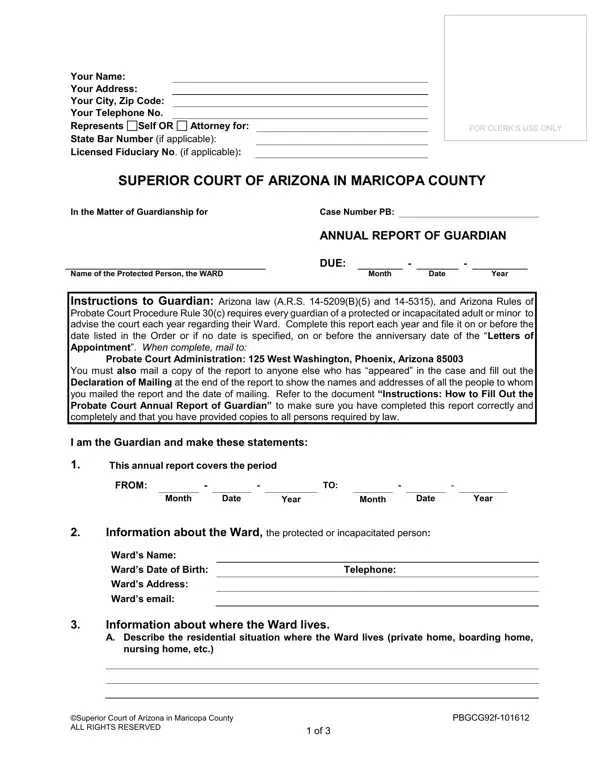
When using the online PDF tool by FormsPal, you can easily fill out or modify the annual report of guardian arizona form right here. FormsPal is constantly improving its editor with easy-to-use features. Follow these steps to complete your form:
Step 1: Click the "Get Form" button above to open the FormsPal PDF editor.
Step 2: You can do more than fill in blank fields. Add custom text, edit the original content, insert photos, and sign the document directly in your browser.
Complete each section with the correct information:
1. The annual report of guardian arizona requires particular information in the first section. Be sure the following fields are filled out:
2. After completing the first section, enter the relevant information in these fields: You must also mail a copy of the annual report, the reporting period dates (Month, Date, Year), the Ward's Name and Date of Birth, Telephone, and the information about where the Ward currently lives, including nursing home or care facility name, and the Superior Court of Arizona location.
3. The next section covers the facility details: Give the name of the facility, Case No, Name of Person in Charge, Name of Facility, Address, Telephone Number, Email Address, where the Ward can typically be found, and Information about the Ward's Doctor.
4. Continue with the health information section: Doctor's details, any changes in the Ward's health or mental condition over the last year, and attach a copy of the doctor's report if required. Also complete the financial information and Email Address fields.
5. Complete the final section with the Email Address, Superior Court of Arizona details, and the signature block. Take care with the Email Address and signature fields, as these are the areas where errors most commonly occur.
Step 3: After reviewing all entries, click "Done" to save your completed form. Create a free FormsPal account to save and access your annual report of guardian arizona at any time. FormsPal keeps all your information secure.
Frequently Asked Questions
Who must file the Annual Report Guardianship form?
Any court-appointed guardian in Arizona who oversees a protected or incapacitated adult or minor must file this form each year. This requirement applies under A.R.S. 14-5209(B)(5) and 14-5315.
What happens if I miss the filing deadline?
Missing the deadline can jeopardize your guardianship status. Courts may hold you in contempt or take action to remove you as guardian. Always submit the report by the court's stated deadline to avoid legal penalties.
Can I fill out the Annual Report Guardianship form online?
Yes. You can complete the form online using FormsPal's free PDF editor. After filling it out, you must submit the completed form to the Arizona Superior Court in person or by mail. Check with your local court for specific filing instructions.
Guardians in other states may need a different form. See the Indiana Guardianship form, the Hawaii Guardianship form, or the New Hampshire Petition for Guardianship for state-specific filings.
