
AOC 846 Form PDF Details Who Must File Form AOC 846?

The AOC 846 form is a Kentucky Court of Justice document required under KRS 395.600 through 395.657. Formally titled "Settlement of Fiduciary" under code "SET" and last revised in March 2000, this PDF must be submitted by personal representatives to close a Kentucky probate case. The form applies to intestate estates (no will) and testate estates (with a will). This official PDF filing is required to end probate administration and release the representative from further obligations.

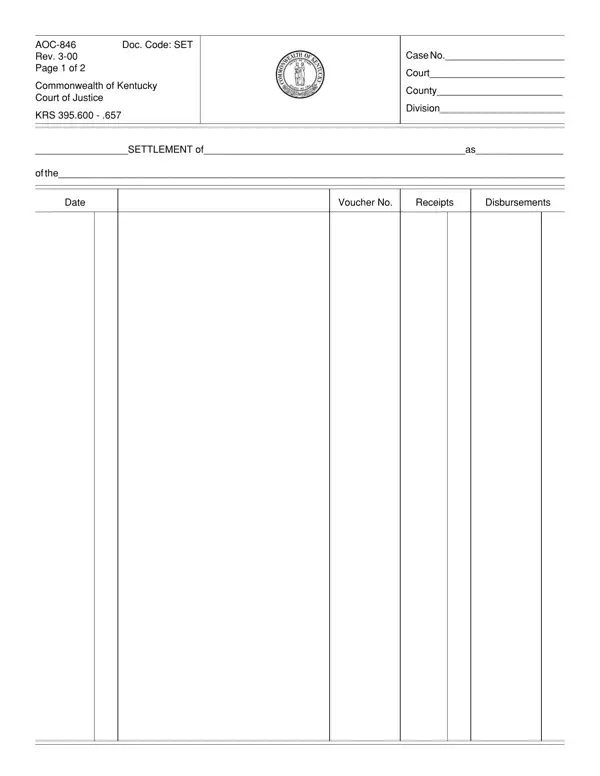
This PDF form records two complete accounting periods. Each period contains columns for transaction dates, voucher numbers, receipts, and disbursements. A summary section calculates total receipts and total disbursements for the full probate period. The judge reviews this PDF accounting to verify that all probate assets were properly managed. Accurate entries in the probate settlement forms are essential. Errors in the totals can delay approval and require resubmission of amended PDF forms.

Who Must File Form AOC 846?

Any appointed personal representative of a Kentucky probate case must file Form AOC-846. This applies to administrators of intestate estates and executors of testate estates that require a formal PDF accounting under state law. Creditors, heirs, and other parties may request Form AOC 846 at any stage of the probate proceeding.

Co-administrators must both sign the probate settlement forms. Any legal representative under judicial supervision at the state district level must submit these probate forms as part of closing the proceeding. Contact your local probate office for state-specific filing deadlines and requirements. Missing the deadline can delay the discharge and extend the administration timeline.

Form AOC-846 must be submitted at the end of probate administration, along with a formal request for approval. Under Kentucky state law (KRS 395.620), the personal representative should submit this PDF within 60 days of completing all financial activities. The judge may grant an extension upon written request to the probate office. Meeting the state filing deadline demonstrates proper oversight of all probate affairs and keeps the proceeding on schedule. Legal consequences may follow from missing the statutory deadline without an approved extension.

The probate settlement process begins when the personal representative prepares a full accounting of all transactions in the PDF form. Each receipt and disbursement entry must include a date, voucher number, and dollar amount. After preparing the PDF filing, the representative signs a notarized verification oath before a notary public. The probate office then schedules a review. If the PDF accounting is accurate, the judge issues a formal approval order and the probate case is legally closed. This official requirement under state law ensures all administration activities are documented for the record.

Supporting documents: Filing Form AOC 846 requires a full set of supporting records. Required legal forms and documents include bank statements for all probate accounts, receipts for income collected by the estate, vouchers for all disbursements paid including attorney fees and legal costs, and copies of prior judicial orders. Submitting a full document set with the PDF forms helps the probate office approve the filing without delay. Missing supporting forms may require additional legal submissions and extend the timeline. The probate office can advise which supporting forms are required for your county.

The PDF form includes a verification oath that the personal representative signs before a notary public. By signing this section of Form AOC-846, the representative certifies under state law that all receipts and disbursements in the PDF are accurate. The attorney section of Form AOC 846 captures the bar number of any legal counsel involved in the administration. This notarized signature is a legal requirement confirming the accuracy of all settlement data provided in the forms.

Once the judge signs the approval order, the district clerk enters it of record and files the PDF. The probate office may also require advertising the approval under applicable state statutes. The personal representative then receives a formal discharge from all administration obligations. This official discharge from the state is the final step in the probate proceeding, releasing the representative from further legal responsibility. The state probate office provides confirmation of the discharge upon written request.

Related Kentucky probate PDF forms filed alongside this settlement PDF include the AOC-841 form for opening a Kentucky probate case, the AOC-E-204 form, and the AOC-E-208 form for related estate PDF forms. Estate planning forms such as the Kentucky living will are often prepared alongside probate PDF forms. The AOC-805 form and the AOC-856 form cover additional state legal procedures in Kentucky probate cases.

QuestionAnswer
Form NameAoc 846 Form
Form Length2 pages
Fillable?No
Fillable fields0
Avg. time to fill out30 sec
Other nameskentucky division ofas, aoc 846 kentucky, kentucky aoc 846, aoc 846 instructions

How to Edit Aoc 846 Form Online for Free

You can fill out Form AOC 846 using FormsPal's free PDF editor. Open the PDF forms in your browser, enter your probate accounting data in the available sections, sign the PDF electronically, and print or save for submission to the probate office. This step-by-step guide covers each section of the PDF forms and answers common filing questions.

Step 1: Click the "Get Form" button at the top of this page to open Form AOC-846 in FormsPal's online PDF editor.

Step 2: The PDF editor loads all form sections ready to fill in. You can type in text entries, add financial totals, and electronically sign the PDF. The editor also supports annotations and additional notes in the PDF forms. Editing and filling in PDF forms in your browser requires no software installation. You can fill in and save your probate PDF forms without downloading any additional programs.

Fill in the following sections of the settlement PDF carefully to ensure accurate and complete probate data:

1. Enter the probate case data at the top of the PDF form: county name, case number, estate name, and accounting period dates. These entries identify the probate case and the reporting period covered by this settlement PDF. The case number appears on the original probate forms from the office where the case was opened. Verify all entries against your original probate forms before filling in this section of the PDF. Accurate case entries help the clerk match your PDF filing to the correct probate case.

Completing the case information section of the AOC 846 Kentucky estate settlement form

2. Record all receipts and disbursements in the accounting table of the PDF. For each transaction, enter the date, voucher number, and dollar amount in the correct column. Receipts are funds coming into the probate account. Disbursements are payments made from it. Keep running totals updated as you fill in each row of the PDF forms. Retain all receipts and vouchers as supporting documentation for your settlement filing. The probate office may request these records during the review and approval of your PDF forms.

Entering receipts and disbursements in the Kentucky probate form accounting table

3. Fill in the second accounting period of the PDF form if the probate case had financial activity across two periods. Verify all running totals before moving to the summary section. Double-check all arithmetic before proceeding. Errors in the totals of these PDF forms can delay approval and require submission of amended forms. Many filers review each entry twice to avoid arithmetic mistakes in the accounting PDF.

Completing period 3 of the Kentucky estate settlement PDF form

4. Enter the final summary totals: Total Receipts and Total Disbursements. Address Form AOC 846 to the Judge of the District Court and fill in the personal representative oath section. Signing this section of Form AOC-846 certifies that all reported financial data is accurate. Review the PDF one final time before signing. An attorney's bar number may be entered in the attorney section of the PDF forms if legal counsel assisted with probate administration.

Summary totals and personal representative oath section of the Kentucky probate form part 4

5. Fill in the remaining sections of Form AOC-846: notary public name and county, notary commission expiration date, attorney bar number if applicable, and the approval section for the district clerk. Every section of these PDF forms must be filled in completely before submission. Submit all supporting forms to the district clerk with your filing. The clerk will enter and file your PDF when all required legal data is present. Incomplete submissions may delay the approval of your probate PDF forms.

Notarization and court approval section of the Kentucky probate settlement form

Step 3: Click "Done" after filling in all sections of the PDF forms. Register for a free 7-day trial at FormsPal to download the completed filing. Your data is saved securely. FormsPal makes it easy to edit, fill in, and download Kentucky probate PDF forms for settlement and related AOC filings.

What Should You Know About the AOC 846 PDF Form?

The following questions cover the most common topics filers ask about Form AOC-846 PDF forms. Learn about filing deadlines, required supporting forms, how to fill in each PDF section, and what happens after the probate office approves the filing.

What is Form AOC 846 used for?

This is Kentucky's official probate settlement PDF. Personal representatives use it to report all receipts and disbursements to the judge at the end of probate administration. Approval of the settlement PDF formally closes the probate case and discharges the personal representative from further legal obligations. These probate settlement forms are required under state law (KRS 395.600-.657) for all applicable Kentucky probate cases.

Who must submit Form AOC-846?

Any personal representative of a Kentucky probate case under judicial supervision must submit these settlement forms. This requirement applies to both intestate and testate cases that need a formal PDF accounting. Creditors and heirs may also request these settlement forms as part of the probate proceeding. Contact your local probate office for guidance on which forms to submit in your specific case.

What supporting forms are filed with Form AOC 846?

Submit bank statements, income receipts, disbursement vouchers, and copies of prior judicial orders along with this settlement PDF. Attach all supporting forms to the PDF filing and deliver the full package to the district clerk. Thorough documentation in all submitted forms speeds up the review and approval timeline. Missing supporting forms may delay the settlement or require resubmission of the PDF filing. Your probate attorney or state probate office can advise on which supporting forms are required in your county.

How long does approval take?

Approval timelines vary by county and case complexity. Simple probate cases with clear accounting and a full set of supporting forms are often approved within a few weeks of submission. Complex cases may require a state hearing before the judge issues a final approval order. Contact your local probate office for expected processing times and any state filing deadlines that apply to your situation. Your legal counsel can also advise on typical approval timelines in your county.

Can I fill in and edit these PDF forms online?

Yes. Use FormsPal's free PDF editor to fill in, edit, and sign Form AOC 846 online. Enter probate financial data in the form sections, sign the PDF electronically, and download the completed forms for submission. No software installation is required. FormsPal supports all standard Kentucky probate PDF forms and settlement documents.

What is the state filing deadline for Form AOC-846?

Kentucky state law (KRS 395.620) requires the personal representative to file this settlement PDF within 60 days of completing all financial activities. The judge can grant a deadline extension upon written request to the probate office. Filing the PDF forms on time avoids delays in the discharge timeline and keeps probate administration on schedule. Check with your local probate office about any state-specific requirements and deadlines for your county.

What happens after the settlement PDF is approved?

After the judge signs the approval order, the district clerk enters it of record and files the PDF. The probate office may require advertising the approval under applicable state statutes. The personal representative then receives a formal discharge, releasing them from all further legal obligations related to the probate case. Keep copies of all probate forms and the discharge for your records. The state probate office provides confirmation of the discharge upon written request.

Related Kentucky Court of Justice PDF Forms

Fill out these related Kentucky probate PDF forms on FormsPal alongside your settlement filing: