
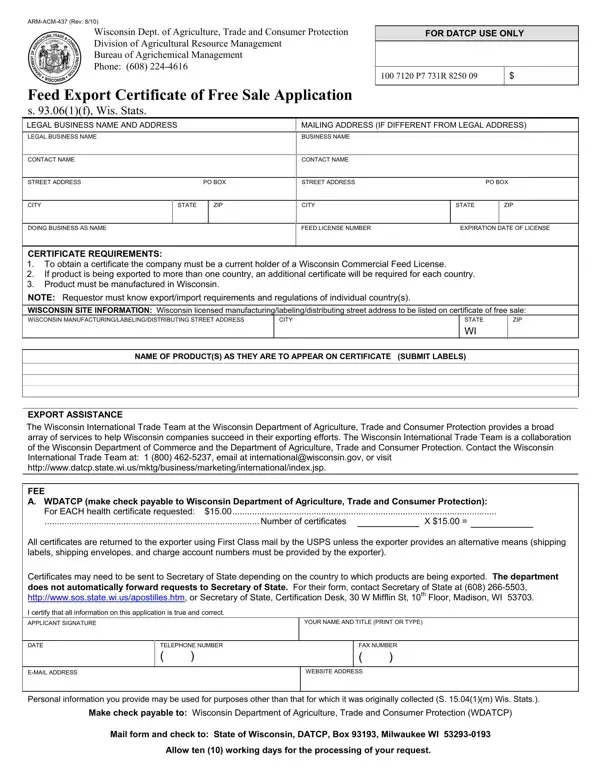
The ARM-ACM-437 form is the Wisconsin Feed Export Certificate of Free Sale Application. It is managed by the DATCP Division of Agricultural Resource Management. Wisconsin commercial feed businesses use this form to certify their products are legally sold in the state and eligible for export to foreign markets.
You need the ARM-ACM-437 form if you manufacture commercial feed products in Wisconsin and plan to export them internationally. This includes:
If you export to multiple countries, you must submit a separate application for each destination. One certificate covers one country of export only.
To qualify for the ARM-ACM-437 certificate, your business must:
DATCP reviews each application before issuing the certificate. A nominal fee is charged per certificate. Contact the DATCP Division of Agricultural Resource Management for current fee schedules and processing times.
The ARM-ACM-437 certificate confirms that your feed products are legally produced and freely sold in the United States. It provides formal assurance to importing countries that Wisconsin products meet state safety and quality standards. The form requires:
Once approved, DATCP also connects exporters with the Wisconsin International Trade Team. This team offers support resources for businesses growing in global markets.
For related export documentation, see the Shipper Export Declaration Form and the Export Declaration Form. Businesses handling multiple certification types may also find the Association Resale Certificate useful for domestic sales compliance documentation.
| Question | Answer |
|---|---|
| Form Name | Arm Acm 437 Form |
| Form Length | 1 pages |
| Fillable? | No |
| Fillable fields | 0 |
| Avg. time to fill out | 15 sec |
| Other names | certificate of sale request form, wi sale get, wisconsin meat certificate of sale, wi sale form |