
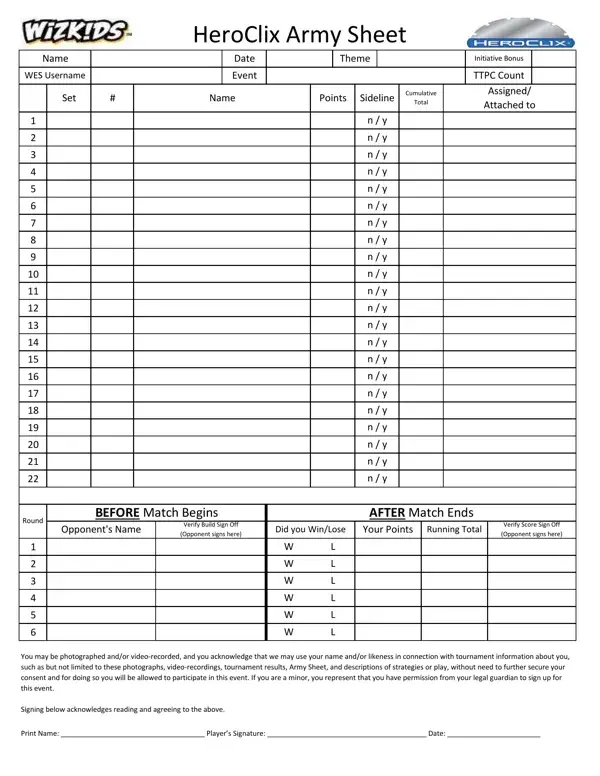
Follow these steps to fill out the Army Sheet form correctly. Taking a few extra minutes before the event to complete every field prevents delays during build checks and eliminates disputes over scores.
Step 1: Gather your information before you start
Before filling out the Army Sheet, collect everything you need:
- Your WES Username (found on the WizKids Event System website)
- The event date and location provided by the tournament organizer
- Your chosen team theme and the exact name as listed in the rules
- The point limit for the event (common limits are 200, 300, or 400 points)
- Each figure you plan to bring, with its card showing the correct set number and point value
Step 2: Complete the player and event section
Write your full name at the top of the form. Add your WES Username directly below. Enter the event date and the name of the venue or event if provided on the registration materials.
Fill in your team theme on the designated line. If your theme grants an initiative bonus, enter the bonus value in the initiative bonus field. Record the TTPC event count for the specific tournament. This number is usually printed on the event flyer or announced by the organizer before play begins.
Step 3: Build your army roster
Work through each figure in your army one at a time. For each figure, locate the set number printed on the bottom of the figure's base. Enter that set number in the first column. Write the figure's full name as it appears on the character card in the second column.
Enter the point value you are paying for the figure. Note that some figures have multiple point values on the same dial. Enter the specific cost you chose. Mark the sideline column yes or no depending on whether the figure is part of your active army or held in reserve on the sideline.
Check the attached box if a figure attaches to another piece such as a resource dial or equipment card. Update the cumulative points column after each row so you can confirm your total stays within the event's point limit at a glance.
Step 4: Double-check your totals before submitting
Count your figures and verify the final cumulative point total. Common mistakes include writing the wrong point value for a figure or forgetting to include a resource dial in the total. A judge will compare your Army Sheet against your physical figures at the start of each round, so any error found during a build check may cost you a game.
If you need to make a correction, draw a single line through the error and write the correct value beside it. Do not use correction fluid. Ask a nearby judge to initial any corrections before play begins.
Step 5: Get your build verified before round one
Arrive early enough for a judge to verify your army before round one starts. The judge will compare each figure on your Army Sheet against the figures you have placed on the table. Both you and your opponent will sign the build verification section of the form to confirm your armies are legal.
If you discover a mistake after verification, report it immediately to a judge. Correcting an honest error before a match starts is handled differently than discovering a discrepancy mid-game.
Step 6: Record results after each match
At the end of every round, fill in your opponent's name and the final score in the matching round block. Both players sign to confirm the result. Unsigned result blocks can cause delays during the final standings calculation, so sign your form as soon as the match ends even if you need to leave the table quickly.
Step 7: Return the completed form at the end of the event
When the tournament concludes, hand your completed Army Sheet to the event organizer or head judge. Organizers use these forms to verify final standings, resolve any disputed results, and submit accurate data to the WES for prize support and ranking calculations.
Common questions about the Army Sheet
Can I change my army after submitting the Army Sheet? No. Your army is locked once the form is submitted and your build has been verified. Changes require organizer approval and usually result in a game loss for the affected round.
What if I run out of roster rows? Most HeroClix armies fit within the available rows. If your army exceeds 12 figures (unusual for standard point limits), ask the organizer for a second form and attach both sheets.
Do I need to bring my own form? Most events provide printed Army Sheet forms at the registration table. However, filling one out in advance using the online editor above saves time on the day of the event.
Is the Army Sheet the same as the character card? No. Character cards describe each figure's powers and abilities. The Army Sheet is a tournament record that lists which figures you brought and tracks your results across rounds.
Where to find related forms
FormsPal has a full library of tournament and organizational documents. The Army Leaders Book Form is useful for unit-level tracking in extended campaigns. The Army Form Risk covers formal risk assessment documentation used in military administrative settings. For scoring sheets in other competitive formats, the Basketball Scoresheet and similar forms are available in the same library.
