
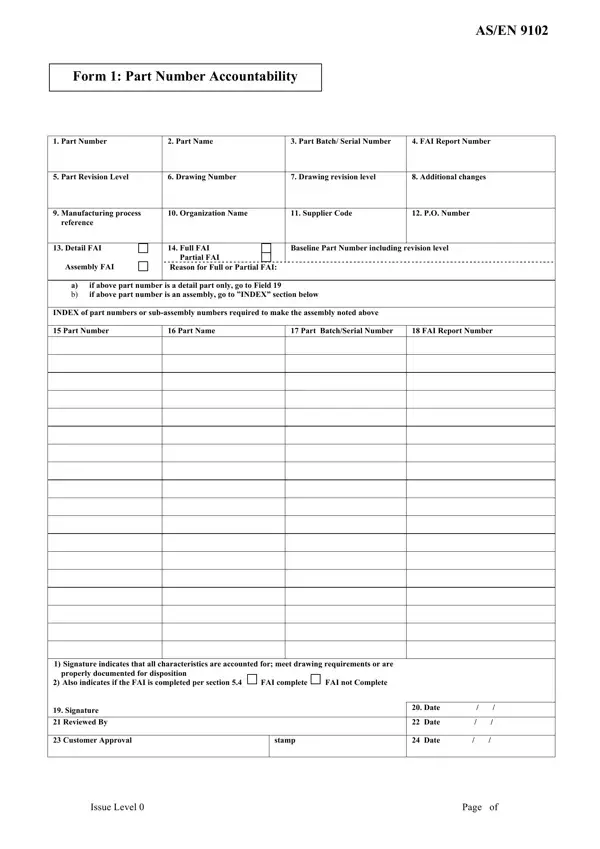
The AS/EN 9102 Form 1, Part Number Accountability, is the required cover sheet for every First Article Inspection (FAI) report under the AS9102 (North America) and EN9102 (Europe) aerospace quality standards. It establishes the part's identity and links all ten FAI forms (Forms 1 through 10) to a single engineering part number and drawing revision.
Key fields on Form 1 include the engineering part number and its current revision level, the drawing number and drawing revision, a unique FAI report number that ties all ten forms together, the batch or serial number of the article being inspected, the manufacturing organization name, the supplier code assigned by the customer, and the purchase order reference number. The authorized quality representative signs and dates the form as a declaration that all drawing characteristics have been inspected and that the part conforms to design requirements.
FAI type declaration is one of the most important decisions recorded on Form 1. A Full FAI is required when a part is new to production, when manufacturing moves to a new facility or production line, or when the part has not been produced for two or more years. A Partial FAI applies when a drawing revision or process change affects only specific characteristics, allowing the supplier to inspect and document only the affected items and provide a written rationale. An Assembly FAI covers a top-level assembly whose subcomponent parts each carry their own Form 1 within the package.
The current revision is AS9102 Revision C, published in 2021, which introduced an updated Design Characteristic Index and revised ballooning requirements. Many aerospace prime contractors still accept Revision B packages, so suppliers should confirm the applicable revision with their customer before completing the form. For a fillable blank template, see the AS9102 writable form on FormsPal.
| Question | Answer |
|---|---|
| Form Name | Asen 9102 Form 1 |
| Form Length | 2 pages |
| Fillable? | No |
| Fillable fields | 0 |
| Avg. time to fill out | 30 sec |
| Other names | AS9102 Form 1, EN9102 Form 1, FAIR Form 1 |