
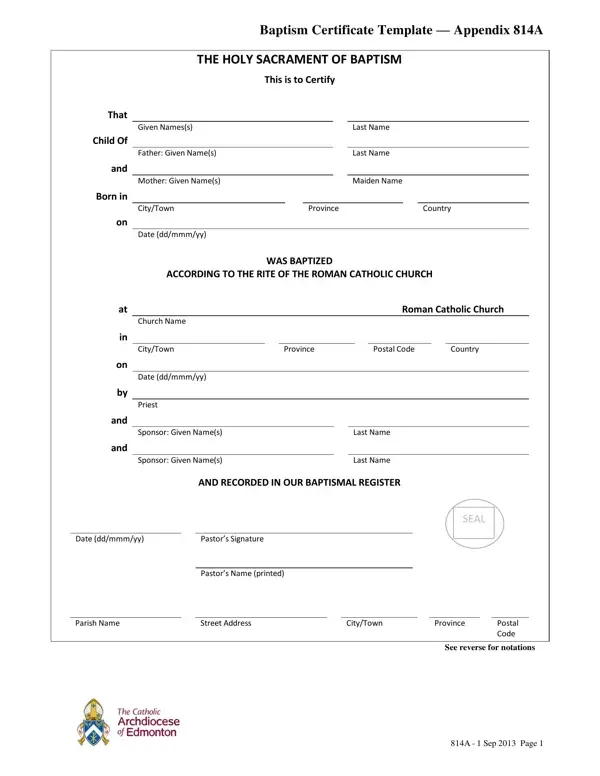
A baptism certificate is an official religious document that confirms a person's reception of the Sacrament of Baptism within the Christian church. This baptism fillable PDF serves as a permanent record recognized by parishes, schools, and religious institutions worldwide.
The baptism certificate PDF records essential information about the sacrament. This includes the baptized individual's full name, date and place of birth, the church where the baptism took place, the baptism date, and the name of the officiating priest or minister. The form also records the names of godparents and sponsors who pledged their religious support during the ceremony. For Catholic baptisms following Appendix 814A, the certificate further documents future sacramental milestones including Confirmation, Marriage, Holy Orders, and Religious Profession.
A baptism certificate PDF is required for many religious and administrative purposes. Parishes maintain this document as part of their sacramental registry. Schools with religious programs request a baptism certificate for enrollment. Adults receiving the Sacrament of Confirmation or getting married in a church must typically present their original baptism certificate. Many churches also require this document when taking on godparent responsibilities in future baptism ceremonies. A baptism certificate also supports genealogy research and family records.
If you need related religious forms, explore the baptism certificate online form for a browser-based version. For other sacramental records, see the 818-A Confirmation Certificate or the blank marriage certificate template. These certificate PDFs document a person's complete sacramental journey within the church.
| Question | Answer |
|---|---|
| Form Name | Baptism Fillable Form |
| Form Length | 2 pages |
| Fillable? | No |
| Fillable fields | 0 |
| Avg. time to fill out | 30 sec |
| Other names | baptism fillable printable, baptism fillable template, are baptism fillable email, province yy baptism printable |
Baptism Fillable Form isn’t the one you’re looking for?