
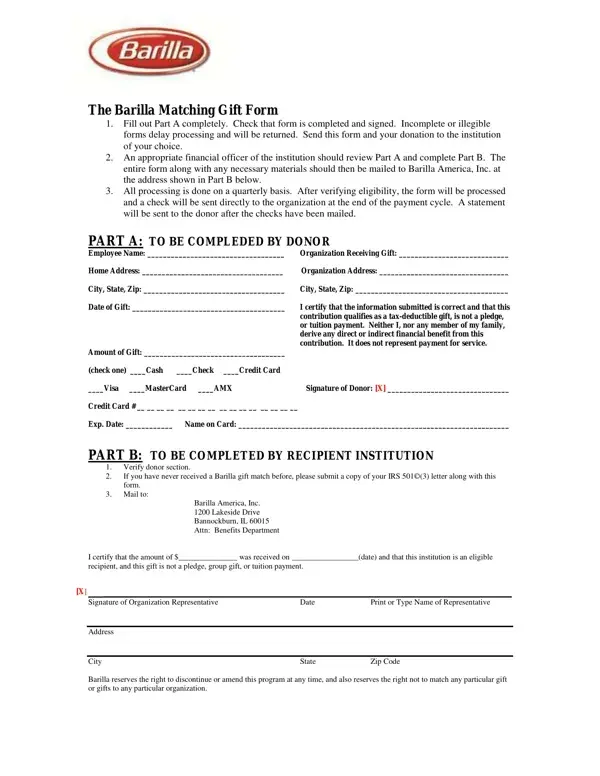
The Barilla Matching Gift Form is a core component of Barilla America's corporate philanthropy program. The program is designed to amplify individual charitable contributions by matching eligible donations to qualifying nonprofit organizations. Through this matching gift initiative, every eligible dollar donated can be doubled, allowing donors to extend the reach of their personal giving. The form serves as the official documentation that initiates the matching gift process between the donor, the recipient institution, and Barilla.
Part A: Donor Responsibilities
The donor must complete Part A of the matching gift form accurately and legibly. This section captures the donor's full name, mailing address, and contact details. Donors must also specify the exact amount of the contribution and provide the full legal name and address of the recipient nonprofit. The form requires the donor's signature to confirm the validity of the gift and the accuracy of all information provided. Incomplete or illegible forms will delay quarterly processing, so all fields in Part A must be filled in before submission.
Part B: Institution Verification
An authorized officer of the beneficiary organization must complete Part B of the matching gift form after the donor has finished Part A. Part B requires the institution to verify the gift amount and confirm that the organization meets the eligibility criteria for Barilla's matching gift program. Nonprofit organizations that have not previously received a Barilla matching gift must include a copy of their IRS 501(c)(3) determination letter along with the completed form. This letter confirms the organization's tax-exempt status and is required for first-time participants.
Processing Timeline and Disbursement
Barilla processes all submitted matching gift forms on a quarterly basis. After the quarterly review is complete and eligibility has been confirmed, Barilla issues a matching check directly to the nonprofit organization. The donor receives a written confirmation statement once the matching gift has been disbursed. Donors and institutions should retain copies of all submitted matching gift forms for their own records.
Benefits of Participating in the Barilla Matching Gift Program
The Barilla matching gift program offers donors a straightforward way to multiply the impact of their personal contributions. By completing the matching gift form and following the submission process, individual donors can trigger a corporate match that potentially doubles the total amount received by the nonprofit. This program reflects Barilla's ongoing commitment to corporate social responsibility and community investment. Donors who participate in matching gift programs often report higher satisfaction with their philanthropic efforts, knowing that each dollar given generates additional support for the causes they care about.
| Question | Answer |
|---|---|
| Form Name | Barilla Pasta Donation Request Form |
| Form Length | 1 pages |
| Fillable? | No |
| Fillable fields | 0 |
| Avg. time to fill out | 15 sec |
| Other names | barilla pasta donation, barilla pasta donations, barilla ny donation request, barilla product donations |
Barilla Pasta Donation Request Form isn’t the one you’re looking for?