
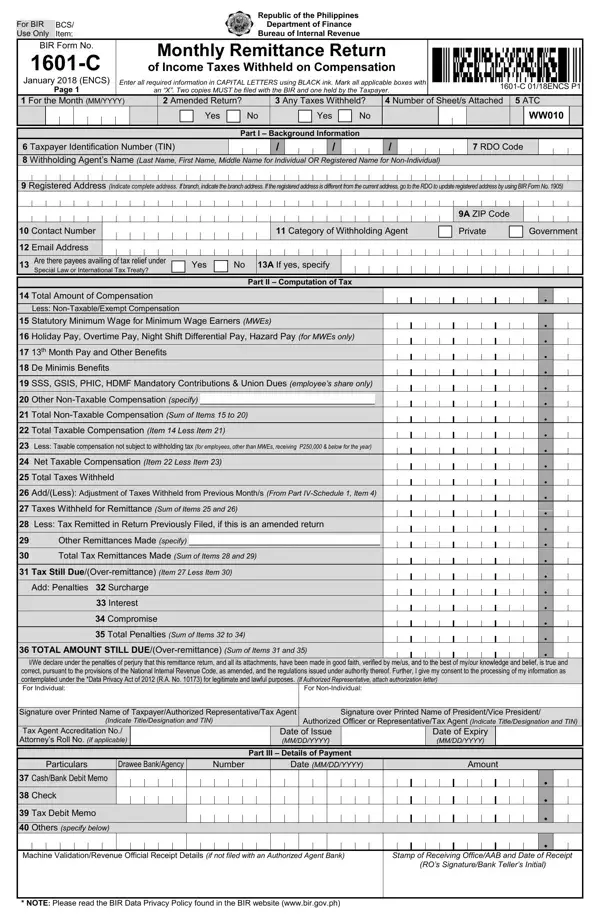
The Bureau of Internal Revenue (BIR) requires employers and withholding agents in the Philippines to file BIR Form No. 1601-C every month. This form captures all compensation subject to income tax withholding and provides the framework for remitting those taxes on schedule. It applies to both private companies and government agencies, ensuring that all sectors meet their tax obligations in a consistent and organized way.
Any employer or withholding agent who deducts income taxes from employees' compensation must file this form. This includes the following entities:
If your organization withholds taxes from compensation payments, you are required to file BIR Form 1601-C monthly, regardless of the amount withheld.
Filing deadlines depend on your taxpayer classification and payment method:
For example, taxes withheld in January must be remitted no later than February 10 for manual filers. Missing the deadline triggers penalties and interest charges.
Taxpayers can file BIR Form 1601-C and remit taxes through several authorized channels:
Failing to file or remit taxes on time results in additional charges:
Timely and accurate filing protects your organization from these costs and keeps your tax standing in good order. For withheld taxes on expanded withholding transactions, see the related BIR Form 1601-E. If you also handle final taxes, you may need BIR Form 1601-F as well.
| Question | Answer |
|---|---|
| Form Name | Bir Form 1601 C |
| Form Length | 2 pages |
| Fillable? | No |
| Fillable fields | 0 |
| Avg. time to fill out | 30 sec |
| Other names | bir form 1601 c editable, bir 1601 c form download, bir 1601 c form, bir form 1601 |