
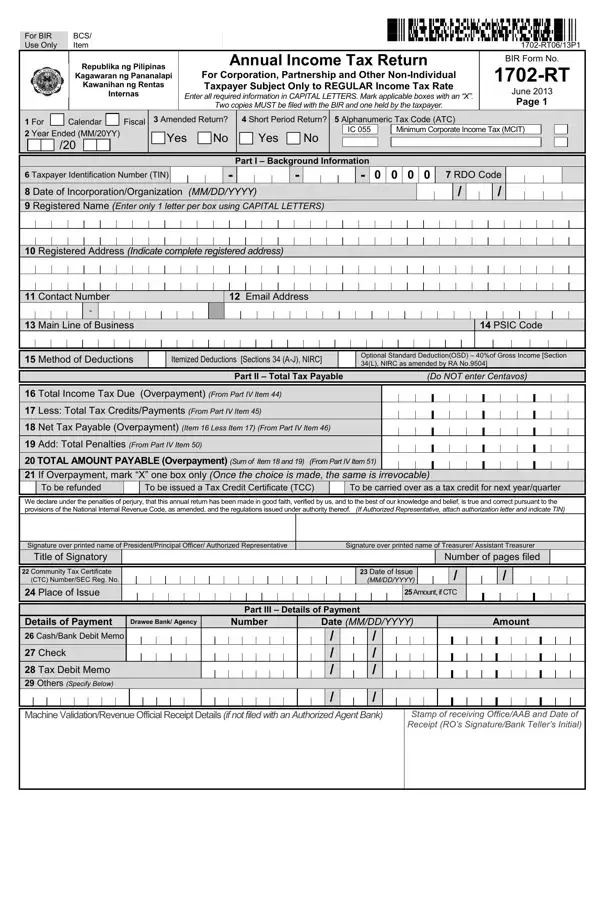
BIR Form 1702-RT PDF Details

The BIR Form 1702-RT (Annual Income Tax Return) is a mandatory filing for corporations, partnerships, and other non-individual entities in the Philippines that are exclusively subject to the regular income tax rate. Enacted in June 2013 by the Bureau of Internal Revenue, it provides a structured way to report annual revenues, deductions, and taxable income.

Who Must File: All domestic corporations, resident foreign corporations, partnerships, and joint ventures that are subject only to the regular corporate income tax rate (RCIT) must file BIR Form 1702-RT. Entities subject to special or preferential tax rates, such as those registered under special economic zones, use a different form.

Filing Deadline: For calendar year filers, the deadline is April 15 of the following year. For fiscal year filers, the deadline is the 15th day of the 4th month after the end of the fiscal year. The form can be filed manually at the BIR Revenue District Office (RDO) or electronically via eFPS or eBIRForms.

Key Sections of the Form: The form requires a taxpayer identification number, registration details, and the deduction method chosen, either itemized deductions or the optional standard deduction (OSD). It also includes schedules for sales, cost of sales or services, other taxable income, and net operating loss carryovers (NOLCO).

Documentary Requirements: When filing, attach the Audited Financial Statements (AFS), the Statement of Management Responsibility (SMR), and proof of prior year's excess tax credits if applicable. Submitting two copies to the BIR while retaining one copy is required by law. Failure to file on time may result in surcharges, interest, and compromise penalties.

QuestionAnswer
Form NameBIR Form 1702-RT
Form Length8 pages
Fillable?No
Fillable fields0
Avg. time to fill out2 min
Other names1702 bir form, bir form 1702q, bir form 1702 annual income tax return, form 1702 rt

How to Edit Bir Form 1702 Rt Online for Free

You are able to prepare the BIR Form 1702-RT effectively using our online PDF editor. In order to make our tool better and less complicated to use, we continuously work on new features, with our users' suggestions in mind. All it requires is a few easy steps:

Step 1: Access the PDF inside our tool by hitting the "Get Form Button" above on this webpage.

Step 2: As you start the PDF editor, you will get the document ready to be completed. Other than filling in different blank fields, you may also perform various other actions with the document, such as adding custom text, changing the initial text, adding illustrations or photos, placing your signature to the form, and more.

This PDF form will involve specific information. To ensure consistency, be sure to heed the suggestions further down:

1. Start filling out the BIR 1702-RT form with a selection of necessary blanks. Collect all of the required information and be sure absolutely nothing is missed!

Step no. 1 for completing bir form 1702q

2. Once your current task is complete, take the next step and fill out all of these fields: Total Income Tax Due Overpayment, Less Total Tax Credits Payments, Net Tax Payable Overpayment Item, Add Total Penalties From Part IV, TOTAL AMOUNT PAYABLE Overpayment, To be issued a Tax Credit, To be carried over as a tax credit, We declare under the penalties of, Signature over printed name of, Date of Issue MMDDYYYY, Amount if CTC, Amount, Title of Signatory, and Community Tax Certificate CTC with their corresponding information. Make sure to double check that everything has been entered correctly before continuing!

Part # 2 for filling out bir form 1702q

3. The next part is quite easy. Stamp of receiving Office AAB, Others Specify Below, and Machine Validation Revenue Official - each one of these form fields needs to be filled out here.

The best ways to complete bir form 1702q portion 3

4. Your next paragraph needs your attention in the following places: Taxpayer Identification Number TIN, Registered Name, Part IV Computation of Tax, Net Sales Revenues Receipts Fees, Less Cost of Sales Services, Gross Income from Operation, Add Other Taxable Income Not, Total Gross Income, Less Deductions Allowable, Total Itemized Deductions, Optional Standard Deduction of Net Taxable Income, Income Tax Rate, and Income Tax Due other than MCIT. Remember to fill in all needed information to move further.

bir form 1702q completion process detailed (part 4)

5. The document has to be wrapped up by going through this segment. Here you'll find a full set of fields that need to be filled out with accurate details: Minimum Corporate Income Tax MCIT, Total Income Tax Due Normal, Less Total Tax Credits Payments, Net Tax Payable Overpayment Item, Add Penalties, Surcharge, Interest, Compromise, Total Penalties Sum, Total Amount Payable Overpayment, Part V Tax Relief Availment, Special Allowable Itemized, Add Special Tax Credits, Total Tax Relief Availment, and Part VI Information External.

Part no. 5 in submitting bir form 1702q

Always be really mindful while filling out Add Penalties and Add Special Tax Credits From, since this is the part where a lot of people make mistakes.

Step 3: Before submitting your document, check that all blank fields were filled out the right way. As soon as you think it is all fine, click "Done." Acquire the BIR 1702-RT form when you register at FormsPal for a free trial. Instantly get access to the form from your personal account page, with all modifications and changes synced! FormsPal offers secure document completion without personal information record-keeping or sharing.

Related BIR Forms You May Need

If you work with other Philippines Bureau of Internal Revenue tax forms, you may also find these resources helpful: