
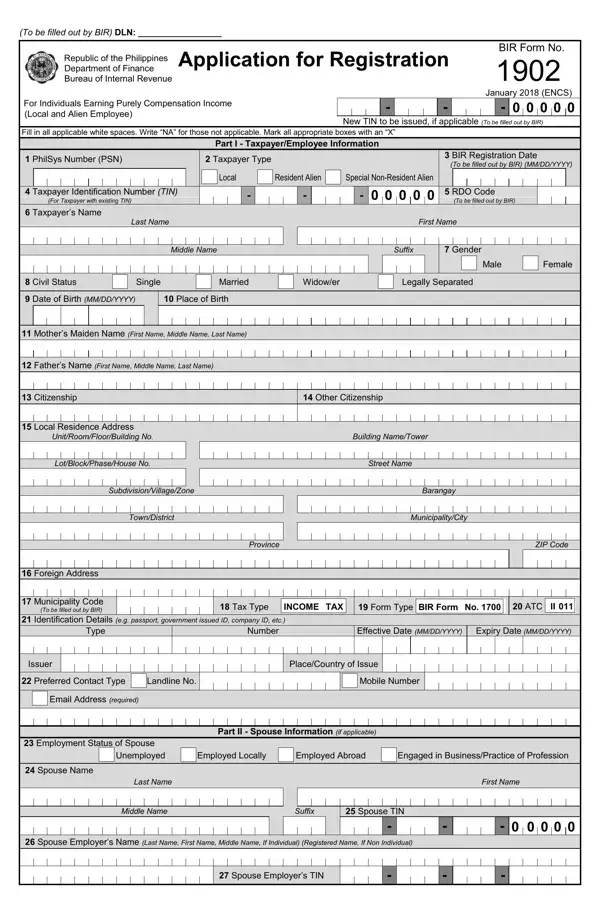
Using PDF documents online is a straightforward process with our PDF editor. You can fill out the BIR Form 1902 here within minutes. We work to add user-oriented features and improvements on a regular basis. Should you be looking to get going, here is what it requires:
Step 1: Click on the "Get Form" button in the top part of this page to access our PDF editor.
Step 2: Using this PDF editor, you can accomplish more than merely fill out blanks. Try all the features and make your documents look professional with custom text, or fine-tune the original content as needed. You can also add images and sign the document.
This PDF form requires specific information. Take time to read the recommendations below before filling it out:
1. Fill out the first section carefully. Pay close attention to these fields:
2. The next step is to fill in all of the following fields: Fathers Name First Name Middle, Citizenship, Other Citizenship, Building NameTower, Street Name, Barangay, MunicipalityCity, Province, ZIP Code, Identification Details, Tax Type INCOMETAX Form Type BIR, Number, Effective Date MMDDYYYY Expiry, Local Residence Address, and UnitRoomFloorBuilding No.
Many people make errors when filling out the Province field in this section. Review what you type here before moving forward.
3. The next step covers these fields: Number, PlaceCountry of Issue, Effective Date MMDDYYYY Expiry, Mobile Number, Part II Spouse Information, Unemployed Employed Locally, Spouse Name Last Name First Name, Middle Name, Spouse TIN, Suffix, Spouse Employers Name Last Name, Spouse Employers TIN, Issuer, Type, and Preferred Contact Type.
4. Part III is for employees with two or more employers. Fill in these fields carefully: Type of Multiple Employments, Successive Employments With, Concurrent Employments With two or more employers, Name of Employer, TIN of Employer, Declaration section, TaxpayerEmployeeAuthorized, and Signature over Printed Name.
5. The final section requires: Employers Address, UnitRoomFloorBuilding No, SubdivisionVillageZone, TownDistrict, Building NameTower, Street Name, Barangay, MunicipalityCity, Province, Contact Details Landline Number, Fax Number, Mobile Number, Municipality Code, ZIP Code, and Stamp of BIR Receiving Office.
Step 3: Spell-check what you have typed into all fields and click the "Done" button. You can then download your completed form. Every edit you make is saved automatically, allowing you to return and update the document later. We do not sell or share the information you enter when completing forms at our site.
Frequently Asked Questions About BIR Form 1902
Who needs to file BIR Form 1902?
Any individual in the Philippines who earns purely compensation income and does not yet have a TIN must file BIR Form 1902. This includes newly hired local employees, foreign nationals working in the Philippines, and individuals who are employed for the first time. Employers typically process this form on behalf of their new employees within ten days of hiring.
What documents do I need to submit with BIR Form 1902?
You need to submit a valid government-issued ID along with BIR Form 1902. Acceptable IDs include a passport, driver's license, or national ID. Foreign employees must provide their visa or work permit. Your employer may also require supporting documents depending on your employment classification.
Can I file BIR Form 1902 online?
You can fill out BIR Form 1902 online using our free PDF editor. Once completed, print the form and submit it to your Revenue District Office (RDO) together with the required supporting documents. The BIR does not currently accept fully online submission of Form 1902. Your employer's HR or payroll department can guide you through the local submission process.
What happens if I do not file BIR Form 1902?
Failing to register with the BIR can result in penalties and difficulty receiving your compensation legally. Without a TIN, your employer cannot properly withhold and remit your taxes. Filing this form promptly when you start a new job keeps you compliant with Philippine tax law.
Related BIR Registration and Tax Forms
Other BIR forms are often filed alongside or after Form 1902. These related forms cover different registration needs for taxpayers in the Philippines:
- BIR Form 1901 - Application for Registration for self-employed individuals and mixed-income earners
- BIR Form 1904 - Application for Registration for one-time taxpayers and persons registering under Executive Order 98
- BIR Form 1905 - Application for Registration Information Update for updating existing BIR registration details
- BIR Form 1601-C - Monthly Remittance Return of Income Taxes Withheld on Compensation
- BIR Form 1701Q - Quarterly Income Tax Return for individuals
