
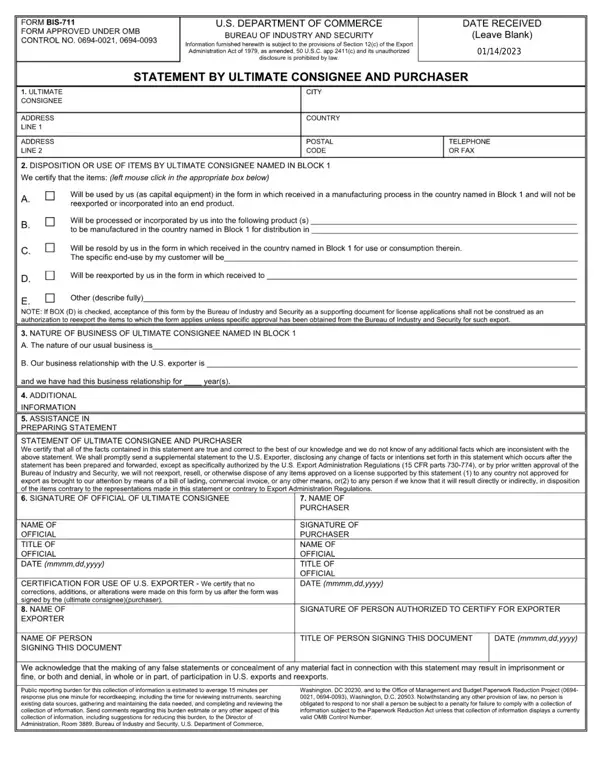

Form BIS-711 at a glance
What it is: FORM BIS-711 is the STATEMENT BY ULTIMATE CONSIGNEE AND PURCHASER.
Who signs: The SIGNATURE OF OFFICIAL OF ULTIMATE CONSIGNEE, the SIGNATURE OF PURCHASER and the SIGNATURE OF PERSON AUTHORIZED TO CERTIFY FOR EXPORTER.
A filled-in Form BIS-711 example: a Canadian reseller certifies a resale
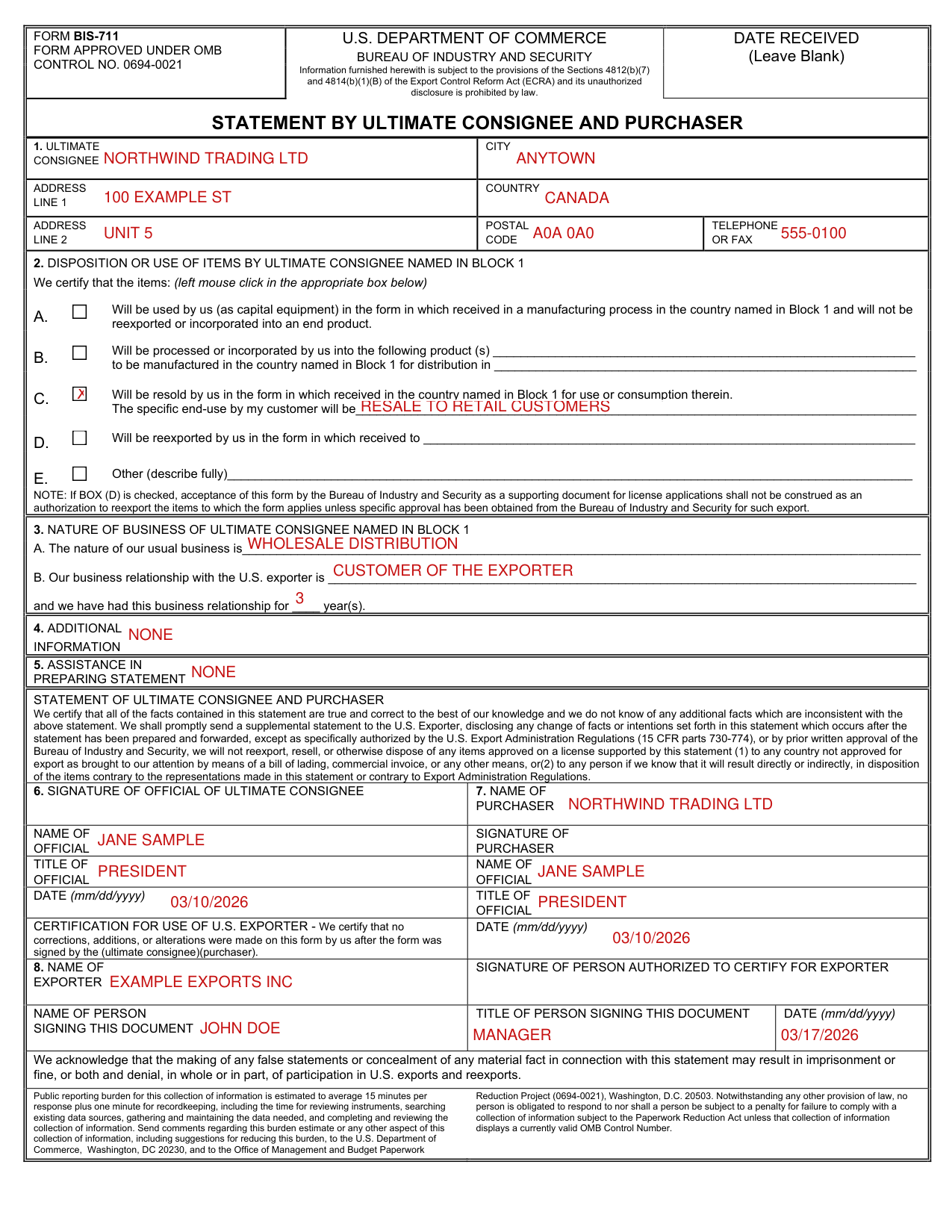
How to fill out Form BIS-711, box by box
Box 1, ultimate consignee
In Box 1, enter the Ultimate Consignee, Address Line 1, Address Line 2, City, Country, Postal Code and Telephone or Fax.
Box 2, disposition or use of the items
In Box 2, left mouse click in the appropriate box below to certify the disposition or use of the items by the ultimate consignee named in Block 1.
A. The ultimate consignee certifies that the items will be used (as capital equipment) in the form in which received in a manufacturing process in the country named in Block 1 and will not be reexported or incorporated into an end product.
B. The ultimate consignee certifies that the items will be processed or incorporated into the following product (s) _____ to be manufactured in the country named in Block 1 for distribution in _____
C. The ultimate consignee certifies that the items will be resold in the form in which received in the country named in Block 1 for use or consumption therein. The specific end-use by the customer will be _____
D. The ultimate consignee certifies that the items will be reexported in the form in which received to _____
E. Other (describe fully).
If BOX (D) is checked, acceptance of this form by the Bureau of Industry and Security as a supporting document for license applications shall not be construed as an authorization to reexport the items to which the form applies unless specific approval has been obtained from the Bureau of Industry and Security for such export.
Box 3, nature of business of the ultimate consignee

3. NATURE OF BUSINESS OF ULTIMATE CONSIGNEE NAMED IN BLOCK 1: A. The nature of the usual business is _____
B. The business relationship with the U.S. exporter is _____ and the ultimate consignee has had this business relationship for ____ year(s).
Boxes 4 and 5, additional information and assistance

Box 4 is ADDITIONAL INFORMATION and Box 5 is ASSISTANCE IN PREPARING STATEMENT.
Boxes 6 and 7, the signatures of the ultimate consignee and the purchaser
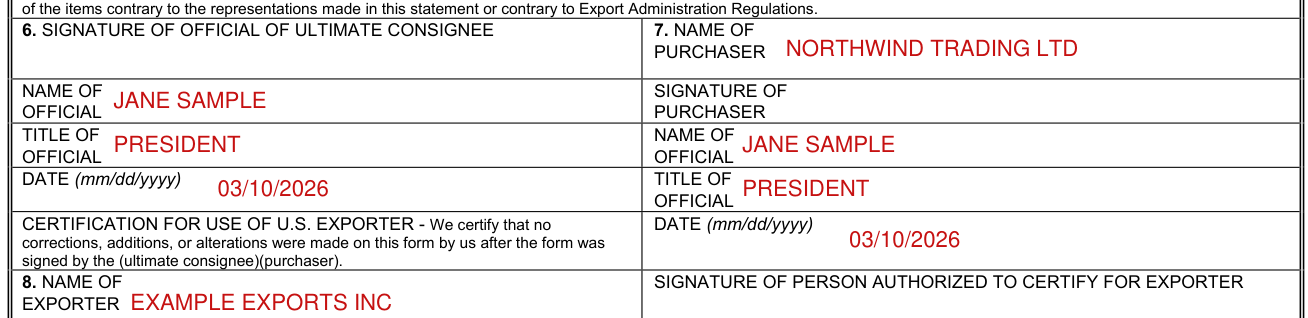
The ultimate consignee and purchaser certify that all of the facts contained in the statement are true and correct to the best of their knowledge and that they do not know of any additional facts which are inconsistent with the statement.
The ultimate consignee and purchaser shall promptly send a supplemental statement to the U.S. Exporter, disclosing any change of facts or intentions set forth in the statement which occurs after the statement has been prepared and forwarded.
Box 6 is the SIGNATURE OF OFFICIAL OF ULTIMATE CONSIGNEE, with the NAME OF OFFICIAL, the TITLE OF OFFICIAL and the DATE (mm/dd/yyyy); Box 7 is the NAME OF PURCHASER, with the SIGNATURE OF PURCHASER, the NAME OF OFFICIAL, the TITLE OF OFFICIAL and the DATE (mm/dd/yyyy).
Box 8, the exporter

CERTIFICATION FOR USE OF U.S. EXPORTER: the exporter certifies that no corrections, additions, or alterations were made on this form by the exporter after the form was signed by the (ultimate consignee)(purchaser).
Box 8 is the NAME OF EXPORTER, with the SIGNATURE OF PERSON AUTHORIZED TO CERTIFY FOR EXPORTER, the NAME OF PERSON SIGNING THIS DOCUMENT, the TITLE OF PERSON SIGNING THIS DOCUMENT and the DATE (mm/dd/yyyy).
More rules for Form BIS-711
Leave blank the DATE RECEIVED.
Common questions about Form BIS-711
What is a bis 711 form?
FORM BIS-711 is the STATEMENT BY ULTIMATE CONSIGNEE AND PURCHASER. Information furnished herewith is subject to the provisions of the Sections 4812(b)(7) and 4814(b)(1)(B) of the Export Control Reform Act (ECRA) and its unauthorized disclosure is prohibited by law.
Is there a penalty?
The making of any false statements or concealment of any material fact in connection with this statement may result in imprisonment or fine, or both and denial, in whole or in part, of participation in U.S. exports and reexports.
Sources
[1] Form BIS-711, Statement by Ultimate Consignee and Purchaser, Bureau of Industry and Security, U.S. Department of Commerce (the Official source link on this page).