Blank Citation Format PDF Details
A blank citation format provides a standardized structure for recording source information in academic documents, research papers, and legal filings. The Modern Language Association (MLA) blank citation format is among the most widely recognized templates for academic writing, guiding writers through the documentation of books, journal articles, websites, and other sources.
Common citation styles and when to use them
Choosing the right citation style depends on your field and the requirements of your assignment or submission. The three most common citation styles are:
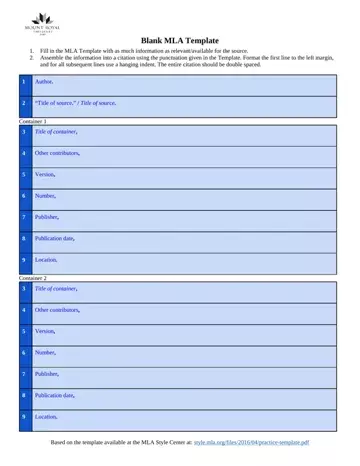
- MLA style: Used primarily in humanities disciplines including literature, language arts, and cultural studies. An MLA citation includes the author name (last name first), the title of the source, the title of the container (if applicable), other contributors, version, number, publisher, publication date, and location. A Works Cited list at the end of the document provides the full citation for each source mentioned in the text.
- APA style: Preferred in social sciences, psychology, education, and business. APA citations place the publication year directly after the author name and use a References page. The author, date, title, and source format are the four core elements of any APA citation.
- Chicago style: Common in history, fine arts, and some social sciences. Chicago format offers two systems: Notes-Bibliography (favored in humanities) and Author-Date (used in sciences). Each system has specific rules for footnotes, endnotes, and bibliography entries.
Key elements of a blank citation template
Most blank citation formats include the following fields, which you fill in with your source information:
- Author: The person or organization responsible for the work. Most citation styles list the last name before the first name for the lead author.
- Title of source: The title of the article, chapter, or specific work being cited. Titles of short works usually appear in quotation marks, while titles of longer works are italicized.
- Title of container: For sources found within a larger work, such as a journal article within a database or a chapter within an edited volume, the container title is listed separately in MLA format.
- Publisher: The organization that produced or distributed the source.
- Publication date: The year, month, and day the source was published, formatted according to the citation style guidelines.
- Location: For print sources, the page numbers. For digital sources, the URL or DOI (Digital Object Identifier).
- Version and number: For periodicals, the volume and issue numbers. For books, the edition.
The MLA citation template also requires specific formatting rules including double spacing throughout, a hanging indent for all lines after the first, and precise punctuation between elements such as periods, commas, and colons in specified positions.
Types of blank citation formats
Different academic and professional contexts require different citation formats. Common types of blank citation templates include:
- MLA citation format: Designed for works in literature, language, and the humanities. The MLA format uses a Works Cited page with entries listed in a specific sequence of elements separated by defined punctuation.
- APA citation format: Used in psychology, education, and social sciences. APA style emphasizes the author and publication year and organizes references on a dedicated References page.
- Chicago citation format: Used in history, fine arts, and some business disciplines. Chicago style offers options for footnotes, endnotes, or an author-date system depending on the type of work and the academic field.
- Legal citation format: Used in law and government to reference cases, statutes, and regulations. Legal citations follow jurisdiction-specific conventions such as the Bluebook citation system in the United States.
Each citation style has specific templates published in official style guides. Using a blank citation format ensures you include all the required elements in the correct order for your chosen style.
Citation formats for legal and governmental documents
Beyond academic writing, citation forms are also used in legal and governmental contexts. A legal citation is an official document issued by a court or law enforcement agency to notify a person of a legal obligation or violation. Common examples include a court petition for citation, a county citation issuance form, or a parking citation appeal form. Each of these legal citation templates provides a blank format for recording the case reference, the cited party, the date, and the applicable statute or regulation.
How to use a blank citation format effectively
Using a blank citation template helps you create accurate, complete citations by providing the correct fields in the right order. Start by identifying the type of source you are citing, then select the corresponding blank citation format for your required style. Fill in each field with the information from your source, following the punctuation and capitalization rules of your chosen citation style. For legal documents and formal filings, you may also find our legal brief format useful when preparing submissions that require properly formatted case citations.
| Question | Answer |
|---|
| Form Name | Blank Citation Format |
| Form Length | 2 pages |
| Fillable? | No |
| Fillable fields | 0 |
| Avg. time to fill out | 30 sec |
| Other names | police ticket template, maryland uniform citation summons, traffic ticket template, speeding ticket template |