
Blumberg Form T 224 PDF Details

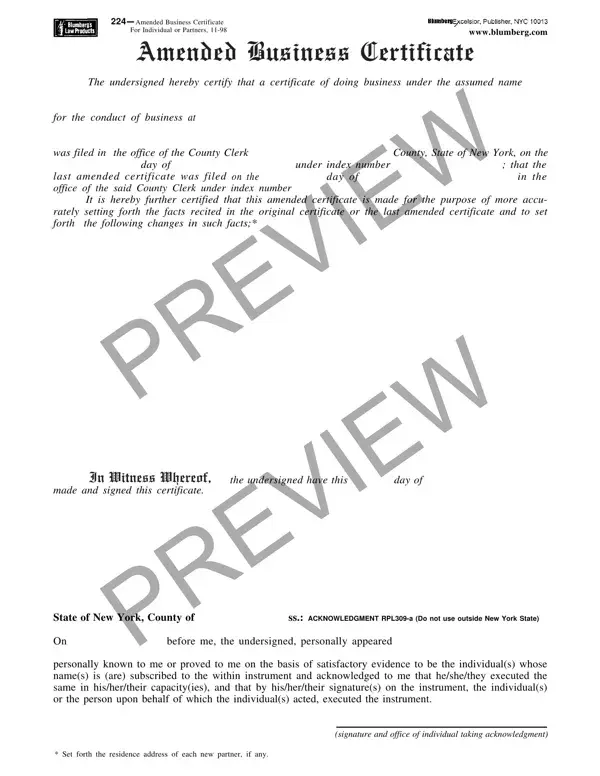
In the world of business, ensuring that all documents are correctly filed and updated is crucial for the smooth operation and legal compliance of any establishment. One such document, particularly relevant for individuals and partnerships operating under an assumed name in New York, is the Blumberg T 224 form, officially known as the Amended Business Certificate for Individuals or Partners. Initially, when a business starts operating under an assumed name, a certificate documenting this fact is filed with the county clerk's office. However, should there be any changes in the facts initially submitted—be they alterations in the business's details or changes in partnership—these need to be officially recorded through an amended certificate. The Blumberg T 224 form serves this very purpose, ensuring that all pertinent changes are legally acknowledged and recorded. It details the necessary acknowledgment procedures both within and outside of New York State, specifying the process through which these changes can be validated. Furthermore, this form is a testament to the importance of keeping business records accurate and up to date, offering a structured way for businesses to adapt their registered details to reflect their current operations accurately.

QuestionAnswer
Form NameBlumberg Form T 224
Form Length2 pages
Fillable?No
Fillable fields0
Avg. time to fill out30 sec
Other namest 224, blumberg form t 224, blumberg form 224, form t 224 amended business certificate

How to Edit Blumberg Form T 224 Online for Free

Working with PDF forms online is easy with our PDF tool. You can fill out form t224 here in a matter of minutes. We are devoted to providing you with the perfect experience with our editor by consistently releasing new functions and upgrades. With all of these improvements, using our tool becomes easier than ever! It just takes several easy steps:

Step 1: Open the PDF doc in our tool by clicking the "Get Form Button" at the top of this webpage.

Step 2: Using our state-of-the-art PDF editor, it's possible to do more than merely fill out blank fields. Try each of the features and make your documents look faultless with customized text put in, or fine-tune the file's original input to excellence - all that comes along with the capability to insert stunning graphics and sign the file off.

This PDF will require particular info to be typed in, hence you need to take your time to fill in what is expected:

1. The form t224 requires specific information to be entered. Ensure the next blanks are filled out:

t 224 conclusion process described (portion 1)

2. Just after filling out this step, go to the next step and fill out the essential particulars in all these blank fields - V I E W V I E W, In Witness Whereof, made and signed this certificate, the undersigned have this day of, State of New York County of, ss ACKNOWLEDGMENT RPLa Do not use, On before me the undersigned, personally known to me or proved, Set forth the residence address, and signature and office of individual.

t 224 conclusion process shown (step 2)

3. In this particular step, take a look at ACKNOWLEDGMENT IN NEW YORK STATE, State of County of, ss, State of New York County of, On before me the undersigned, On before me the undersigned, personally known to me or proved, insert city or political, signature and office of individual, edgment taken, V I E W V I E W, personally known to me or proved, signature and office of individual, R E D N U, and e t a c i f i t r e C. These should be completed with greatest precision.

Filling in part 3 in t 224

Be really careful while filling in R E D N U and e t a c i f i t r e C, as this is the section where a lot of people make some mistakes.

Step 3: Ensure the details are right and then click on "Done" to continue further. Go for a free trial plan with us and acquire direct access to form t224 - download or modify inside your personal account page. When you use FormsPal, you can complete documents without needing to get worried about information breaches or entries getting shared. Our secure platform makes sure that your personal information is stored safely.