
How to Use the Online PDF Editor
When working in the online tool for PDF editing by FormsPal, you can fill out or edit the C 258 form directly in your browser without installing any software. Our team continuously improves the editor based on user feedback. Follow the steps below to complete your Claimant's Record of Job Search Efforts.
Step 1: Open the PDF tool by pressing the "Get Form" button at the top of this page.
Step 2: Once the editor opens, the document is fully loaded and ready to use. You can fill in blank fields, edit existing text, add your signature, insert images, and annotate the document as needed.
The C 258 form requires accurate information in each section. Review every field carefully before proceeding to the next step.
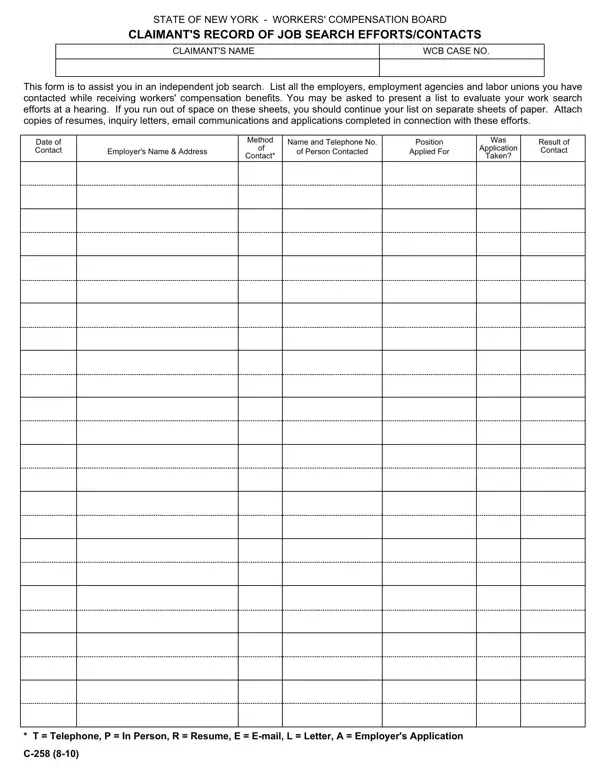
1. In the first section, record all employer contact details accurately. Complete every required field in the area to ensure your information is captured correctly and can be processed without delays.
2. After completing the first section, enter the required details in the second portion of the form. Include the employer's full address and the exact title of the position you applied for before moving forward.
3. In the third section, indicate your contact method using the correct code: T for Telephone, P for In Person, or R for other methods such as online submission or written correspondence. Fill in all applicable blanks.
4. The fourth section requires: Date of Contact, Employer Name and Address, Name of Contact Person, Position Applied For, Application Method, and Result of Contact. Complete every field in this section before continuing.
5. The final section contains a set of blank fields that must be completed to finalize your job search record. Ensure all entries are accurate before concluding.
Step 3: After reviewing all the information you have entered, click "Done" to finalize your document. Your completed form is available for download immediately. All changes are saved automatically so you can return to edit the file at any time. FormsPal's secure platform keeps your personal information and document data protected throughout the process.
Tips for Completing the C 258 Form Correctly
Accurate job search records are essential for maintaining workers' compensation benefits in New York. The following tips will help you complete the form in a way that satisfies WCB requirements:
- Record contacts on the day they occur. Writing entries after the fact increases the risk of errors and omissions that may be questioned at a hearing.
- Use the employer's full legal name and complete address. Partial or abbreviated entries may not be accepted as valid documentation by the WCB.
- Specify the exact job title applied for. Vague entries such as "office work" or "any available position" do not meet WCB documentation standards.
- Enter the correct contact method code. Use T for telephone contact, P for in-person contact, and R for other methods including email and online applications.
- Attach supporting materials for each entry. Resume copies, application confirmation emails, and letters of inquiry strengthen your job search record and may be requested at a hearing.
- Never leave the Result of Contact field blank. Record the outcome for every entry, whether the result was no opening, an application accepted, or an interview scheduled.
- Retain a personal copy of every submitted form. If the original is lost or disputed, your copy provides a reliable backup record.
- Check whether retraining affects your requirements. Claimants enrolled in a WCB-approved vocational retraining program may have reduced or different job search documentation obligations.
Frequently Asked Questions about the C 258 Form
What is the C 258 form used for?
The C 258 form is the official New York Workers' Compensation Board document for recording a claimant's independent job search efforts and employer contacts. It is required when the WCB directs a claimant receiving temporary disability benefits to demonstrate active job searching during the benefit period.
Who must complete the C 258 form?
Claimants who receive workers' compensation benefits in New York and are directed by the WCB to conduct a job search must complete and submit this form. The specific requirement depends on your disability classification and benefit type. Confirm your individual obligations with your WCB case manager or attorney.
What types of job contacts qualify?
Contacts with employers, employment agencies, and labor unions are all eligible. Accepted contact methods include in-person visits, telephone calls, online job applications, and written correspondence. Each qualifying contact must be documented as a separate entry on the form.
How often must I submit the C 258 form?
The submission schedule is set by your WCB case manager or attorney. Many claimants submit the form at each scheduled WCB hearing or at intervals specified by the Board. Always retain a copy of each form you submit in case the original is needed later.
Can I fill out the C 258 form online?
Yes. The FormsPal online PDF editor allows you to complete and download the C 258 form directly in your browser. Submission to the Workers' Compensation Board must follow WCB procedures, which may require a physical or certified submission. Contact the WCB or your attorney for current submission requirements.
Where can I find other related Workers' Compensation forms?
FormsPal also provides the Workers' Compensation C-4 form for treating physicians, the Workers' Compensation Injury Report for documenting workplace injuries, and a job search log template for tracking multiple employer contacts over time.
