
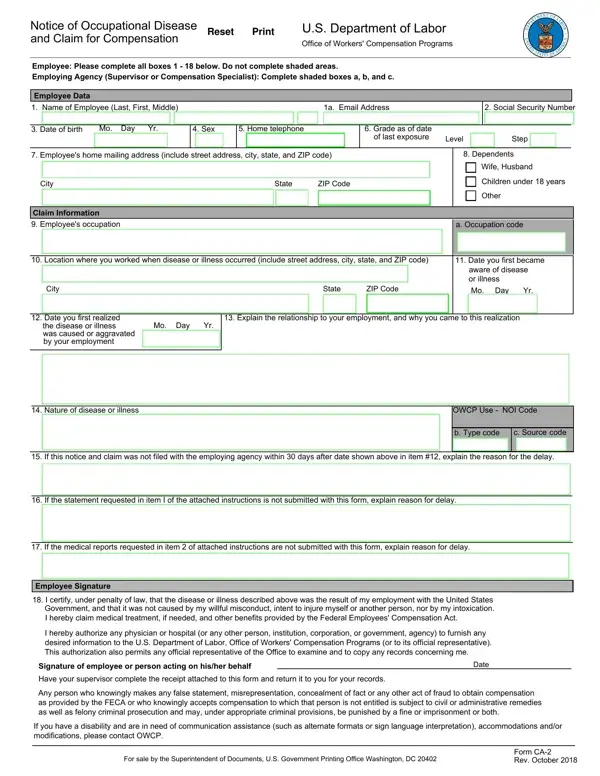
Working with PDF files online can be very simple with our PDF editor. You can fill in the ca 1 form or ca 2 here with no trouble. FormsPal is aimed at providing you with the best possible experience with our editor by continuously presenting new features and upgrades. Our tool has become a lot more helpful as the result of the latest updates! Currently, editing documents is easier and faster than ever. All it takes is just a few simple steps:
Step 1: Click the "Get Form" button at the top of this webpage to open our editor.
Step 2: As soon as you access the file editor, you will find the form all set to be filled out. Other than filling in different blanks, you can also do various other actions with the file, including writing any textual content, changing the original textual content, adding images, placing your signature to the document, and more.
To be able to complete this PDF form, ensure that you enter the right details in each and every field:
1. The ca 1 or ca 2 requires specific information to be entered. Ensure that the subsequent blanks are complete:
2. Given that the previous part is complete, you'll want to add the necessary details in Nature of disease or illness, OWCP Use NOI Code, b Type code, c Source code, If this notice and claim was not, If the statement requested in, If the medical reports requested, Employee Signature, I certify under penalty of law, I hereby authorize any physician, Signature of employee or person, Date, Have your supervisor complete the, and Any person who knowingly makes any in order to progress further.
Always be extremely mindful when filling in Signature of employee or person and If the statement requested in, because this is the part where many people make a few mistakes.
3. This next step is relatively easy, Supervisors Report, Agency name and address of, OWCP Agency Code, OSHA Site Code, City State ZIP Code, Employees duty station include, City State ZIP Code, Regular, work hours From, Regular, work schedule, Sun, Mon, Tues, and Wed - all of these form fields will need to be completed here.
4. All set to fill out the next portion! In this case you'll have all of these returned to work, Time, If employee has returned to work, Employees Retirement Coverage, CSRS, FERS, Other Specify, Was injury caused, Name and address of third party, by third party, Yes, No If No go to Item , Signature of Supervisor, City State ZIP Code, and A supervisor who knowingly empty form fields to complete.
5. The very last stage to finalize this document is essential. Ensure you fill out the necessary form fields, which includes I certify that the information, Name of Supervisor Type or print, Signature of Supervisor, Supervisors Title, Date, Office phone, and Form CA Rev October Page , before submitting. In any other case, it might end up in an incomplete and possibly invalid form!
Step 3: As soon as you've reread the details you given, simply click "Done" to complete your ca 2 form at FormsPal. Right after starting a 7-day free trial account at FormsPal, you'll be able to download ca 1 or ca 2 or email it promptly. The document will also be at your disposal via your personal account page with your changes. FormsPal is focused on the confidentiality of all our users, and all personal data handled by our system is kept protected.
What to Prepare Before Filing
Gather the following documents and information before you begin filling out the occupational disease form. Having them ready will help you complete each section accurately and avoid delays in OWCP processing.
- Medical records and physician statements: Obtain a written opinion from your treating physician connecting your diagnosis to your work environment. OWCP requires medical evidence establishing both the diagnosis and the causal relationship to your federal employment.
- Employment records: Collect your position description, duty history, and any exposure records that document the workplace conditions linked to your condition. Your employing agency's human resources office can assist with obtaining official employment documentation.
- Dates and timeline: Note the earliest date you experienced symptoms and the date you first connected them to your work. The 3-year filing window runs from the date you became aware of the work-related cause, not the date symptoms first appeared.
- Supervisor contact information: Identify your current supervisor who will complete the agency portion of the form. Both the employee and supervisor sections must be fully completed before OWCP can accept the claim.
Common Mistakes When Filing This Form
Filing this OWCP form correctly is critical for a smooth claims process. Watch out for these frequent errors that delay or deny compensation:
- Missing the filing deadline: Report occupational disease within 3 years of becoming aware of it. Late filings may affect your right to OWCP compensation.
- Incomplete supervisor section: This form requires both employee and supervisor signatures. A missing supervisor section will delay or deny your claim.
- Vague disease description: Provide a specific, detailed account of the occupational disease. Entries without a clear link to your work environment are routinely rejected by OWCP.
- Skipping medical authorization: You must authorize the release of medical records. Failing to complete this section prevents OWCP from processing your compensation claim.
- Using the wrong form: Use the ca 1 form for a traumatic workplace injury. This occupational disease form applies only to illnesses that developed gradually over time.
Frequently Asked Questions About the Ca 2 Form
Who should file this OWCP occupational disease form?
Federal civilian employees covered under FECA who developed an occupational disease or illness from their work environment. If you suffered a specific traumatic injury, you need the ca 1 form instead.
How long does OWCP take to process this claim?
Initial decisions typically take 90 days, though complex occupational disease cases may take longer. You can track your claim status through OWCP's iFECS online portal.
Can I complete and submit this form electronically?
Complete and print this form using FormsPal's PDF editor. Then submit the completed document to your employing agency's human resources office, which forwards it to OWCP for processing.
What is the difference between this form and the ca 7 form?
This occupational disease form initiates your OWCP claim. The ca 7a form is used later to claim wage loss compensation after your occupational disease claim is accepted.
What if my OWCP occupational disease claim is denied?
If OWCP denies your claim, you have the right to request reconsideration within one year of the decision or appeal to the Employee Compensation Appeals Board (ECAB) within 90 days. Gather additional medical evidence and a more detailed physician statement supporting the causal relationship between your work and the condition before filing an appeal.
Related Federal Compensation Forms
If you are navigating federal workers' compensation under FECA, these related OWCP forms may also apply:
- Ca 1 Form - Notice of Traumatic Injury and Claim for Continuation of Pay
- Ca 3 Form - Report of Termination of Disability and Resumption of Regular Pay
- Ca 7A Form - Time Analysis Form for Compensation Claims
- Workers Compensation Injury Report - General workplace incident documentation
- Workers Compensation C-4 Form - Doctor's initial report for compensation claims
