
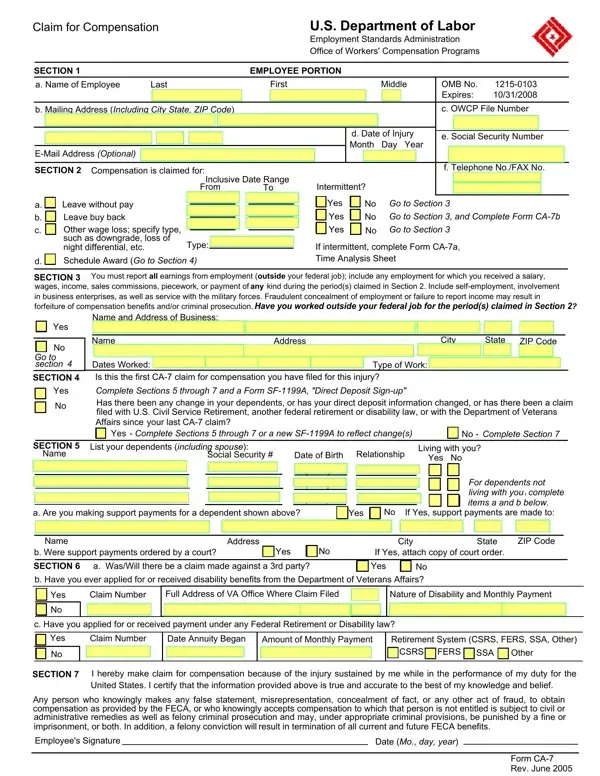

Form CA-7 at a glance
What it is: This is the Claim for Compensation of the U.S. Department of Labor, Office of Workers' Compensation Programs.
A filled-in Form CA-7 example: an employee claims leave without pay
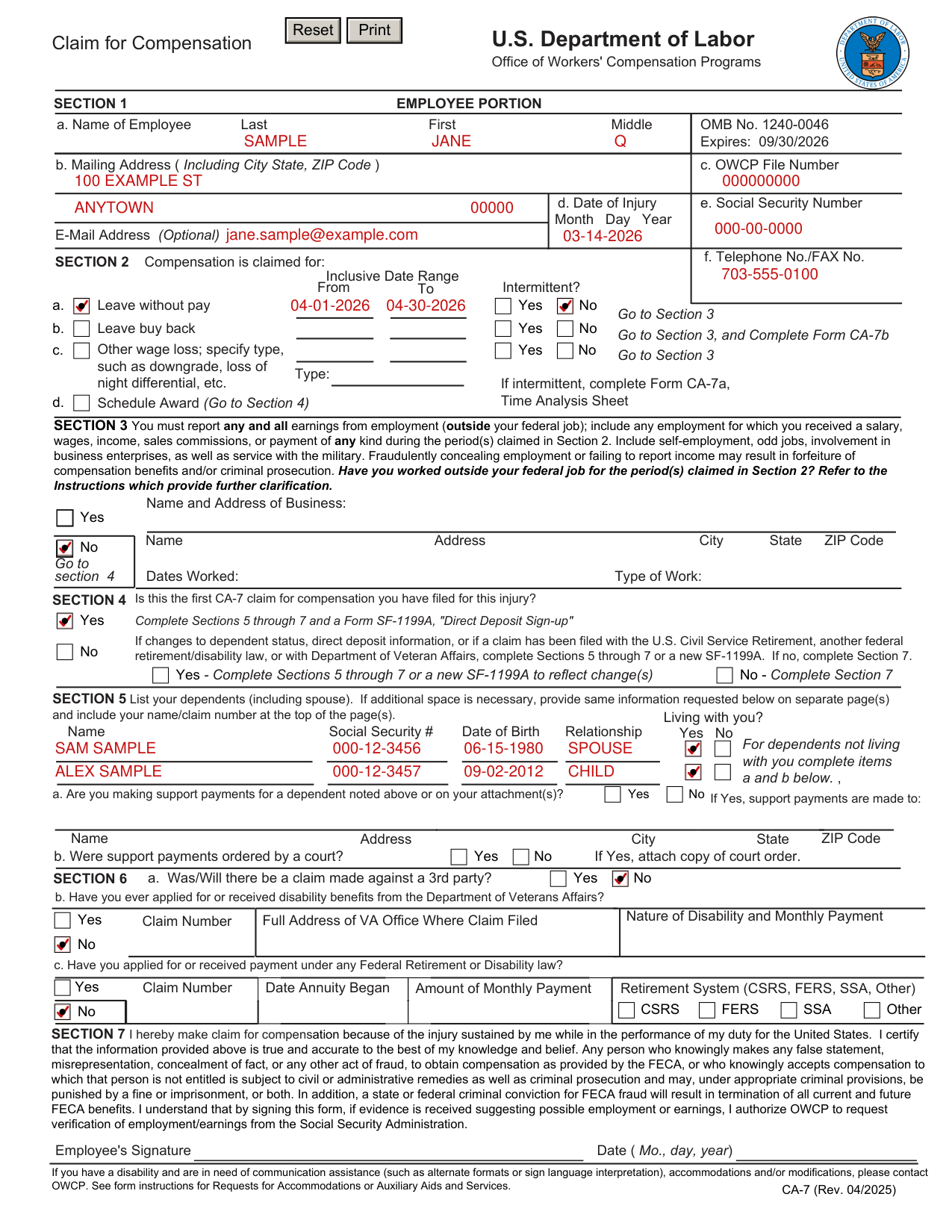
How to fill out Form CA-7, box by box
Section 1: the employee's name, address, file number and injury
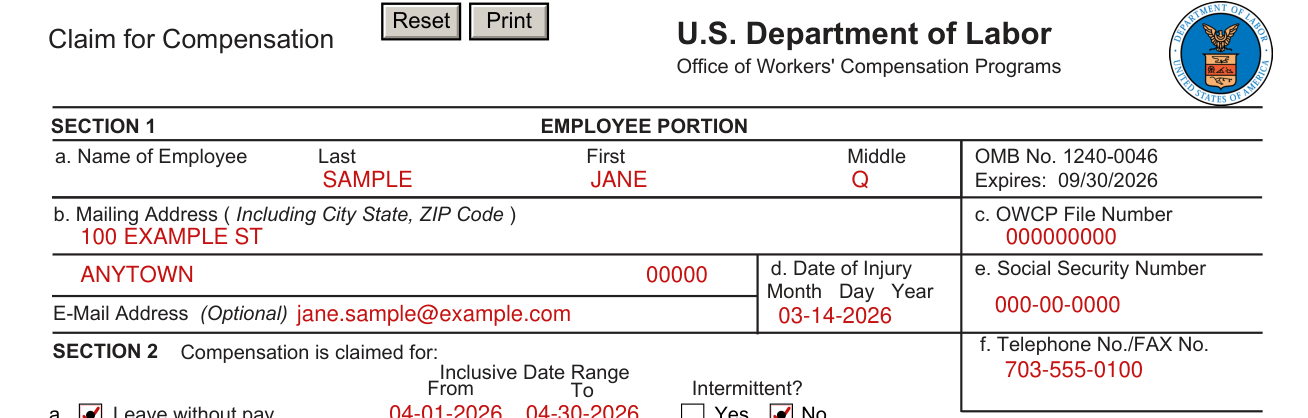
Sections 1 through 7 are the Employee Portion: the EMPLOYEE (or person acting on the employee's behalf) completes them as directed and submits the form to the employee's supervisor.
Section 1, Employee Portion: enter a. Name of Employee (Last, First, Middle).
Enter b. Mailing Address (Including City State, ZIP Code) and c. OWCP File Number.
Enter d. Date of Injury (Month Day Year), e. Social Security Number, the E-Mail Address (Optional) and f. Telephone No./FAX No.
Section 2: the compensation claimed

Employee: Section 2, Compensation is claimed for: enter the Inclusive Date Range (From, To) and mark Intermittent?
For Leave without pay, enter From and To and mark Intermittent? Yes or No. Go to Section 3.
For Leave buy back, enter From and To and mark Intermittent? Yes or No, go to Section 3, and complete Form CA-7b.
For Other wage loss, specify the type, such as downgrade, loss of night differential, etc., enter From and To and mark Intermittent? Yes or No. Go to Section 3.
In Section 2, if intermittent, complete Form CA-7a, Time Analysis Sheet.
For a Schedule Award, go to Section 4.
2d, Schedule Award: schedule awards are paid for permanent impairment to a member or function of the body.
The form should also be submitted when the employee reaches maximum improvement and claims a schedule award.
Section 3: earnings outside the federal job
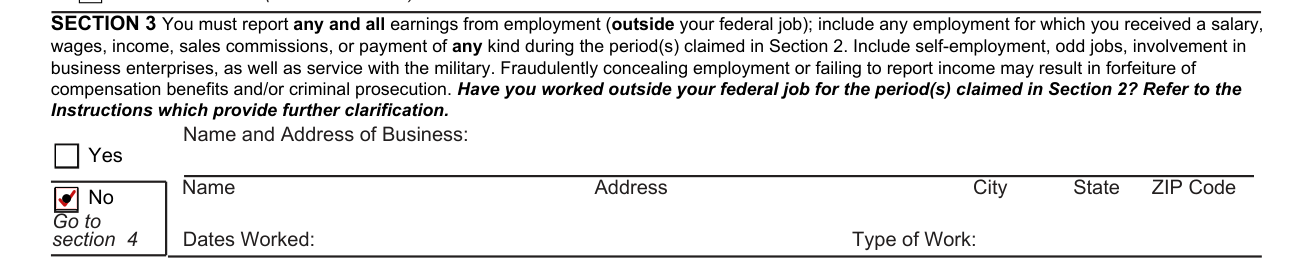
Employee: Section 3: you must report any and all earnings from employment (outside your federal job), including any employment for which you received a salary, wages, income, sales commissions, or payment of any kind during the period(s) claimed in Section 2; this includes self-employment, odd jobs, involvement in business enterprises, as well as service with the military. Fraudulently concealing employment or failing to report income may result in forfeiture of compensation benefits and/or criminal prosecution. Have you worked outside your federal job for the period(s) claimed in Section 2? Refer to the Instructions which provide further clarification.
If Yes, under Name and Address of Business, write the Name, Address, City, State and ZIP Code, then write the Type of Work and the Dates Worked. If No: “Go to section 4”.
3, Employment: an employee who either claims or is receiving compensation for partial or total disability must advise OWCP immediately of any return to work.
An employee must report all outside employment, including any concurrent dissimilar employment held at the time of injury.
The employee must report even those earnings which do not seem likely to affect benefits; failure to report earnings may result in forfeiture of all benefits paid during the period for which compensation is claimed.
For example, include sales, farming, and operating (or keeping books for) a business including a family business.
Report providing services (such as carpentry, mechanical work, child care, odd jobs) provided in exchange for money, goods, or other services.
Report part-time or intermittent activities and any volunteer work for which any form of monetary or in-kind compensation was received.
Passive investment in any public traded business is not a required reporting item.
Section 4: is this the first CA-7 claim

Employee: Section 4: mark Is this the first CA-7 claim for compensation you have filed for this injury? Yes or No.
If Yes, complete Sections 5 through 7 and a Form SF-1199A, “Direct Deposit Sign-up”.
If No (this is not your first CA-7 claim) and there are changes to dependent status, direct deposit information, or a claim has been filed with the U.S. Civil Service Retirement, another federal retirement/disability law, or with Department of Veteran Affairs, mark Yes and complete Sections 5 through 7 or a new SF-1199A. If there are no such changes, mark No and complete Section 7.
4, Direct Deposit Information: the Department of the Treasury requires all Federal payments be made by electronic funds transfer (EFT), also called Direct Deposit.
If you have not previously signed up to receive compensation with EFT, or desire to change your current account information, please submit SF-1199A, Direct Deposit Sign Up.
If you do not have a bank account, you may be required to receive your payment through Direct Express Debit MasterCard.
NOTE: payments to residents of foreign countries are exempt from the Treasury requirements.
The CA-7 also should be used to claim continuing compensation, when a previous CA-7 claim has been made.
Section 5: the dependents
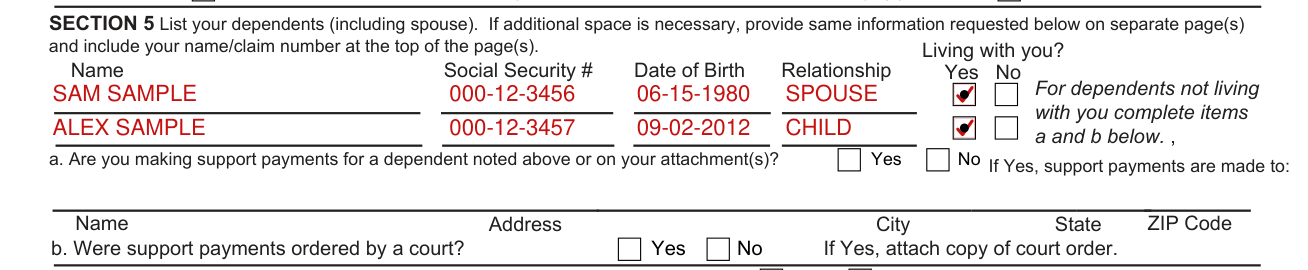
Employee: Section 5: list your dependents (including spouse) with the Name, Social Security #, Date of Birth and Relationship of each, and mark Living with you? Yes or No. If additional space is necessary, provide same information requested below on separate page(s) and include your name/claim number at the top of the page(s).
For dependents not living with you complete items a and b below. a. Are you making support payments for a dependent noted above or on your attachment(s)? Yes or No.
If Yes, support payments are made to: write the Name, Address, City, State and ZIP Code.
b. Were support payments ordered by a court? Yes or No. If Yes, attach copy of court order.
5, List your dependents: your spouse is a dependent if he or she is living with you.
A child is a dependent if he or she either lives with you or receives support payments from you, and he or she: 1) is under 18, or 2) is between 18 and 23 and is a full-time student, or 3) is incapable of self-support due to physical or mental disability.
Section 6: third party, VA benefits and federal retirement

Employee: Section 6, a.: mark Was/Will there be a claim made against a 3rd party? Yes or No.
6a, Was/will there be a claim made against 3rd party?: a third party is an individual or organization (other than the injured employee or the Federal government) who is liable for the injury.
For instance, the driver of a vehicle causing an accident in which an employee is injured, the owner of a building where unsafe conditions cause an employee to fall, and a manufacturer who gave improper instructions for the use of a chemical to which an employee is exposed, could all be considered third parties to the injury.
b. Have you ever applied for or received disability benefits from the Department of Veterans Affairs? Mark Yes or No; under Yes enter the Claim Number, Full Address of VA Office Where Claim Filed, and Nature of Disability and Monthly Payment.
c. Have you applied for or received payment under any Federal Retirement or Disability law? Mark Yes or No; under Yes enter the Claim Number, Date Annuity Began, Amount of Monthly Payment and Retirement System (CSRS, FERS, SSA, Other).
Section 7: the employee's claim and signature
Employee: SECTION 7 By signing you make claim for compensation because of the injury sustained by you while in the performance of your duty for the United States, and you certify that the information provided is true and accurate to the best of your knowledge and belief. Any person who knowingly makes any false statement, misrepresentation, concealment of fact, or any other act of fraud, to obtain compensation as provided by the FECA, or who knowingly accepts compensation to which that person is not entitled is subject to civil or administrative remedies as well as criminal prosecution and may, under appropriate criminal provisions, be punished by a fine or imprisonment, or both. In addition, a state or federal criminal conviction for FECA fraud will result in termination of all current and future FECA benefits. By signing this form, if evidence is received suggesting possible employment or earnings, you authorize OWCP to request verification of employment/earnings from the Social Security Administration.
Sign on the Employee's Signature line and enter the Date (Mo., day, year).
Employing agency, Sections 8 to 10: pay, schedule and enrollment
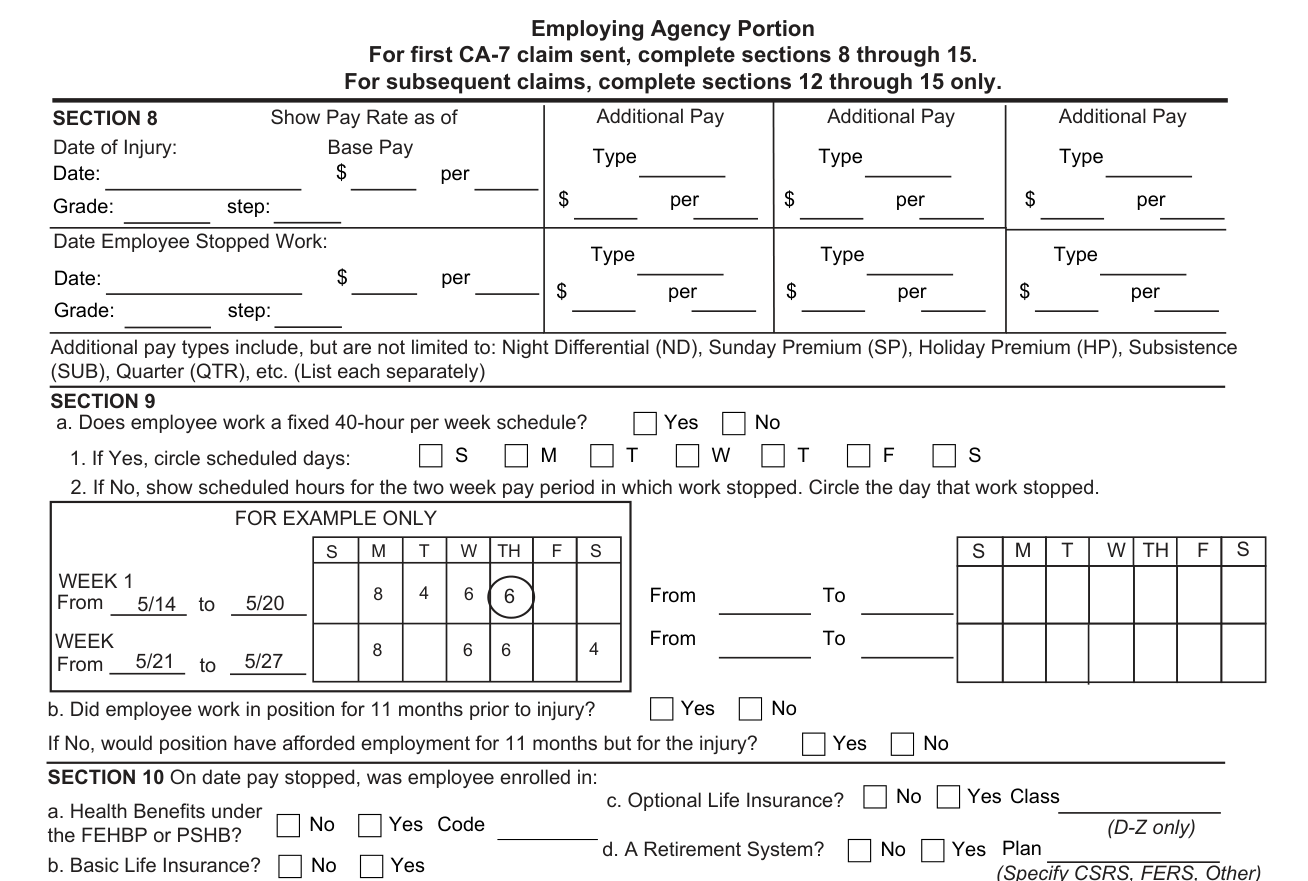
The SUPERVISOR (or appropriate official in the employing agency) completes sections 8 through 15 as directed and promptly forwards the form to the OWCP.
In the Employing Agency Portion, for the first CA-7 claim sent, complete sections 8 through 15.
For subsequent claims, complete sections 12 through 15 only.
Employing agency (supervisor or appropriate official): Section 8: show Pay Rate as of Date of Injury and as of Date Employee Stopped Work: the Base Pay, the Grade and step, and each Additional Pay Type with its $ per.
Additional pay types include, but are not limited to: Night Differential (ND), Sunday Premium (SP), Holiday Premium (HP), Subsistence (SUB), Quarter (QTR), etc. List each separately.
8, Additional Pay: “Additional Pay” includes night differential, Sunday premium, holiday premium, and any other type (such as hazardous duty or “dirty work” pay) regularly received by the employee, but does not include pay for overtime.
If the amount of such pay varies from pay period to pay period (as in the case of holiday premium or a rotating shift), then the total amount of such pay earned during the year immediately prior to the date of injury or the date the employee stopped work (whichever is greater) should be reported.
Employing agency (supervisor or appropriate official): Section 9, a.: Does employee work a fixed 40-hour per week schedule? Yes or No.
If Yes, circle scheduled days.
If No, show scheduled hours for the two week pay period in which work stopped.
Circle the day that work stopped.
b. Did employee work in position for 11 months prior to injury? Yes or No.
If No, would position have afforded employment for 11 months but for the injury? Yes or No.
Employing agency (supervisor or appropriate official): Section 10, On date pay stopped, was employee enrolled in: Health Benefits under the FEHBP or PSHB?, Basic Life Insurance?, Optional Life Insurance? and A Retirement System? Mark each Yes or No. The form also has a Code box, a Class box with “(D-Z only)” under it, and a Plan box with “(Specify CSRS, FERS, Other)” by it.
Employing agency, Sections 11 to 13: pay status and return to work
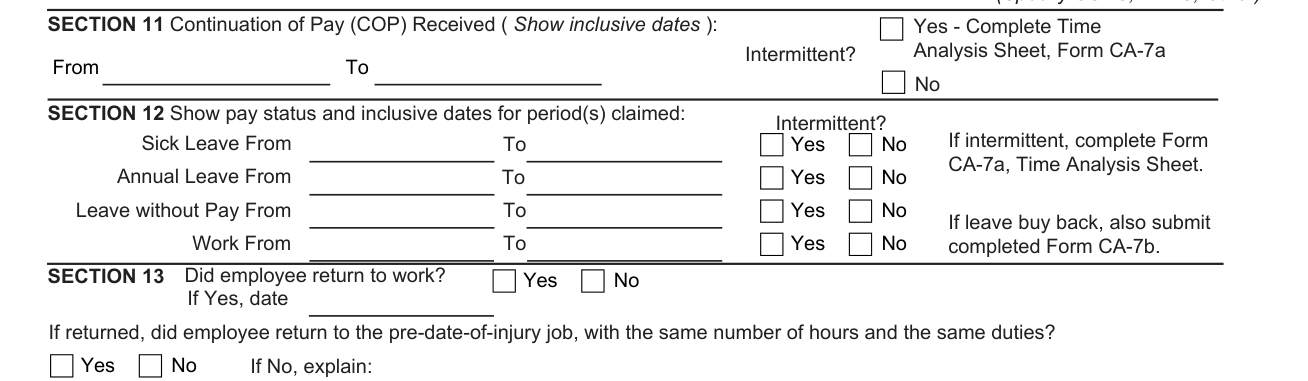
Employing agency (supervisor or appropriate official): Section 11, Continuation of Pay (COP) Received: show inclusive dates (From, To) and mark Intermittent? Yes or No; if Yes, complete Time Analysis Sheet, Form CA-7a.
11. Continuation of pay (COP) received: If the injury was not a traumatic injury reported on Form CA-1, this item does not apply.
Employing agency (supervisor or appropriate official): Section 12: show pay status and inclusive dates for period(s) claimed (From, To) for Sick Leave, Annual Leave, Leave without Pay and Work, and mark Intermittent? Yes or No for each. If leave buy back, also submit completed Form CA-7b.
In Section 12, if intermittent, complete Form CA-7a, Time Analysis Sheet.
Employing agency (supervisor or appropriate official): Section 13: Did employee return to work? Yes or No; if Yes, enter the date.
If returned, did employee return to the pre-date-of-injury job, with the same number of hours and the same duties? Yes or No; if No, explain.
Employing agency, Sections 14 and 15: remarks and the official's certification
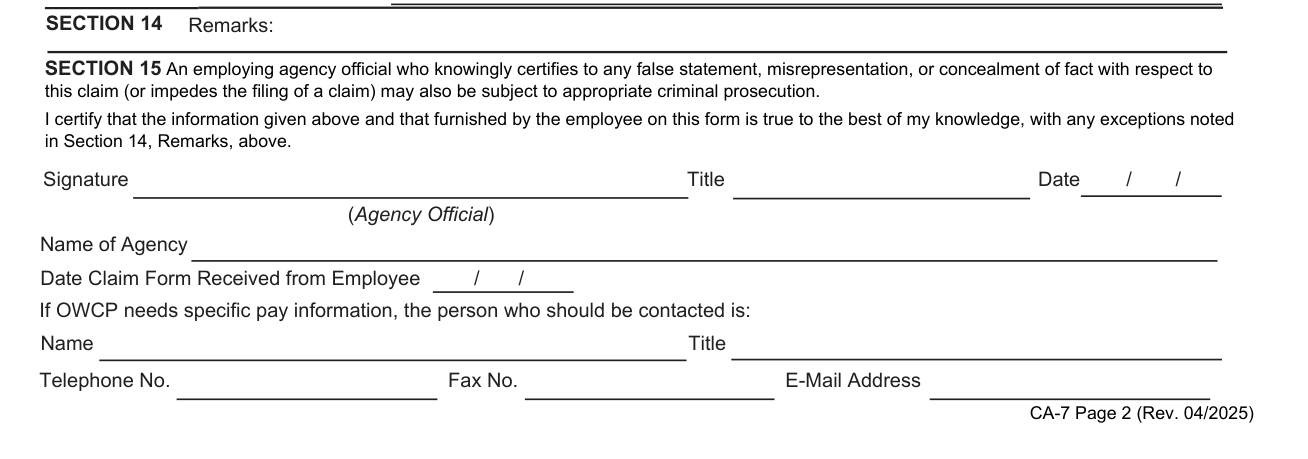
Employing agency (supervisor or appropriate official): Section 14, Remarks: this space is used to provide relevant information which is not present elsewhere on the form.
Section 15: an employing agency official who knowingly certifies to any false statement, misrepresentation, or concealment of fact with respect to this claim (or impedes the filing of a claim) may also be subject to appropriate criminal prosecution.
Agency Official: “I certify that the information given above and that furnished by the employee on this form is true to the best of my knowledge, with any exceptions noted in Section 14, Remarks, above.”
Sign on the Signature line and enter the Title and the Date (Agency Official).
Enter the Name of Agency and the Date Claim Form Received from Employee.
If OWCP needs specific pay information, the person who should be contacted is: write the Name, Title, Telephone No., Fax No. and E-Mail Address.
More rules for Form CA-7
If additional space is needed to respond to questions on this form, attach a separate sheet of paper and write “see attachment” in the applicable portion of the form. Please ensure the claimant's full name and claim number appear on the separate sheet(s).
Common questions about Form CA-7
What is a CA-7 form for?
This is the Claim for Compensation of the U.S. Department of Labor, Office of Workers' Compensation Programs. The information on this form is requested under 5 U.S.C. 8101 et seq. and will be used to determine entitlement to benefits.
Is there a deadline?
If the employee does not quality [sic] for continuation of pay (for 45 days), the form should be completed and filed with the OWCP as soon as pay stops. If the employee is receiving continuation of pay and will continue to be disabled after 45 days, the form should be filed with OWCP 5 working days prior to the end of the 45-day period.
Sources
[1] Form CA-7 (Rev. 04/2025), Claim for Compensation, U.S. Department of Labor, Office of Workers' Compensation Programs (the Official source link on this page).