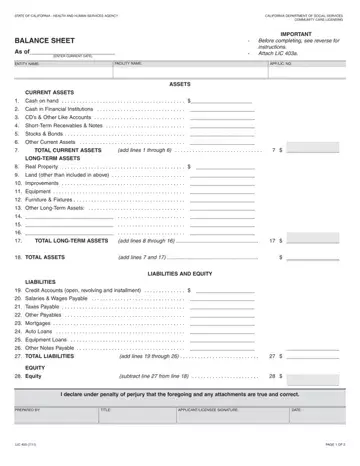
You can complete the California Balance Sheet (LIC 403) online using our free PDF editor. The steps below guide you through the process quickly and accurately.
Step 1: Open the California Balance Sheet Form
Click the orange "Get Form Now" button at the top of this page. The LIC 403 loads instantly in the online editor. No software installation or account creation is required.
Step 2: Access the Editing Toolbar
Once the form is open, you will find all editing tools in the top menu. You can type into text fields, add a signature, highlight sections, or annotate the document before saving.
Step 3: Fill In the Asset and Liability Sections
Work through each financial field carefully. Complete the following key areas:
- Total Long-Term Assets (add lines through)
- Total Assets (add lines and)
- Credit accounts open and revolving
- Salaries and wages payable
- Taxes payable and other payables
- Mortgages, auto loans, and equipment loans
- Total Liabilities
Step 4: Complete the Equity Section
In the Equity section, subtract your total liabilities from total assets to calculate equity. Then complete the perjury declaration and enter the prepared-by name, title, applicant or licensee signature, and date.
Step 5: Download and Submit
Click Done when all fields are complete. Download the finished LIC 403 to your device, or send it by email directly from the editor. Print and submit it with the LIC 403a supplemental schedule to the Community Care Licensing Division.
Common Mistakes to Avoid on the LIC 403
The following errors appear frequently on submitted California Balance Sheets:
- Reporting facility assets only. The form requires ALL entity assets and liabilities, not just those related to the care facility. Report every asset and liability the entity holds.
- Omitting the LIC 403a supplemental schedule. The LIC 403a must be completed first and submitted together with the LIC 403. Submitting one without the other delays the application.
- Leaving the equity calculation blank. Equity equals total assets minus total liabilities. This line must be calculated and filled in.
- Missing the signature. The applicant or licensee must sign and date the completed form. An unsigned balance sheet is returned without review.
- Using outdated form versions. Always use the current revision of the LIC 403. The version date appears in the footer of the document.
Frequently Asked Questions
What is the California Balance Sheet (LIC 403) used for?
The LIC 403 discloses the complete financial position of an entity applying for or renewing a care facility license issued by the California Community Care Licensing Division. It shows total assets, liabilities, and equity at a specific point in time and is used to verify the financial stability of the applicant or licensee.
Who must submit the California Balance Sheet?
Every applicant and licensee under the Community Care Licensing Division must submit the LIC 403. This requirement applies to sole proprietorships, partnerships, and corporations operating or seeking to operate a licensed care facility in California.
Is the LIC 403a required along with the LIC 403?
Yes. The LIC 403a is a supplemental schedule that provides the detailed asset and liability line items supporting the totals on the LIC 403. Both documents must be completed and submitted together. Do not submit the LIC 403 without the accompanying LIC 403a.
Can I complete the California Balance Sheet online?
Yes. Use the free PDF editor on this page to fill in all fields, add your signature, and download the finished LIC 403 at no cost. No software or account is needed.
What financial information do I need before starting?
Gather all current and long-term asset values (cash, property, equipment), all liability amounts (mortgages, loans, unpaid wages, taxes), and the current date. Having this information ready before you open the form reduces completion time.
Related Financial Forms
If you need other financial disclosure documents, the following may be useful:
- Projected Balance Sheet – for forecasting future financial position
- Model Balance Sheet – a standard template for entity finances
- Medicare Credit Balance Report Sheet – for Medicare providers
- Individual Financial Statement – for personal financial disclosure