
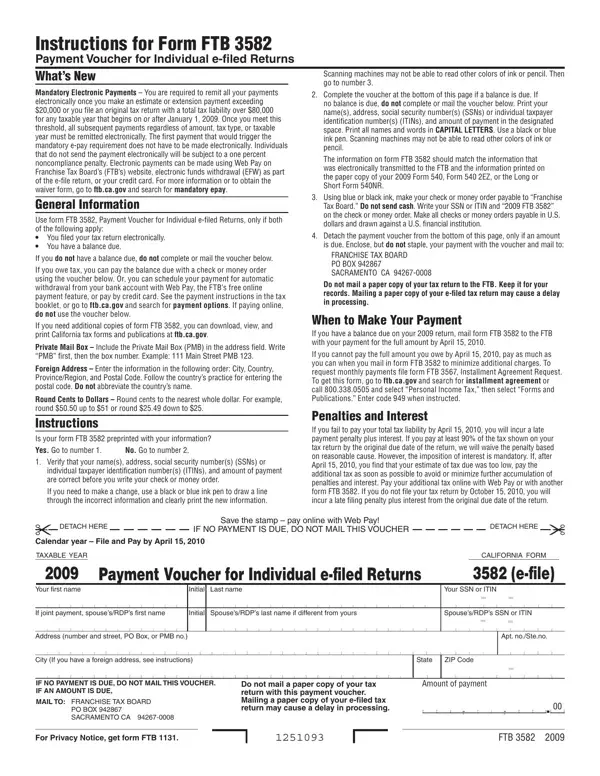
California FTB Form 3582 is the Payment Voucher for Individual e-filed Returns, required for taxpayers who file their California state income tax return electronically and owe a remaining balance to the Franchise Tax Board. Use the steps below to fill out, print, and mail the tax voucher forms correctly to avoid penalties.
How to Fill Out FTB Form 3582
- Download the voucher. Get the current-year FTB Form 3582 from FormsPal or visit ftb.ca.gov to download the official tax form PDF. The 3582 voucher is a one-page form you attach with your payment.
- Enter your identifying information. Write your legal name, Social Security Number (SSN) or ITIN, and the applicable tax year. Make sure this information matches your e-filed return exactly to avoid processing issues with the FTB.
- Enter the payment amount. Write the total tax balance due from your Form 540, 540NR, or 540 2EZ. Round cents to the nearest dollar as instructed in the FTB voucher forms guidelines at ftb.ca.gov.
- Submit payment. Make your check or money order payable to "Franchise Tax Board" and attach Form 3582. Mail both to the FTB mailing address shown on the tax voucher. Alternatively, explore online payment options at ftb.ca.gov/pay, including Web Pay and credit card, to pay your California tax balance without mailing paper forms.
- Keep documentation. Retain a copy of your completed FTB voucher and payment confirmation for at least four years. Contact the FTB at 800-852-5711 if you have potential questions about the status of your payment.
Who Needs to Submit Form 3582
Any California taxpayer who e-files their individual income tax return and owes a balance must submit FTB Form 3582. Failing to submit payment by the due date results in late-payment penalties and interest from the Franchise Tax Board. Taxpayers who make estimated or extension payments exceeding $20,000, or whose total tax liability exceeds $80,000, must pay electronically via EFT and cannot use paper voucher forms. Visit ftb.ca.gov for details on mandatory electronic payment requirements.
Related California Tax Forms
If you need to learn about other California tax forms related to FTB vouchers and state income taxes, you may also need California Form 3539 for extension payments, California Form 3533 to update your mailing address with the FTB, or California FTB Form 626 for collection-related issues. Browse FormsPal's collection of California state tax forms and FTB vouchers to find the right form for your tax situation.
Frequently Asked Questions (FAQs)
When is FTB Form 3582 due?
Form 3582 is due on the same date as your California individual income tax return, typically April 15. If the April 15 deadline falls on a weekend or gov holiday, the due date moves to the next business day. Extension filers who owe tax should still pay by the original April 15 deadline to avoid penalties.
Can I pay online instead of using the paper tax voucher?
Yes. The California FTB accepts online payments through Web Pay at ftb.ca.gov/pay, credit and debit card transactions, and electronic funds withdrawal. Online payment eliminates the need to print and mail Form 3582, and the FTB processes electronic payments faster than mailed voucher forms.
What if I made an error on Form 3582?
If you entered incorrect information on the FTB tax voucher, do not alter the original form with corrections. Print a new copy from FormsPal or ftb.ca.gov and complete it accurately. For issues with payments already submitted, contact the FTB at 800-852-5711 to correct the problem before it results in additional penalties.
Does Form 3582 apply to all California income tax filers?
No. FTB Form 3582 is specifically for taxpayers who e-file their California individual income tax return and have a balance due. Taxpayers who file paper returns or who have no balance due do not need this voucher. Businesses file different tax forms and FTB vouchers depending on their entity type. Visit ftb.ca.gov to learn about all available California state tax forms.
