
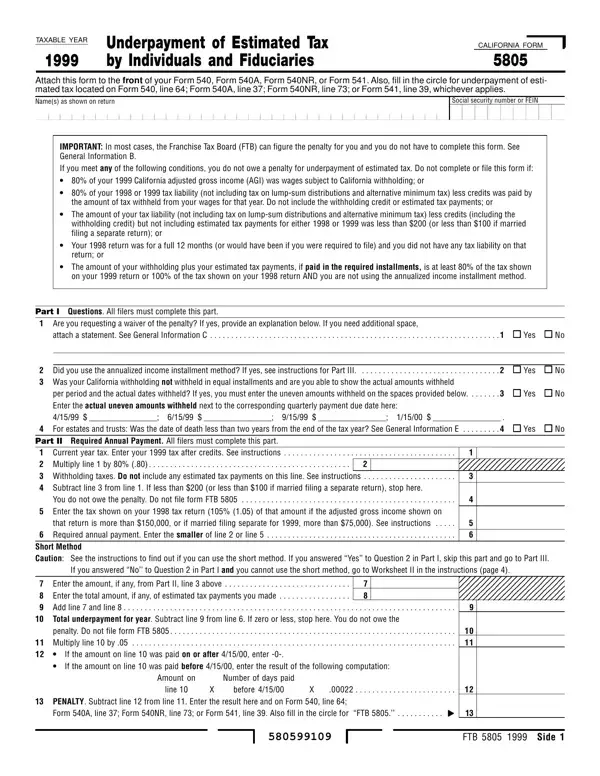
Dealing with PDF documents online can be quite easy with this PDF editor. Anyone can fill out California Form 5805 here with no trouble. Our tool is constantly evolving to grant the best user experience attainable, and that's due to our commitment to continual development and listening closely to customer comments. With some simple steps, you'll be able to begin your PDF editing:
Step 1: Click on the orange "Get Form" button above. It will open our editor so that you can start completing your form.
Step 2: The editor lets you change PDF forms in a range of ways. Change it by including personalized text, correct existing content, and place in a signature - all at your convenience!
It is easy to complete the document using out practical tutorial! This is what you need to do:
1. To start with, when completing the California Form 5805, beging with the form section that features the following fields:
2. Once your current task is complete, take the next step - fill out all of these fields - Did you use the annualized income, per period and the actual dates, Current year tax Enter your tax, Part II Required Annual Payment, Subtract line from line If less, If you answered No to Question in, Enter the amount if any from Part, If the amount on line was paid on, and cid with their corresponding information. Make sure to double check that everything has been entered correctly before continuing!
3. This part is generally simple - fill out all of the form fields in If the amount on line was paid on, cid, Amount on, Number of days paid, PENALTY Subtract line from line, line, before, and FTB Side to complete this segment.
4. This next section requires some additional information. Ensure you complete all the necessary fields - Enter your adjusted gross income, Enter your itemized deductions for, Enter your standard deduction from, Figure the tax on the amount in, Subtract line from line Form NR, and instructions - to proceed further in your process!
People generally make some mistakes when filling in instructions in this section. Don't forget to reread what you type in right here.
5. Now, this final subsection is precisely what you'll want to wrap up prior to closing the form. The fields in question include the following: COMPLETE LINE THROUGH LINE OF, Note If you use the annualized, and Side FTB.
Step 3: Prior to obtaining the next step, you should make sure that all blank fields are filled out the proper way. Once you think it's all fine, click on "Done." Acquire your California Form 5805 when you sign up for a free trial. Quickly get access to the pdf file within your FormsPal account, together with any edits and adjustments all kept! Here at FormsPal, we aim to be sure that all your details are maintained private.
Submitting Your Completed Form 5805
After completing California Form 5805 online, download and print the form to attach to your California income tax return. Mail your completed return with Form 5805 to the Franchise Tax Board at the address listed in your Form 540, 540NR, or 541 instructions. Sending your return by registered mail with the postal service provides you with a postmark receipt as documented proof of your timely filing date.
Related California Tax Forms
You may also need these related forms when preparing your California income tax return:
- California Form 540 - Standard individual income tax return
- California Schedule P (540) - Alternative Minimum Tax and credit limitations
- IRS Form 1040-ES - Federal estimated tax payment vouchers
- IRS Form 2210 - Federal underpayment of estimated tax
