
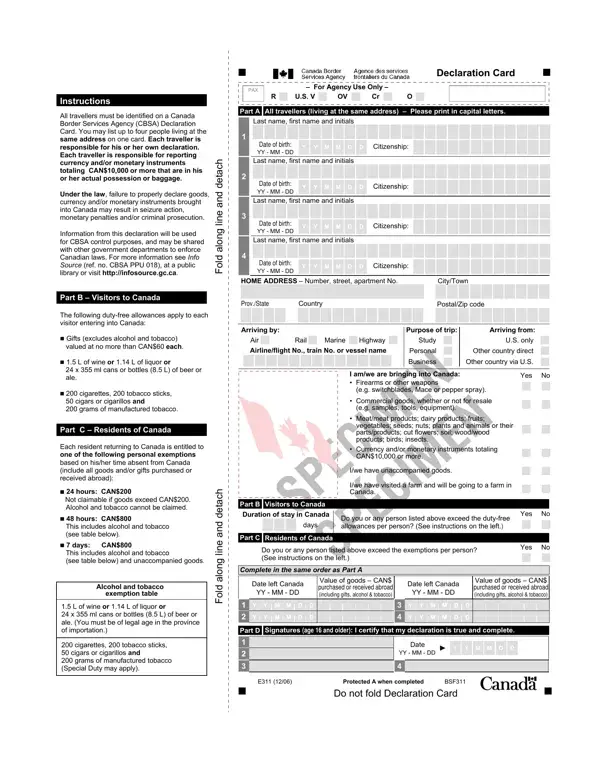
The Canadian Declaration Form, officially known as the CBSA E311 Declaration Card, is a mandatory customs document that all travelers must complete before arriving at a Canadian border crossing or airport. The Canada Border Services Agency (CBSA) requires every person entering Canada to submit this declaration. Up to four individuals residing at the same address may share a single card.
Every person arriving in Canada must fill out this declaration, including Canadian residents returning from abroad, foreign visitors, and travelers in transit. Completing the form accurately is a legal requirement under Canadian customs regulations. Each person is responsible for their own declaration and the goods they are bringing into Canada.
You must declare all goods you are bringing into Canada, including items purchased or received as gifts while abroad. Required declarations include any currency or monetary instruments totaling CAN$10,000 or more, commercial goods intended for resale or business use, food products, plants, and animals subject to border inspection, and any goods subject to Canadian customs regulations or import restrictions.
Canadian residents returning from abroad may claim duty-free exemptions based on time spent away from Canada. After 24 hours you may claim up to CAN$200. After 48 hours, your exemption rises to CAN$800. After 7 days, you may claim up to CAN$800 plus certain alcohol and tobacco allowances. Taxes apply to goods that exceed your personal exemption.
Failing to accurately declare goods or currency can result in seizure of goods, monetary fines, or criminal prosecution. Border services officers have the authority to inspect all declarations and search travelers and their belongings at any Canadian port of entry. Always apply complete and accurate information to avoid penalties at customs.
Looking for related Canadian customs forms? Explore the Canada E311 Declaration Card, the Canada Customs Invoice, and the CN-23 Customs Declaration on FormsPal.
| Question | Answer |
|---|---|
| Form Name | Canadian Declaration Form |
| Form Length | 1 pages |
| Fillable? | No |
| Fillable fields | 0 |
| Avg. time to fill out | 15 sec |
| Other names | declaration form canada, canada declaration form 2021, cbsa declaration card, customs declaration form canada |
Canadian Declaration Form isn’t the one you’re looking for?