CCSD Residential Affidavit PDF Details

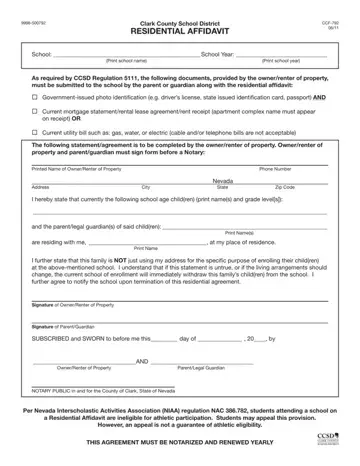
The CCSD Residential Affidavit, officially form CCF-792, is required by Clark County School District (CCSD) when a student lives with someone other than their parent or legal guardian. Governed by CCSD Regulation 5111, the form certifies that the child and their parent or guardian genuinely reside at the listed address and that the address is not used solely for the purpose of school enrollment.

Required supporting documents

Along with the completed CCF-792 affidavit, applicants must bring the following to the school during registration:

Note that cable bills and telephone bills are not accepted as proof of residency. For help with residency documentation, see our proof of residency from homeowner form and our proof of residency letter sample.

Notarization requirement

The CCSD Residential Affidavit must be signed and notarized before submission. Both the property owner or renter and the parent or legal guardian must sign in the presence of a notary public. Forms without a notary stamp will not be accepted by the school district.

Annual renewal

The Residential Affidavit is valid for one school year only. Families using the affidavit for enrollment must complete and submit a new notarized form at the start of each academic year to maintain the child's enrollment in CCSD.

Athletics eligibility

Students enrolled through the CCSD Residential Affidavit may be ineligible for athletic participation under Nevada Interscholastic Activities Association (NIAA) regulations. An appeal process is available through the NIAA, though approval is not guaranteed.

QuestionAnswer
Form NameCCSD Residential Affidavit
Form Length2 pages
Fillable?No
Fillable fields0
Avg. time to fill out30 sec
Other namesccsd residential, school district affidavit, ccsd affidavit, clark county school residential affidavit

How to Edit CCSD Residential Affidavit Online for Free

The CCSD Residential Affidavit (CCF-792) can be opened and completed online using the FormsPal PDF editor. Follow the steps below to fill in the form correctly and download a completed copy.

Step 1: Open the form

Click the "Get form here" button on this page to open the CCSD Residential Affidavit in the online editor. No account or software download is required.

Step 2: Fill in the required fields

The editor lets you type directly into fields, add checkmarks, insert signatures, and highlight sections. The form has two pages and includes both English and Spanish sections.

The images below show the main sections of the CCSD Residential Affidavit:

ccsd residential affidavit form blanks to complete

In the English section, complete the Parent/Guardian signature line, the Owner/Renter of Property field, the Parent/Legal Guardian line, and the NOTARY PUBLIC section. This portion must be completed and signed in front of a notary public. The form includes the label THIS AGREEMENT MUST BE NOTARIZED.

ccsd residential affidavit form Signature of ParentGuardian, SUBSCRIBED and SWORN to before me, AND, OwnerRenter of Property, ParentLegal Guardian, NOTARY PUBLIC in and for the, Per Nevada Interscholastic, and THIS AGREEMENT MUST BE NOTARIZED blanks to insert

The Spanish section (Distrito Escolar del Condado de Clark) mirrors the English section. Enter the school year, school name, property address, parent or guardian name, and phone number. Attach a current utility bill or mortgage statement as proof of residency. Cable and telephone bills are not accepted as valid proof.

ccsd residential affidavit form Distrito Escolar Del Condado De, Escuela Año Escolar  Escriba en, Escribir en letra de molde el, Como se exige en el Reglamento  de, Identificación con foto emitida, identificación del estado emitida, Declaración actual de la, el nombre del complejo de, Recibo de un servicio actual como, La siguiente declaraciónacuerdo, Escribir el Nombre del, Número de Teléfono, and Nevada Estado fields to insert

The affirmation section contains the statement that the child and parent or legal guardian reside at the property address. Enter the names of the property owner or renter and the parent or guardian. Both parties sign in front of a notary public, who then stamps and dates the completed form.

Filling in ccsd residential affidavit form step 4

Step 3: Download and submit

Click the "Done" button when the form is complete. Download the finished CCSD Residential Affidavit as a PDF, print it, and bring it to your child's school. Submit the notarized form along with government-issued photo ID and proof of residency.

Step 4: Save a copy for your records

Keep a copy of the completed, notarized form. Because the CCSD Residential Affidavit must be renewed each school year, having the previous year's form speeds up the renewal process. For other school-related legal documents, see our homeschool affidavit forms and our full collection of affidavit forms.

Watch CCSD Residential Affidavit Video Instruction

Please rate Ccsd Residential Affidavit

1 Votes
If you believe this page is infringing on your copyright, please familiarize yourself with and follow our DMCA notice and takedown process - click here to proceed .
