

Central Registry Release of Information Form at a glance
What it is: Central Registry Release of Information Form of the VA Department of Social Services, Office of Background Investigations.
Notary: The notary requirement has been removed and is no longer needed.
The Virginia Child Abuse and Neglect Central Registry contains the names of individuals identified as an abuser or neglector in founded child abuse and/or neglect investigations conducted in the state of Virginia.
What to bring and attach to Central Registry Release of Information Form
Payment must accompany search forms. Only money orders, company/business checks, or cashier checks will be accepted. Personal checks and cash will not be accepted. All money orders, company/business checks, or cashier checks should be made payable to: Virginia Department of Social Services.
A filled-in Central Registry Release of Information Form example: a volunteer asks for a search
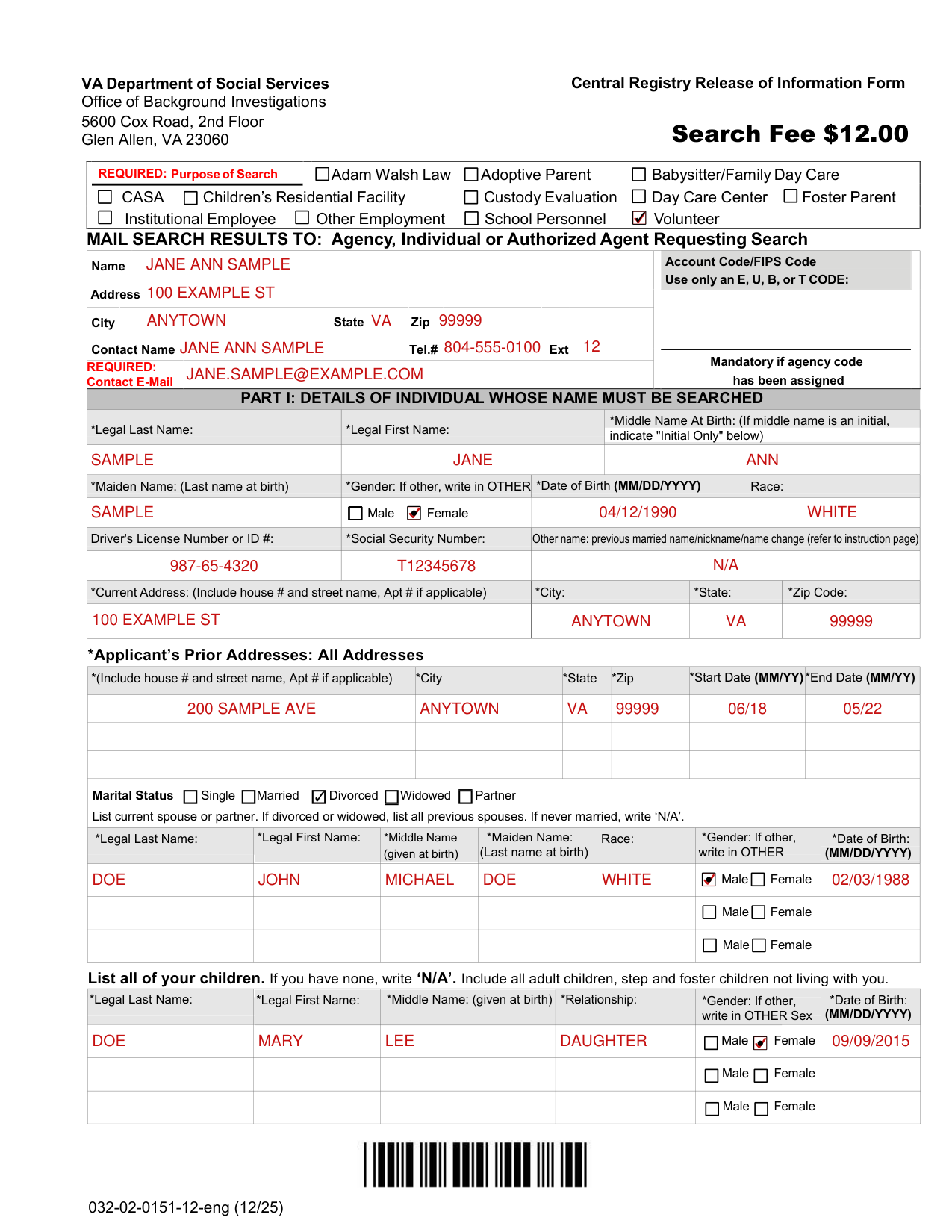
How to fill out Central Registry Release of Information Form, box by box
Purpose of Search and where the results go
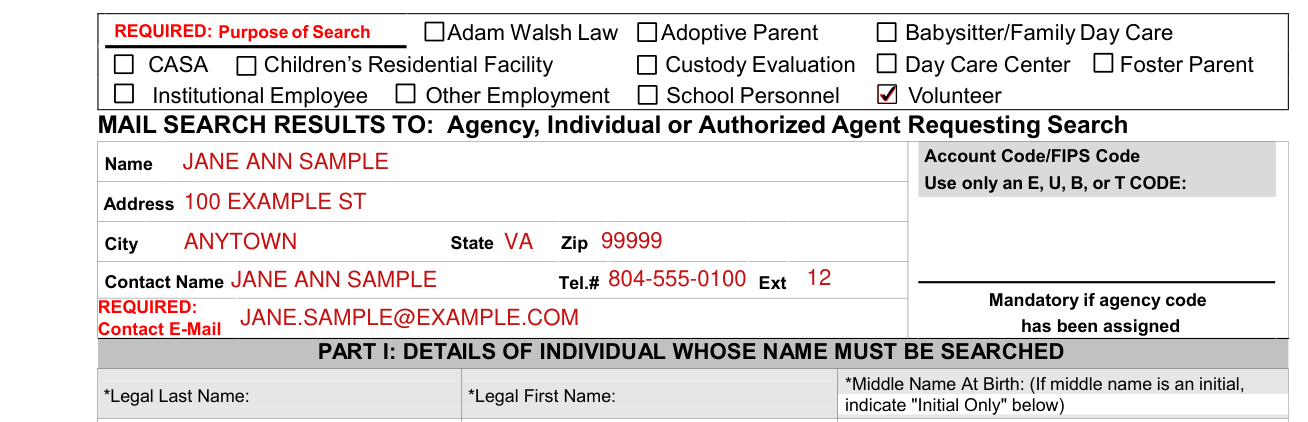
Mail search results to the Agency, Individual or Authorized Agent Requesting Search.
Enter the Name and Address. Under Account Code/FIPS Code, use only an E, U, B, or T CODE.
Enter the Contact Name, Tel.# and Ext.
Part I: the individual whose name must be searched
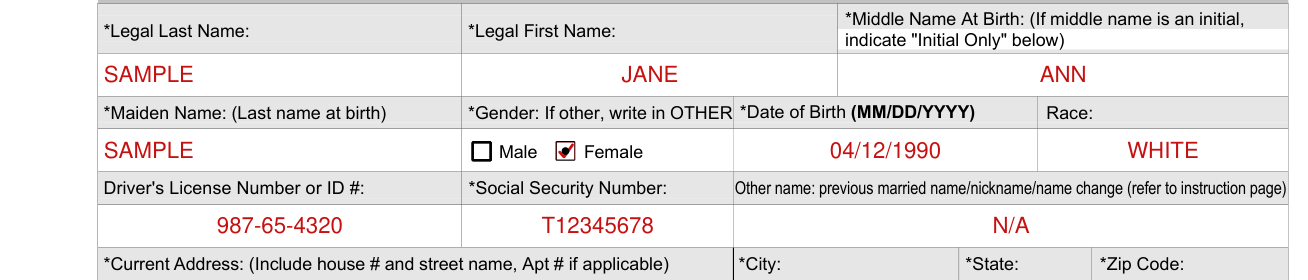
Part I: Details of individual whose name must be searched.
The applicants current legal first, middle and last name should be entered on the form; all these fields are mandatory.
If a middle name is an initial, indicate in writing “initial only” otherwise, enter a full middle name given at birth. If there is no middle name, enter NMN. Middle name is a mandatory field.
Maiden name is required and for all is the last name at birth.
Enter the Race, the Gender (if other, write in OTHER) and the Date of Birth (MM/DD/YYYY).
Date of Birth (DOB) is a mandatory field for applicant, spouse, children.
Enter the Driver's License Number or ID #, the Social Security Number and any other name: previous married name/nickname/name change.
For “other names used” list all other names used, (ie. previous married names, nick name or any legal name or gender change provide explanation on a separate sheet of paper and attach to your search request submission.
If the answer to any question is none, write “N/A“.
Addresses
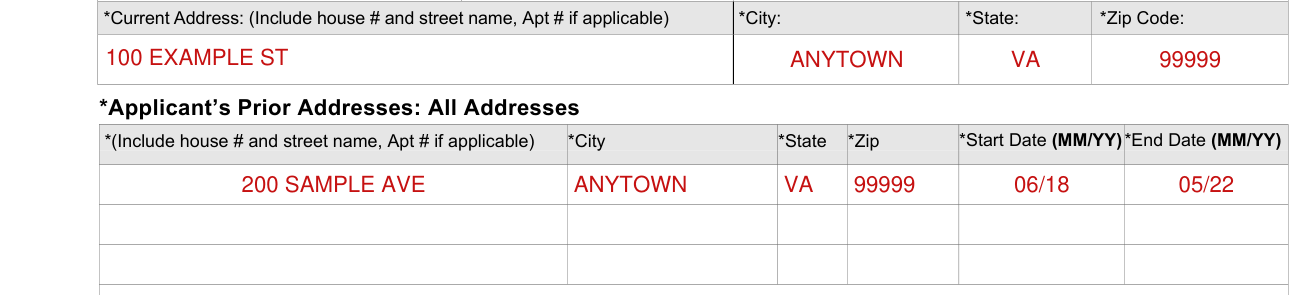
Enter the Current Address (include house # and street name, Apt # if applicable), City, State and Zip Code. A * here is the same as for *Social Security Number after Driver's License Number or ID #.
List all of the applicant's prior addresses (include house # and street name, Apt # if applicable), with City, State, Zip, Start Date (MM/YY) and End Date (MM/YY). A * in this line is the same as for *Social Security Number after Driver's License Number or ID #.
Marital status and spouse
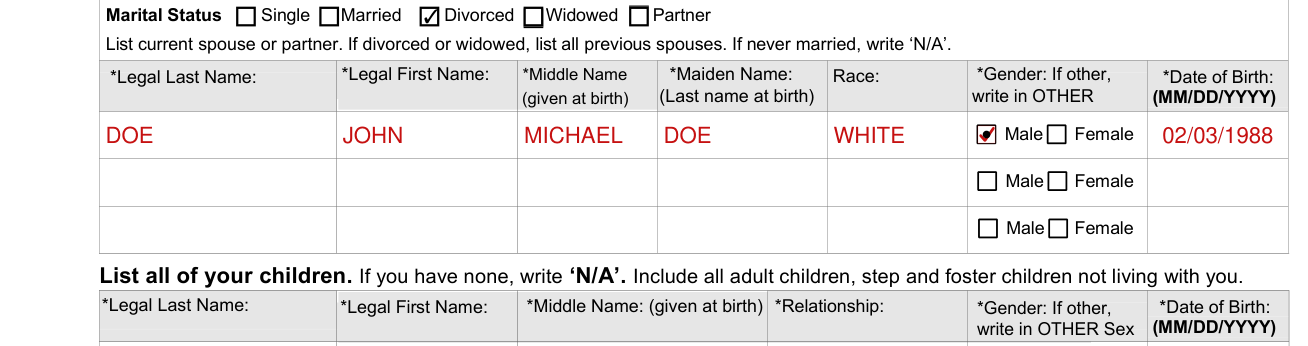
Marital Status: Single, Married, Divorced, Widowed or Partner.
List current spouse or partner. If divorced or widowed, list all previous spouses. If never married, write ‘N/A'.
If the applicant has been married, divorced and/or widowed more than once, all spouse information should be entered.
For each spouse or partner, enter the Legal Last Name, Legal First Name, Middle Name (given at birth), Maiden Name (Last name at birth), Race, Gender and Date of Birth (MM/DD/YYYY).
Children

List all of your children. If you have none, write ‘N/A'. Include all adult children, step and foster children not living with you.
For each of your children, enter the Legal Last Name, Legal First Name, a full Middle Name (given at birth), Relationship and Date of Birth (MM/DD/YYYY). A * on these lines is the same as for *Social Security Number after Driver's License Number or ID #.
Page 2 contains additional space for spouse and/or children. Utilize this space if needed.
More rules for Central Registry Release of Information Form
Read all instructions before completing the form: (Incomplete forms will be returned)
Answer all questions completely and accurately by printing clearly in black ink or typing your answers.
Forms that contain strike outs, correction tape or white-out will result in a failed submission. All failed submissions will be returned to the requester.
OBI no longer issues or accepts billed account codes for the purpose of billing. Payment is required with every search form unless your agency/facility or program meets an exception as defined in the Code of Va.
Search results are not transferable and are not considered official beyond the requesting agency or individual.
If you have questions about the Office of Background Investigations, Central Registry Search Unit please submit an email to crs_operations@dss.virginia.gov.
Pursuant to Section 2.2-3806 of the Code of Virginia, I authorize the release of personal information regarding me which has been maintained by either the Virginia Department of Social Services or any local department of social services which is related to any disposition of founded child abuse/neglect in which I am identified as responsible for such abuse/neglect.
Common questions about Central Registry Release of Information Form
Does it need a notary?
The notary requirement has been removed and is no longer needed.
Who signs it?
Signature of person whose name is being searched, with the Date. Parent or Guardian signature, with the Date (Required for minor children under the age of 18). Sign the Central Registry Release of Information Form. Only original signatures will be accepted on the request form. No copies of the form will be accepted.
Where do I file it?
Mail the completed, signed search request form and payment to: Virginia Department of Social Services Office of Background Investigations, 2nd Floor 5600 Cox Road Glen Allen, VA 23060.
Are there fees?
A $12.00 fee is required for each search (checked October 31, 2026).
What am I certifying when I sign?
Form 032-02-0151-12-eng (12/25), Part II: Certification and consent for release of information. Required: by signing you certify that the information contained on this form is true, correct and complete to the best of your knowledge.
Sources
[1] Central Registry Release of Information Form 032-02-0151 (12/25), Virginia Department of Social Services (the Official source link on this page).
