
CIBC Funds Transfer Form PDF Details

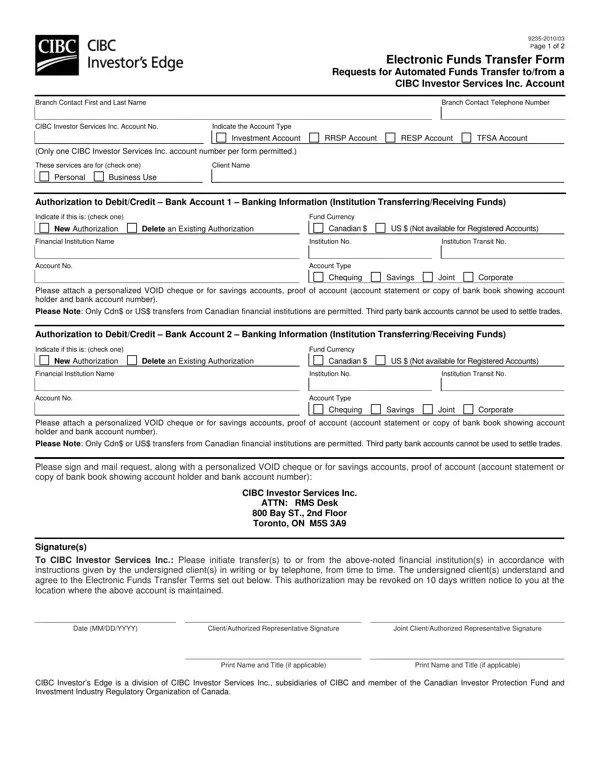
The CIBC Funds Transfer Form is the key document for setting up or canceling electronic fund transfers (EFT) to or from a CIBC Investor Services Inc. account. It records all the account details needed to process transfers accurately.

This form supports several account types: investment accounts, Registered Retirement Savings Plans (RRSP), Registered Education Savings Plans (RESP), and Tax-Free Savings Accounts (TFSA). Both personal and business accounts are eligible.

Transfers can be made in Canadian dollars (CAD) or US dollars (USD). CIBC only accepts transfers from Canadian financial institutions in these currencies.

You can use this form for two purposes. The first is to set up a new transfer authorization. The second is to delete an existing one. For new authorizations on chequing accounts, you must attach a void cheque. For savings accounts, attach an account statement or bank book instead.

The form includes a section for account holder authorization. CIBC requires written or phone instructions for each transfer. Review the cancellation terms and NSF (Non-Sufficient Funds) charge policy before submitting. NSF charges apply when your account lacks enough funds at the time of transfer.

CIBC designed this form to support secure and controlled fund management. It gives account holders full authority over their transfer authorizations.

QuestionAnswer
Form NameCIBC Funds Transfer Form
Form Length2 pages
Fillable?Yes
Fillable fields1
Avg. time to fill out42 sec
Other namesvoid check cibc, void cheque cibc, how to get a void cheque cibc, how to download void cheque cibc

How to Edit CIBC Funds Transfer Form Online for Free

The CIBC Funds Transfer Form lets you authorize or cancel electronic fund transfers for your CIBC Investor Services account. Use the guide below to complete it correctly.

How to Fill Out the CIBC Funds Transfer Form

Follow these steps to complete the form:

  1. Enter your account details. Write your full name, address, and CIBC Investor Services account number.
  2. Select your account type. Choose from investment account, RRSP, RESP, or TFSA.
  3. Choose personal or business use. Mark whether the transfer is for a personal or business account.
  4. Select the transfer currency. Choose Canadian dollars (CAD) or US dollars (USD). Only transfers from Canadian financial institutions are accepted.
  5. Choose the authorization type. Select "New Authorization" to set up a new transfer. Select "Delete Authorization" to cancel an existing one.
  6. Attach a void cheque or account statement. For chequing accounts, attach a personalized void cheque. For savings accounts, use an account statement or bank book.
  7. Sign and date the form. The account holder must sign to authorize the transfers.

What Is a Void Cheque and Why Is It Needed?

A void cheque confirms your bank account details. It shows your transit number, institution number, and account number. These details let CIBC link your external bank account to your investment account.

To void a cheque, write "VOID" in large letters across a blank cheque. Do not sign it. If you do not have a chequing account, use a bank statement or passbook instead.

Which Account Types Can Use This Form?

This form supports the following CIBC account types:

  • Investment accounts
  • Registered Retirement Savings Plans (RRSP)
  • Registered Education Savings Plans (RESP)
  • Tax-Free Savings Accounts (TFSA)

Both personal and business accounts are accepted.

What Are NSF Charges?

NSF stands for Non-Sufficient Funds. An NSF charge happens when your account does not have enough money to complete a scheduled transfer. CIBC may charge a fee for each returned transfer. Keep your account balance above the transfer amount to avoid these charges.

How Long Does a Fund Transfer Authorization Take?

Processing times vary. CIBC typically needs a few business days to set up a new authorization. Once authorized, on-demand transfers can be requested by phone or in writing. Contact CIBC Investor Services for current timelines.

Related Fund Transfer Forms

You may also need these forms for other transfer situations: