
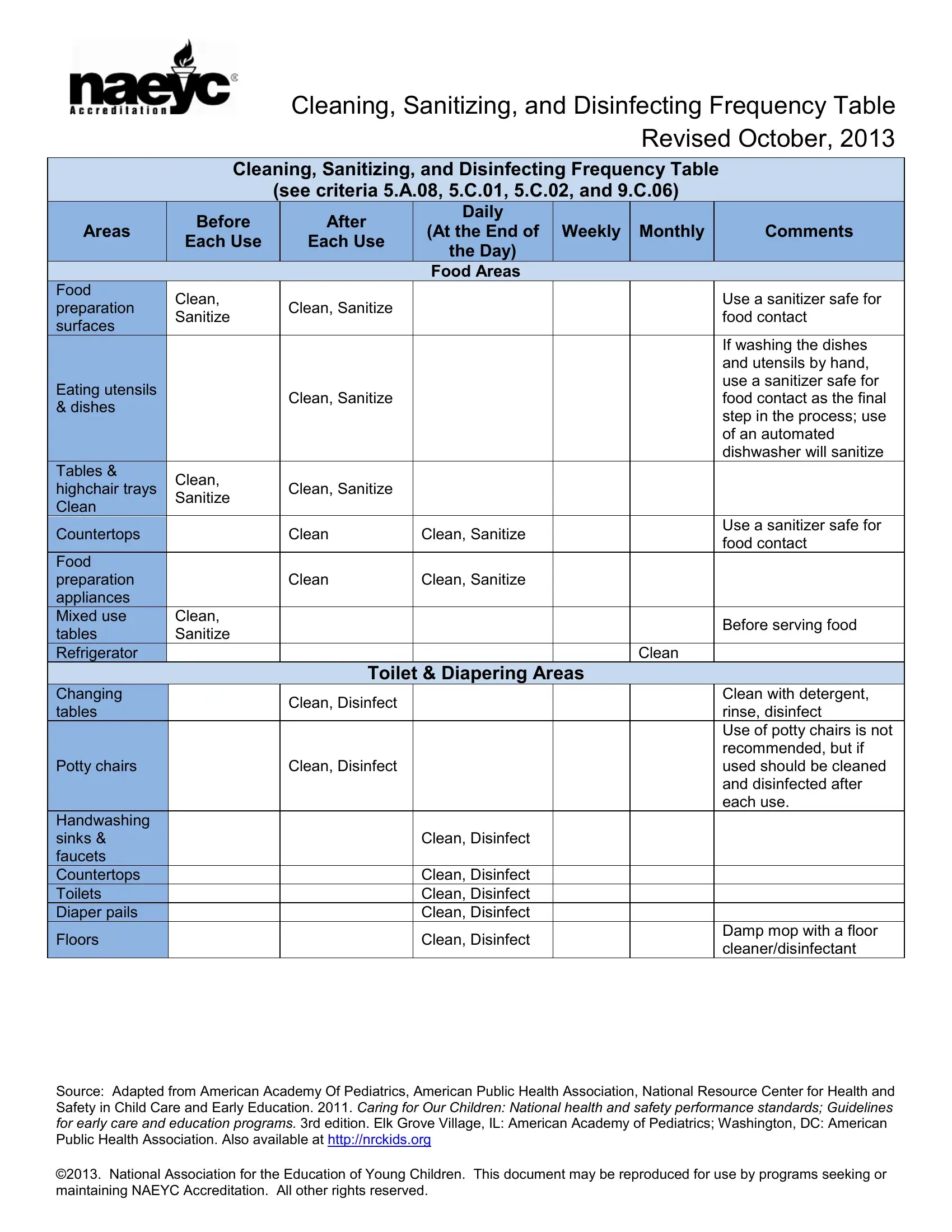
Child care programs require a structured approach to keep their facilities clean, sanitized, and disinfected to protect children from illness. The Cleaning, Sanitizing, and Disinfecting Frequency Table, revised in October 2013, provides the specific guidance child care providers need to maintain safe environments that meet national health and safety standards.
Understanding the difference between cleaning, sanitizing, and disinfecting is key to applying the table correctly. Cleaning removes visible dirt and organic matter from a surface using soap and water. This step must always come first, because disinfectant products cannot penetrate grime or debris effectively. Sanitizing reduces germs on a clean surface to a safe level. Food contact surfaces such as high chair trays and feeding tables require sanitizing before each use to prevent the spread of foodborne illness. Disinfecting kills nearly all bacteria and viruses on a clean surface. Diaper changing pads, toilets, and mouthed toys must be disinfected daily or after each use to prevent disease transmission.
A diluted bleach solution is one of the most common and cost-effective disinfectants used in child care settings. To prepare a safe bleach solution, mix one tablespoon of unscented liquid chlorine bleach per quart of water. Apply the solution and keep the surface wet for at least two minutes of contact time before allowing it to air dry. Prepare a fresh bleach solution each day because stored diluted bleach loses its effectiveness. Store all bleach and cleaning products safely out of reach of children at all times.
When selecting a commercial disinfectant product, check the EPA registration number on the product label to confirm it is approved against the specific pathogens you want to prevent. Always follow label instructions for dilution rates, contact time, and ventilation requirements. Wearing gloves and appropriate protective equipment while working with disinfectant products keeps cleaning staff safe. The frequency table covers everything from food preparation surfaces to door handles and computer keyboards, providing a comprehensive plan for the entire child care facility.
This resource was adapted by the American Academy of Pediatrics and the American Public Health Association. It aligns with the Caring for Our Children national health and safety standards. Child care programs seeking NAEYC Accreditation will find that following this frequency table helps demonstrate compliance with key accreditation criteria related to hygiene and disease prevention practices. Programs that consistently clean, sanitize, and disinfect according to this schedule create safer environments that support healthy outcomes for children in their care.
| Question | Answer |
|---|---|
| Form Name | Cleaning Disinfecting Care Table Form |
| Form Length | 3 pages |
| Fillable? | No |
| Fillable fields | 0 |
| Avg. time to fill out | 45 sec |
| Other names | each disinfecting form, sanitize each disinfect, disinfect care, health sanitizing care |