
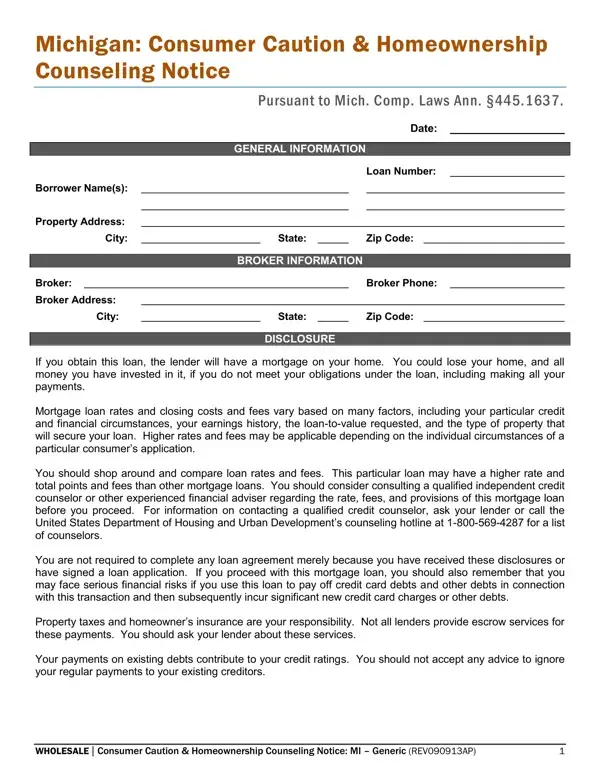
In the journey towards homeownership, prospective homebuyers in Michigan must review several key disclosures before securing a loan. The consumer caution form, officially titled the Consumer Caution and Homeownership Counseling Notice, is one such critical document. It educates Michigan borrowers about the potential risks of obtaining a mortgage, including the risk of losing their home if loan obligations go unmet. Mortgage applicants are encouraged to shop around, compare rates and fees across multiple lenders, and consult with independent credit counselors or financial advisers before committing. The form emphasizes that mortgage rates and closing costs vary based on individual financial profiles. It also reminds borrowers of ongoing responsibilities such as property taxes and homeowner’s insurance, and cautions against taking on new debts that could undermine financial stability. Acknowledging receipt of this notice is required, confirming the borrower understands its contents. The form serves as a protective measure, guiding Michigan residents through the complex path to homeownership with a clear focus on informed, cautious decision-making.
| Question | Answer |
|---|---|
| Form Name | Consumer Caution And Homeownership Counseling Form |
| Form Length | 1 pages |
| Fillable? | Yes |
| Fillable fields | 6 |
| Avg. time to fill out | 1 min 27 sec |
| Other names | Mich, Michigan, Borrower, Originator |