
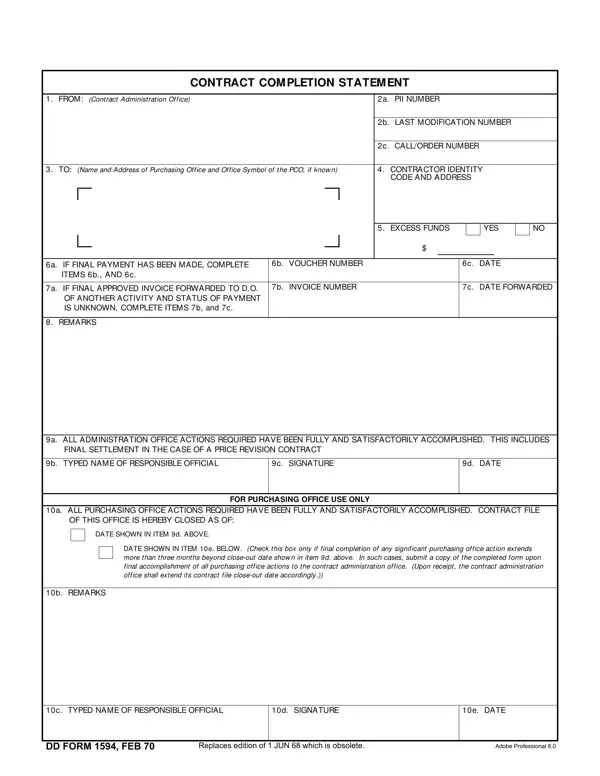
DD Form 1594 is the Department of Defense standard form used to officially close a contract file. It is required under the Defense Federal Acquisition Regulation Supplement (DFARS) when both the contract administration office and the purchasing office have completed all required actions related to the contract.
The primary purpose of this form is to certify that all administrative and financial obligations tied to a contract have been resolved. This includes confirming that final payment has been made, that no excess funds remain obligated, and that all price revisions or contract amendments have been settled. A contract file cannot be officially closed until this form is signed by authorized officials from both participating offices.
This form is used by Defense Department contracting personnel, including contracting officers, contract specialists, and their counterparts in the purchasing office. Both offices must sign the form before the contract is considered closed. Government contractors and subcontractors are not signatories but may be required to submit supporting documentation referenced in the form, such as a final invoice or settlement agreement.
The form is divided into two main parts. The Administration Office section covers the contract number, office identity code, contractor name and code, contractor address, and details about any excess funds. It also records the final payment voucher number and date. If a separate final approved invoice was submitted, the invoice number and forwarding date are entered here as well.
The Purchasing Office section captures the purchasing office identity code, a remarks field for any special circumstances, the typed name and signature of the responsible official, and the date of signature. Both the date shown in the administration section and the date of the purchasing office signature are required to complete the record.
Before filling out this form, gather the contract number, both office identity codes, the contractor's CAGE code and mailing address, and any pending voucher or invoice information. Leave voucher number fields blank only when no separate final invoice exists. If any price revisions are still unresolved, those must be finalized before the form can be signed. Double-check the signature date against your records, as discrepancies between dates on the administration and purchasing sides can delay official contract closure.
Use the FormsPal PDF editor above to complete your form quickly. For related government contracting documents, see the Subcontractor Agreement, the Independent Contractor Agreement, or the DD Form 1351-2 (Travel Voucher).
| Question | Answer |
|---|---|
| Form Name | Contract Completion Statement Form |
| Also Known As | DD Form 1594 |
| Form Length | 1 page |
| Fillable? | Yes (online via FormsPal) |
| Avg. time to fill out | 5-10 minutes |
| Required by | DFARS contract closeout procedures |
| Other names | contract closeout form, DD-1594, statement of completion |
Contract Completion Statement Form isn’t the one you’re looking for?