Costco Immunization Form PDF Details

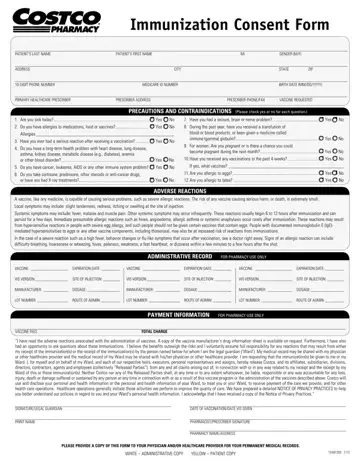
The Costco Pharmacy Immunization Consent Form is a standardized one-page document required before any vaccine is given at a Costco pharmacy. It is also known as form PHA000021B and covers flu shots, COVID-19 vaccines, shingles shots, and other pharmacy vaccines. Understanding each section helps you complete it accurately and quickly at your next appointment.

Patient Information Section

The first section asks for your full legal name, date of birth, gender, home address, and phone number. You also need to provide the name of your primary healthcare prescriber. Medicare and Medicaid beneficiaries must include their Medicare ID number. Parents or legal guardians filling out the form for a minor must use their own contact information and will sign the consent section on behalf of the child.

Health Screening Questionnaire

Before any vaccine is given, the pharmacist uses this section to screen for possible contraindications. You answer yes or no questions about your current health. The questionnaire covers these topics:

If you answer yes to any screening question, the pharmacist reviews your answers before proceeding. In some cases, vaccination may be postponed or an alternative vaccine may be recommended. Answering these questions honestly protects your safety.

Vaccine Consent and Acknowledgment

By signing the consent section, you confirm that you have read the Vaccine Information Statement provided by the pharmacist. This section summarizes potential adverse reactions, which range from mild injection site soreness to rare serious reactions occurring in fewer than 1 in 1,000,000 doses. Your signature indicates voluntary and informed consent. You may ask the pharmacist questions before signing at any time.

Administrative Record (Pharmacy Staff Only)

The lower portion of the form is completed by Costco pharmacy staff after the vaccine is given. Staff enter the vaccine manufacturer name, lot number, expiration date, site of injection (left or right arm, specific muscle), route of administration, dosage in milliliters, and the VIS version date. This record is submitted to your state immunization registry as required by state law. Do not attempt to fill in this section yourself.

Privacy and HIPAA Compliance

All information you provide on the consent form is handled under the Health Insurance Portability and Accountability Act. Costco Pharmacy may share your vaccination records with your primary care provider and state immunization registries as part of routine healthcare operations. Full details appear in the Costco Pharmacy Notice of Privacy Practices, available at any pharmacy location or on the Costco website.

Vaccine Types This Form Covers

This single consent form applies to all vaccines offered by Costco Pharmacy at their in-store pharmacy locations across the United States. Covered vaccines include:

Vaccine availability varies by location and season. Call your local Costco pharmacy or check the pharmacy website to confirm which vaccines are currently offered at your preferred location.

What Happens After You Submit the Form

After you submit the completed consent form at the pharmacy counter, the pharmacist reviews your screening answers. If there are no contraindications, you are taken to the immunization area, typically a private consultation room or partitioned area within the pharmacy. The pharmacist administers the vaccine and immediately completes the administrative record section of your form. You receive a copy of the Vaccine Information Statement and may be asked to wait 15 minutes after the shot so staff can monitor for any immediate reactions.

QuestionAnswer
Form NameCostco Immunization Form
Form Length1 pages
Fillable?No
Fillable fields0
Avg. time to fill out5 min
Other namescostco pharmacy flu shot form, costco flu shot consent, costco immunization consent form, costco pharmacy vaccination form, PHA000021B

How to Edit Costco Immunization Form Online for Free

Filling out the Costco pharmacy vaccine consent form is quick and straightforward with our online PDF editor. The entire process takes under five minutes. Follow these four steps to complete, download, and use your form before your vaccination appointment.

Step 1: Click the "Get Form Here" button at the top of this page. The PDF opens directly in your browser with no software download or installation required.

Step 2: Use the editing toolbar to type into each field. Click any blank space on the form to place your cursor and begin typing. The toolbar lets you add text, check boxes, insert a date, and draw or upload your signature. Work through the form top to bottom: start with your personal information, then answer the health screening questions, then add your signature in the consent section.

Fill in each of the following required fields:

  • Full legal name and date of birth
  • Home address and phone number
  • Primary healthcare provider name and contact
  • Medicare or Medicaid ID number (if applicable)
  • Yes or No answers to each health screening question
  • Your signature and the date in the consent section
filling out costco pharmacy flu shot form part 1

The lower administrative section of the form is for Costco pharmacy staff only. Leave these fields blank when you fill out the form yourself. Pharmacy staff will enter the vaccine lot number, expiration date, injection site, VIS version date, vaccine manufacturer, dosage, route of administration, and payment information after your shot is given.

costco pharmacy flu shot form administrative record section - leave blank for pharmacy staff

Step 3: Click "Done" when you have finished filling out all patient sections. You can then download the completed form as a PDF, print it directly from your browser, or send it to your email address for safekeeping.

Step 4: Print one copy to bring to the pharmacy and keep a second copy for your personal health records. Your data is not stored or shared by our platform after you close the session. Each editing session is private and independent.

Tips for Completing the Form Without Errors

Check your date of birth and Medicare ID before you print. Errors in these fields can slow down your check-in at the pharmacy counter and may require you to fill out a new form. If a screening question asks about a condition you are not certain about, answer yes and discuss it with the pharmacist. The pharmacist will determine whether vaccination is safe to proceed.

Print in color when possible. The checkboxes and signature lines are easier to verify in the original formatting. If you are completing this form on behalf of a minor child, the parent or legal guardian must sign the consent section. The pharmacist may ask to see the guardian's photo ID at the counter.

Plan your visit for non-peak times when possible. Costco pharmacies tend to be busiest on weekday mornings and during September and October when flu shot demand peaks. Bringing a pre-filled form reduces your wait time at the counter significantly.

Frequently Asked Questions About the Costco Pharmacy Consent Form

Can I fill out this form at home and bring it to the pharmacy?
Yes. Costco pharmacies accept pre-completed consent forms. Filling it out at home and printing it before your visit reduces wait time at the counter, which is especially helpful during busy flu season in fall.

How many pages is the form?
The standard form is one page. Both the patient consent section and the pharmacy administrative record section fit on a single sheet.

Do I need a new form for each vaccine visit?
Yes. A separate consent form is completed for each visit. The pharmacist records the vaccine lot number, date, and injection details specific to that appointment. You cannot reuse a form from a previous visit.

Is there a cost to download or fill out this form?
No. The PDF is free to access, complete, and print from this page.

What should I bring to my Costco pharmacy vaccine appointment?
Bring your completed consent form, your insurance card, your Medicare or Medicaid card if applicable, and a photo ID. Wearing a short-sleeved shirt makes it easier for the pharmacist to administer the injection.

Related Pharmacy and Health Forms

If you are managing your immunization records or need other pharmacy documents, these related forms may be helpful:

Please rate Costco Immunization Form

1 Votes
If you believe this page is infringing on your copyright, please familiarize yourself with and follow our DMCA notice and takedown process - click here to proceed .