
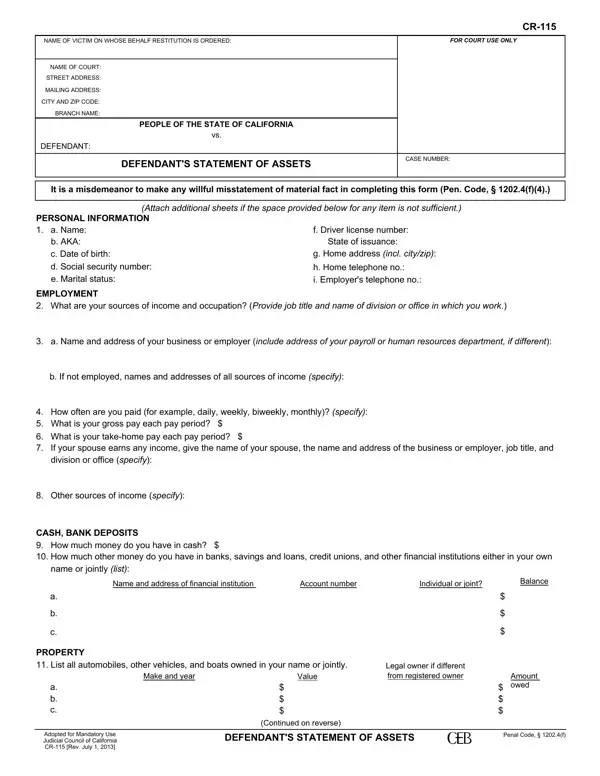
If you want to fill out the CR-115 form, you do not need to download any software. Use our free online PDF editor. To make the tool more convenient, we continually add new features based on user feedback. Completing the form takes just a few steps:
Step 1: Click the "Get Form" button at the top of this page to open the CR-115 form in our editor.
Step 2: The editor lets you modify the PDF in multiple ways. Add custom text, adjust existing content, and add your signature, all in one place.
The CR-115 form requires specific information at each stage. Follow these steps carefully to avoid errors:
1. Start by filling in the RESTITUTION section with all required details. Collect your information in advance so nothing is missed.
2. Next, complete the employment and income fields: EMPLOYMENT (sources of income), name and address of your employer, whether you are employed, how often you are paid, other income sources, CASH BANK DEPOSITS (amount of money), name and address of financial institution, account number, individual or joint status, and current balance. Review each field before moving on.
3. The next section covers additional bank accounts and property: name and address of financial institution, account number, individual or joint status, balance, PROPERTY (list all automobiles with make, year, and value), legal owner if different, amount owed, and related fields. Work through each line carefully.
4. This section covers your court case details and real estate: PEOPLE OF THE STATE OF CALIFORNIA, CASE NUMBER, DEFENDANT, list all real estate owned (address, fair market value, amount owed), OTHER PERSONAL PROPERTY (description, value, location), ASSETS (list all other assets, note whether anyone is holding assets for you). Take time with each entry to ensure accuracy.
Double-check your PEOPLE OF THE STATE OF CALIFORNIA entry before submitting. Errors in court identifiers can cause processing delays.
5. The final section documents assets since your arrest and your debts: Yes (assets held by others), DEBTS (loans with details, taxes owed, support arrearages with copies attached, credit card creditor names), other debts, and finally Date, TYPE OR PRINT NAME, and SIGNATURE. Sign only after reviewing the entire form.
Step 3: Once you have reviewed all entries, click "Done" to finalize the form. You can download or print the completed CR-115 directly from the editor. FormsPal saves your work automatically, so you can return and make changes later. Your data is protected and never shared. For related legal finance documents, also see the employment verification form and the financial affidavit on FormsPal.
CR-115 Form Tips and Common Mistakes
Tip 1: Gather documents before you start.
Have your pay stubs, bank statements, vehicle titles, and loan documents on hand. The form asks for specific account numbers, balances, and property values that are easy to get wrong without the source documents in front of you.
Tip 2: Disclose all assets, including jointly held property.
The CR-115 requires disclosure of assets held jointly with another person. Omitting jointly held accounts or property is treated the same as a willful misstatement.
Tip 3: Attach supporting documents where required.
The support arrearages field requires copies of relevant documents to be attached. Check each section for attachment instructions before submitting the form to the court.
