
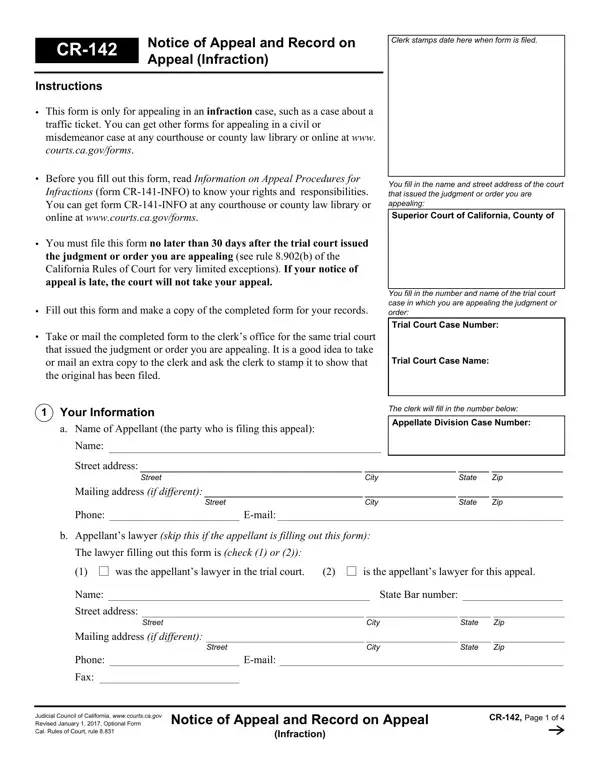
The CR-142 form is California's official Notice of Appeal and Record on Appeal for infraction cases. An infraction is a minor legal violation, such as a traffic ticket for speeding, running a red light, or other moving violations. When a trial court issues a judgment against you in an infraction case, this fillable PDF form is the document you submit to appeal that decision to the appellate division of the superior court.
The CR-142 is required for anyone who wants to appeal a trial court judgment or order in a California infraction case. This includes drivers who received a traffic ticket conviction, individuals who disagree with the fine or penalty imposed by the court, and appellants whose attorney handled the original case. The form applies to all California infraction appeals, whether you are representing yourself or working with a licensed attorney. Your attorney fills out the form on your behalf and signs it in the designated fields.
You must file the completed CR-142 form with the trial court clerk within 30 days of the trial court's judgment or order. There are very few exceptions to this filing deadline. Missing the 30-day window will almost always result in your appeal being dismissed without further review. A filing fee is due at the time of submission, unless you qualify for a court fee waiver. Before completing the CR-142, read the companion document CR-141-INFO, which explains California's infraction appeal procedures in full detail.
Part of the CR-142 process involves choosing whether to include a record of the oral proceedings from your trial. You may appeal without any record, or you may select one of three options for the record: a Statement on Appeal (a written summary you prepare and the trial court reviews), an official electronic recording of the court proceedings, or a reporter's transcript prepared by a court reporter. Each choice has different costs and preparation timelines. The appellate court uses the record to review what happened at the original trial.
For other California court documents related to infraction appeals, see the Traffic Citation Appeal form and the California Form CR-101.
| Question | Answer |
|---|---|
| Form Name | CR-142 Notice of Appeal and Record on Appeal |
| Form Length | 4 pages |
| Fillable? | No |
| Fillable fields | 0 |
| Avg. time to fill out | 1 min |
| Jurisdiction | California Courts |
| Use Case | Infraction Case Appeal |
| Other names | california cr142 appeal infraction, form record cr form, 1 proceedings cr form, cr appeal |