
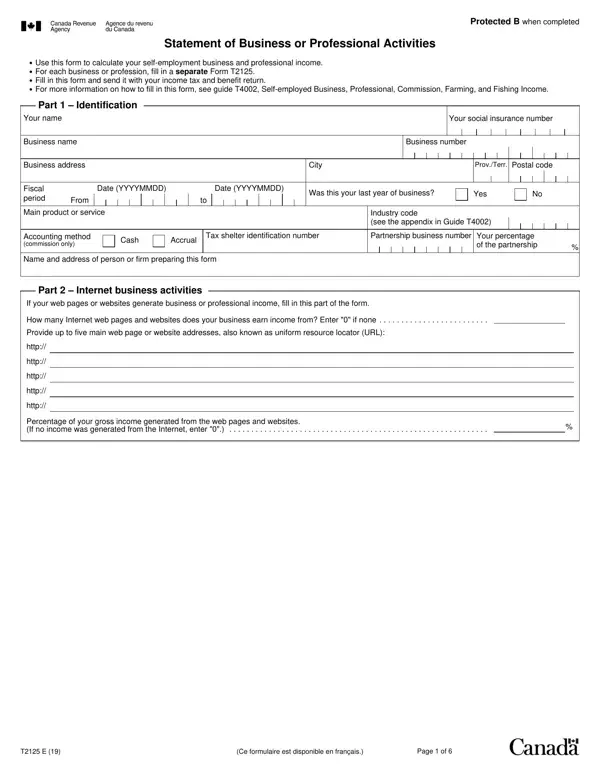
What Is the CRA Form T2125?

The T2125 is a key document for anyone earning self-employment income in Canada. Whether you are a freelancer, consultant, independent contractor, or professional, this form helps you accurately report your business or professional income and claim eligible deductions as part of your annual T1 tax return.

Each business or profession you operate requires its own separate form. It captures your accounting method (cash or accrual), gross income, GST/HST adjustments, and all eligible business expenses. The form also includes dedicated sections for internet business activities, capital asset purchases, and business-use-of-home expenses. Commission agents, farmers, and fishers use related CRA forms for their specific income types, but this form covers the broadest range of self-employment situations for Canadian tax filers.

Self-employed Canadians must attach all completed T2125 forms to their T1 General return. The net income calculated on each T2125 transfers directly to the applicable lines of the T1, where it contributes to total income and self-employment earnings subject to Canada Pension Plan (CPP) contributions. Self-employed individuals pay both the employee and employer share of CPP on net self-employment income above the basic exemption, calculated on Schedule 8 of the T1 return. You can then claim half of those CPP contributions as a non-refundable tax credit that reduces your federal and provincial taxes.

By completing the T2125 accurately, you can claim all allowable deductions, calculate your net income before and after adjustments, and fully comply with Canada Revenue Agency requirements. Keeping organized records throughout the year makes filing straightforward and ensures you claim every deduction you are entitled to.

QuestionAnswer
Form NameCRA Form T2125
Form Length6 pages
Fillable?No
Fillable fields0
Avg. time to fill out1 min 30 sec
Other namesstatement form t2125, form t2125, t2125 file, t2125 form pdf

How to Edit Cra Form T2125 Online for Free

The T2125 form, officially the Statement of Business or Professional Activities, must be completed and filed with your T1 income tax return each year you earn self-employment income. Use the six steps below to work through each section of the form accurately, claim every eligible deduction, and calculate your final net business or professional income. For the official form and line-by-line instructions, visit the Canada Revenue Agency T2125 page.

What Is the T2125 Form Used For?

The T2125 is the Canada Revenue Agency's official form for reporting self-employment income and expenses. It applies to all types of independent work, including freelance services, consulting, skilled trades, commission sales, and professional practices such as medicine, law, or accounting. You must file a separate T2125 for each distinct business or profession you operate. Each completed form calculates the net income from that activity, and all net amounts are then combined and carried forward to your T1 General income tax return.

The form is also used to claim capital cost allowance on business assets, deduct business-use-of-home expenses, and report internet business activities. If your business is organized as a partnership rather than a sole proprietorship, each partner records their name, social insurance number, and percentage of ownership on the same T2125 form.

Step 1: Enter Your Identification and Business Information

Start by recording your full legal name and social insurance number (SIN) at the top of the form. Next, enter your business name. If you operate informally under your own name, you can enter your personal name in the business name field. If you have registered a business name with your province, use that registered name.

Enter the fiscal period for the business, which is typically January 1 to December 31 for sole proprietors who do not have a different approved fiscal year. If you are a partner in a business partnership, record the full name, SIN, and partnership percentage of each partner. A formal general partnership agreement helps you establish each partner's agreed share of income and expenses before tax time. When you operate more than one business, complete a separate T2125 for each one. Use a separate form even if the businesses overlap or share some of the same clients.

Step 2: Report Your Gross Business or Professional Income

Part 2 of the form is where you declare all revenue generated by your business or profession before any deductions. For business income, enter the total gross receipts from all sales of goods and services during the fiscal year. For professional income, such as consulting or legal fees, enter total billings earned during the year. Using a consistent invoice template throughout the year makes it straightforward to total your gross receipts at tax time.

If you are registered for GST or HST, you must subtract the tax you collected on behalf of the government from your gross income. This adjustment prevents you from being taxed on money that never belonged to you. After subtracting GST or HST, the result is your net sales figure before expenses. If you file a GST/HST return separately, ensure the reported figures align with your T2125 income for consistency.

Step 3: Claim Business Expenses and Deductions

Part 4 of the T2125 provides a detailed list of allowable business expense categories. For each category, enter only the portion that relates directly to your business activities. The following expenses are commonly deducted by self-employed Canadians:

  • Advertising and promotion: website costs, print ads, social media marketing, business cards
  • Business insurance: commercial general liability, professional liability, property insurance
  • Delivery, shipping, and postage: courier fees, mailing costs, packaging materials
  • Fuel costs: gas or diesel consumed in a vehicle used for business travel (maintain a mileage log to support the business-use portion of your vehicle expenses)
  • Legal, accounting, and professional fees: bookkeeping, tax preparation, contract review
  • Meals and entertainment: 50 percent of reasonable meals with clients or at business events
  • Office expenses and supplies: paper, printer ink, pens, notebooks, filing supplies
  • Rent: commercial workspace rented for business use only
  • Salaries, wages, and benefits: amounts paid to arm's-length employees
  • Telephone and utilities: the business-related portion of your phone, internet, and hydro bills
  • Travel: flights, hotels, and ground transportation for business trips

Keep all original receipts, invoices, and bank statements for a minimum of six years from the end of the tax year. The Canada Revenue Agency may request them at any time through an audit or review.

Step 4: Calculate Capital Cost Allowance (CCA)

When you purchase business assets with a useful life of more than one year, you generally cannot deduct the entire cost in the year of purchase. Instead, you claim capital cost allowance (CCA), which spreads the deduction across the asset's expected life using prescribed rates set by the CRA.

Each asset is assigned to the appropriate class. For example, computer hardware typically belongs to Class 50 (55 percent declining-balance rate), while passenger vehicles belong to Class 10 or Class 10.1 depending on cost (30 percent rate), and furniture and fixtures fall into Class 8 (20 percent rate). Tools costing less than $500 may be deducted as a current expense rather than a capital asset. The immediate expensing incentive introduced by the federal government may also allow eligible businesses to deduct the full cost of qualifying depreciable assets in the year of purchase, subject to a $1.5 million annual limit per associated group.

Step 5: Claim Business-Use-of-Home Expenses

If you regularly use part of your home for business purposes, you may deduct a proportionate share of your housing costs. To determine your deduction rate, calculate the percentage of your home's total floor area that is dedicated to business use. For example, if your home is 1,200 square feet and your home office is 150 square feet, the business-use percentage is 12.5 percent.

Apply that percentage to eligible housing costs such as rent, mortgage interest, property taxes, home insurance, condominium fees, utilities, and home maintenance and repair costs. You cannot deduct mortgage principal payments. The total business-use-of-home deduction is limited to your net income from the business before this deduction is applied. If the deduction would create a loss, carry the unused amount forward to future years when you earn more income from the same business.

Step 6: Calculate Net Income and Transfer to Your T1 Return

After entering all revenue and subtracting all allowable deductions, including CCA and home office costs, the form calculates your net professional or business income. If the result is positive, you have a profit from self-employment. If the result is negative, you have a business loss that can generally be applied against other income sources in the same tax year.

Transfer the final net income figure to the corresponding line on your T1 General income tax return. If you operated two or more businesses during the year, complete a separate T2125 for each and combine all net income amounts on the designated T1 line. Net income from self-employment is also used to calculate Canada Pension Plan (CPP) contributions payable by self-employed individuals.

Tips for Staying Organized Year-Round

Accurate completion of the T2125 depends on financial records maintained throughout the year, not just at tax time. The following habits make the filing process significantly easier and reduce the chance of errors that could trigger a CRA review.

  • Separate accounts: Use a dedicated business bank account and credit card for all business transactions. This eliminates the need to sort through personal charges at year end and creates a clean audit trail.
  • Monthly reconciliation: Reconcile your business bank account within 30 days of each month end against your invoices and receipts. Catching discrepancies early prevents compounding errors and reduces stress at tax time.
  • Digital receipts: Photograph or scan paper receipts immediately after a purchase. The CRA accepts digital copies, and backing up to at least 2 secure locations makes retrieval straightforward during an audit or review.
  • Vehicle log: If you claim vehicle expenses, record the date, destination, purpose, and distance of every business trip. The CRA expects a contemporaneous record and may disallow vehicle expense deductions entirely without one.
  • Quarterly review: Every 90 days, total your revenue and major expense categories so you can estimate your annual income and anticipated tax owing before the April 30 payment deadline.
  • Home office records: Keep a floor plan of your home showing the dimensions of your work area. Photograph your dedicated workspace each year. This documentation supports your business-use-of-home deduction if the CRA requests verification.
  • Year-end checklist: Before year end, confirm you have invoices or receipts for every income entry and every expense claim. Identify any capital assets purchased during the year that require CCA treatment and place them in the correct asset class on a working copy of the T2125 Schedule 8.

Common Mistakes to Avoid When Filing

  • Mixing personal and business expenses: Use a dedicated business bank account and credit card to keep records clean.
  • Forgetting GST/HST adjustments: Always subtract tax collected from gross income to avoid overstating revenue.
  • Claiming 100 percent of vehicle expenses: Only the business-use portion is deductible. Keep a mileage log throughout the year.
  • Omitting one of your businesses: Each business activity requires a separate T2125. Filing a single form for multiple businesses combines income in ways that can trigger a CRA review.
  • Missing carry-forward of home office losses: Unused business-use-of-home amounts must be tracked and carried forward for use in future tax years.
  • Misclassifying workers as independent contractors: If the CRA determines that a worker you treated as a contractor is actually an employee, you may owe unpaid source deductions, employer CPP contributions, and EI premiums, plus penalties and interest.
  • Not reporting all income streams: All revenue earned during the fiscal year must be reported, including cash payments, barter income, and income received from clients who did not issue a T4A slip. The CRA's third-party data matching program can detect unreported income.

Frequently Asked Questions About the T2125

Who needs to file a T2125 form?
Anyone who earned income from self-employment, freelance work, or an unincorporated business in Canada during the tax year must file a T2125. This includes sole proprietors, independent contractors, consultants, tradespeople, and professionals who bill clients directly rather than through a corporation. If you work under a subcontractor agreement, you are typically self-employed and need to report that income on a T2125.

How many T2125 forms do I need to file?
You need one form for each separate business or professional activity. If you operate a freelance graphic design business and also earn income as an independent bookkeeper, those are two distinct activities requiring two separate forms. Add the net income from each form together on your T1 return to arrive at your total self-employment income for the year.

What accounting method should I use on the T2125?
The T2125 asks you to declare whether you use the cash method or the accrual method. Under the cash method, you report income when you receive payment and deduct expenses when you pay them. This is the simpler approach and suits most small businesses and freelancers because it mirrors your actual cash flow. Under the accrual method, you report income when earned and deduct expenses when incurred, regardless of when cash changes hands. The accrual method gives a more accurate picture of profitability during the year but requires more detailed bookkeeping. Most self-employed Canadians use the cash method. If you change accounting methods from one year to the next, be careful to avoid double-counting income or creating gaps in your reported figures.

What business expenses can I deduct on the T2125?
Eligible deductions include advertising costs, bank charges on business accounts, business insurance, delivery and shipping, fuel and motor vehicle expenses, home office costs, internet and phone charges, office supplies, professional development, professional fees, salaries paid to arm's-length employees, and subcontractor fees. Each expense must be reasonable, ordinary, and incurred to earn business income. Personal expenses are not deductible even if they occur during a business trip.

Can I claim capital purchases as an expense?
Items lasting more than one year are generally capital assets claimed through CCA rather than immediate expenses. Small tools under $500 may qualify as current expenses. Some eligible assets may qualify for the immediate expensing incentive, allowing a full deduction in the year of purchase. Check the CRA guidance or consult a tax professional to confirm which CCA class and rate applies to each asset you purchase for your business.

What is the filing deadline for self-employed Canadians?
Self-employed individuals and their spouses have until June 15 of the following year to file their T1 return. However, any taxes owing must still be paid by April 30 to avoid interest charges. If you expect a balance owing, estimate your liability and pay by April 30 even if you plan to file the return in June.

Do I owe CPP contributions on self-employment income?
Yes. Self-employed individuals pay both the employee and employer portions of Canada Pension Plan contributions on net self-employment income above the basic exemption. This is calculated on Schedule 8 of the T1 return and added to any income tax owing. You can claim half of the CPP contributions as a non-refundable tax credit, which reduces your federal and provincial tax payable.

For related documents, see the T2125 Form Canada, explore other CRA forms, use our self-employed income analysis tool, or download a business income statement to track annual revenue and expenses.