
The Canada Revenue Agency (CRA) issues a variety of tax forms to help Canadians meet their fiscal responsibilities. Two of the most essential CRA forms are the T2032 and the PD4R.
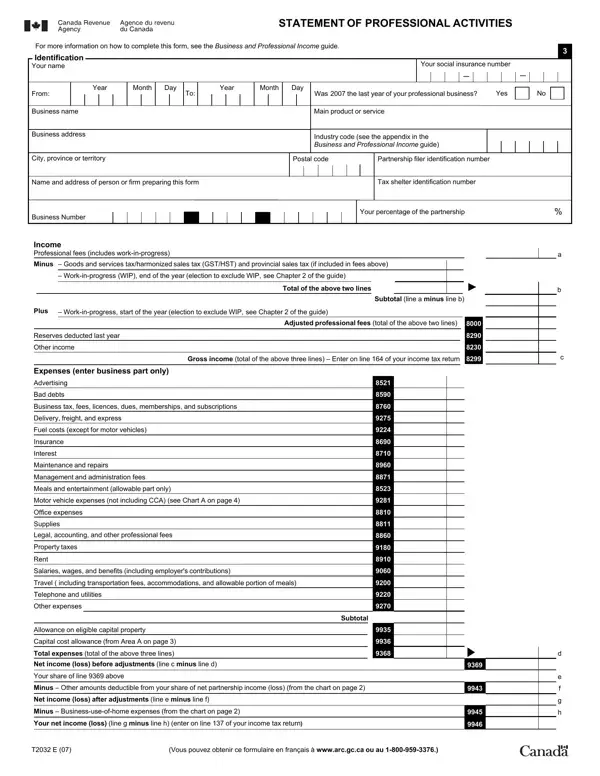
The T2032, Statement of Professional Activities, is used by self-employed professionals such as doctors, lawyers, accountants, and consultants to record and declare their business and professional income. This form covers identification details such as social insurance number and industry code, income sources including professional fees and gross revenues, and a full breakdown of deductible expenses such as advertising, office supplies, salaries, motor vehicle costs, and business-use-of-home amounts. It also includes a section for capital cost allowance and partnership income.
The PD4R, Payroll Discrepancy Notice, is issued by the CRA when there is a discrepancy between the amounts reported on payroll remittance returns and the amounts assessed. It requires the employer to review the discrepancy, indicate agreement or provide a written explanation with supporting documentation, and return the form to the CRA by the indicated deadline.
Completing CRA forms accurately is essential for tax compliance. Both forms require careful review of income sources, expense records, and supporting documents before submission. FormsPal provides a straightforward way to access, complete, and download these Canada Revenue Agency forms online.
| Question | Answer |
|---|---|
| Form Name | CRA Forms (T2032, PD4R) |
| Issued By | Canada Revenue Agency (CRA) |
| Form Length | 4 pages |
| Fillable? | Yes (online via FormsPal) |
| Avg. time to fill out | 10-20 minutes |
| Other names | pd4r discrepancy notice, pd4r form cra, pd4r e, t2032, statement of professional activities |