
How to Complete a Criminal Intake Form
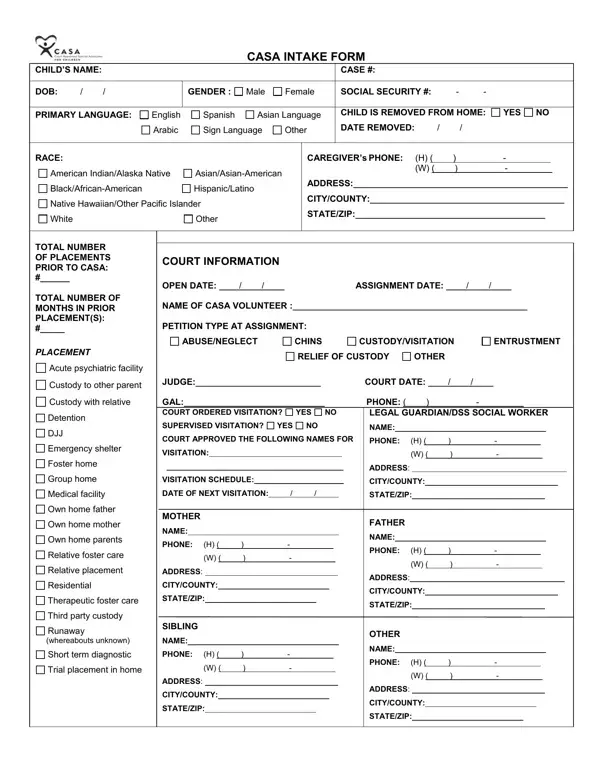
Complete each section carefully. Accurate entries reduce processing delays and give the CASA volunteer and legal team the full picture needed to move the case forward.
- Personal Information: Enter the child's full legal name, date of birth, gender, and primary language. Include the social security number if required by the court.
- Case Details: Record the official court case number, current juvenile justice status, and the documented reason for removal from the home.
- Offense Category: Mark the applicable type, such as theft, violence, sexual misconduct, or property damage. Check all that apply.
- Placement History: List current and prior placements, including dates and contact details for each caregiver or facility.
- Family and Contacts: Provide names and contact details for parents, guardians, and any other party who receives updates on the case.
- Advocate Assignment: Record the assigned CASA volunteer's name and visit schedule. The volunteer will send progress notes to the court throughout the case.
Who Uses a Criminal Intake Form?
Courts, CASA programs, and juvenile justice agencies use this document at the start of a case. Typical users include:
- CASA volunteers assigned to a minor facing theft, violence, or sexual misconduct charges
- Public defenders documenting a new juvenile client at first contact
- Social workers coordinating placement and family services for children in the justice system
Related forms: Blank Criminal Report Template, Client Intake Form, and Career Counseling Intake Form.
Frequently Asked Questions
What information does a criminal intake form collect?
It collects personal data, case history, and offense details for a juvenile entering the court system. Results from the completed form guide support services and court decisions.
Who fills out a criminal intake form?
CASA volunteers, defense attorneys, and juvenile justice workers complete it at the start of a case.
How long does it take to complete?
Most users finish the 8-page PDF in about 2 minutes using the online editor. Download or print the results instantly with no account required.
