
What Is the CRS 1 Form?

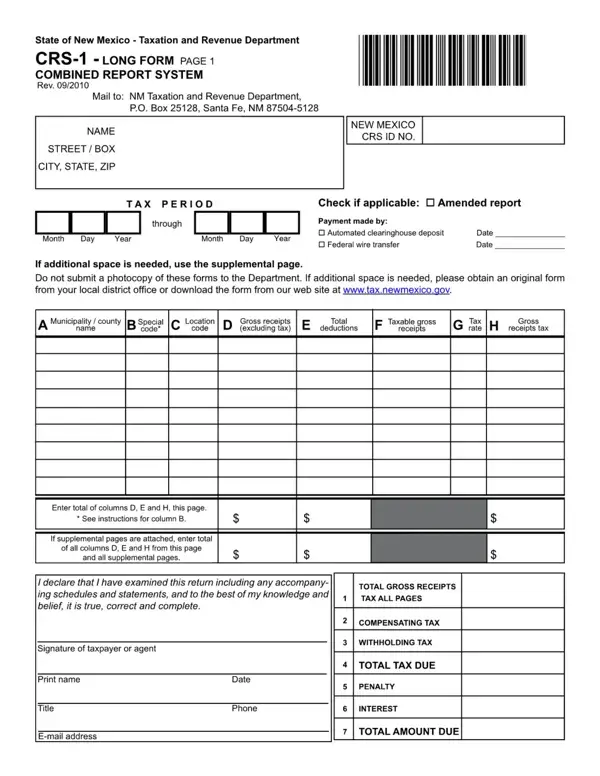
The CRS 1 form, officially called the New Mexico Combined Reporting System (CRS) Long Form, is the primary gross receipts tax return used by businesses in New Mexico to report taxable income and calculate their state gross receipts tax obligation. Issued by the New Mexico Taxation and Revenue Department (TRD), this two-page document lets businesses report gross receipts, claim eligible deductions by location, and calculate net taxable gross receipts for a given period. Businesses with multiple CRS permits, diverse deduction types, or operations across several localities use the long form to consolidate all required schedules into one submission. Filing frequency is assigned by the TRD: monthly for high-volume businesses, quarterly or semi-annually for smaller filers. Common deduction categories include sales to certain exempt organizations, professional services exempt from gross receipts tax, and qualifying interstate transactions. The CRS 1 form requires the taxpayer's CRS number, business name, reporting period, and a line-by-line breakdown of gross receipts and deductions before arriving at the taxable amount and the applicable gross receipts tax rate.

QuestionAnswer
Form NameCRS-1 Long Form
Also Known AsNew Mexico Combined Reporting System Form
Form Length2 pages
Fillable?No
Fillable fields0
Avg. time to fill out30 sec
PurposeGross Receipts Tax Reporting
Issued byNew Mexico Taxation and Revenue Department
Other namescrs 1 long form new mexico, printable crs 1 forms, crs 1 form, clearinghouse

How to Edit Crs 1 Form Online for Free

Steps to Complete the CRS-1 Form

Use FormsPal's free PDF editor to fill out each section of the CRS-1 Long Form accurately. The steps below follow the standard field order on the New Mexico Combined Reporting System form.

  1. Enter your CRS taxpayer number - Your CRS number is assigned by the New Mexico Taxation and Revenue Department when you register your business. Enter it at the top of the form.
  2. Provide your business name and address - Fill in your legal business name and primary address in New Mexico.
  3. Select the reporting period - Enter the month, quarter, or semi-annual period you are reporting for, as determined by your TRD filing frequency.
  4. Report gross receipts by location - List total gross receipts for each business location or activity during the reporting period. Separate entries are required for each locality code.
  5. Apply eligible deductions - Enter deductions for which your business qualifies. Common deductions include receipts from exempt organizations, certain services, and interstate sales.
  6. Calculate net taxable gross receipts - Subtract total deductions from gross receipts to find your taxable amount for each location.
  7. Apply the gross receipts tax rate - Multiply net taxable gross receipts by the applicable rate for each locality. New Mexico gross receipts tax rates vary by municipality.
  8. Total your tax liability - Add up tax due across all locations and enter the combined amount at the bottom of the form.
  9. Sign and date the form - An authorized person must sign the completed CRS-1 form before submission to the New Mexico Taxation and Revenue Department.

Related New Mexico Forms

If you need to update your CRS account registration, the ACD-31075 Tax Registration Update form handles changes to business information on file with the TRD. For businesses forming a new entity in the state, review the New Mexico LLC Operating Agreement templates. Other CRS-related reporting forms are also available through the CPI CRS Form 13-146 page.