
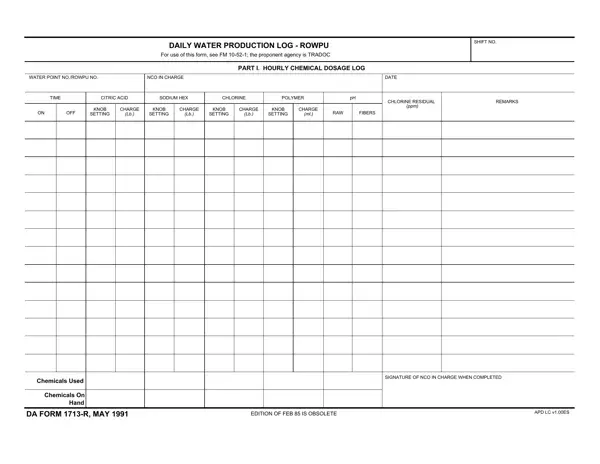
The DA Form 1713-R serves a crucial role within the operations of water purification, specifically tailored for the Reverse Osmosis Water Purification Unit (ROWPU) operations. This document, designed for the meticulous recording of daily water production logistics, is indispensable for ensuring the quality and safety of the water produced. Detailed sections capture a range of operational data, including hourly chemical dosages and gauge and indicator readings. Chemical management, reflected in the log of chemicals used versus those on hand, alongside specifics on water flow rates, pressure levels, and the overall operation of the purification equipment, are systematically tracked. This form is not only a tool for operational efficiency but also serves as a legal record, underscoring the importance of accuracy and diligence in its completion. Guided by FM 10-52-1, with the Training and Doctrine Command (TRADOC) as the proponent agency, the DA Form 1713-R embodies the rigorous standards expected from personnel tasked with producing safe, potable water.
Part I covers the hourly chemical dosage log. Operators record the type and amount of each chemical added during treatment, including coagulant, chlorine, and other disinfectants. This section provides a continuous chemical audit trail that supervisors review to confirm treatment protocols are followed. Any deviations from prescribed dosage ranges must be explained in the remarks column.
Part II covers the gauge and indicator log. This section requires readings at set intervals throughout each shift, capturing product water flow, reverse osmosis pressure, cartridge filter pressure, multimedia filter pressure, and raw water flow. Consistent monitoring of these gauges allows operators to catch equipment malfunctions early and take corrective action before water quality is affected.
Part III covers summary totals. At the close of each shift, operators compile totals for gallons of water produced, gallons of fuel consumed, and total hours of equipment operation. These figures feed into unit supply requests and are reviewed by the Officer in Charge to verify mission productivity.
This form is the responsibility of Army Water Treatment Specialists, trained under Military Occupational Specialty (MOS) 92W. The NCO in Charge (NCOIC) at each water point is required to verify all entries and add their signature at the end of each shift. Officers reviewing the completed logs use them to confirm compliance with Army potable water standards and to support requisition of chemical supplies for upcoming operations.
Entries on the form must reflect actual observed values, not estimates. Units are required to retain completed forms as part of their operational record. During inspections and command reviews, these logs provide documented proof that water produced for troop consumption met established safety standards.
Failing to record readings at the required hourly intervals is the most common error in ROWPU logs. Operators sometimes skip entries during high-activity periods and then try to reconstruct them at the end of the shift, which compromises the accuracy of the record. Another common error is leaving chemical-on-hand fields blank when no replenishment occurred. Blank fields are interpreted as omissions, not as confirmation of no change. Entering zero where no change occurred is the correct practice. The REVERSE OSMOSIS PRESSURE section has been noted in field guidance as an area where operators frequently make errors, so re-examining entries in this area before signing off is strongly advised.
| Question | Answer |
|---|---|
| Form Name | Da Form 1713 R |
| Form Length | 2 pages |
| Fillable? | Yes |
| Fillable fields | 518 |
| Avg. time to fill out | 30 sec |
| Governing Field Manual | FM 10-52-1 |
| Other names | da daily production log, food record, daily production log blank, da 1713 daily |
Da Form 1713 R isn’t the one you’re looking for?