


DA Form 3434 at a glance
What it is: DA Form 3434 is the Notification of Personnel Action for a Nonappropriated Funds employee.
Who signs: At SIGN in box 27, the Designated Appointing Official enters the SIGNATURE (Or other authorization) AND TITLE.
A filled-in DA Form 3434 example: an hourly pay adjustment
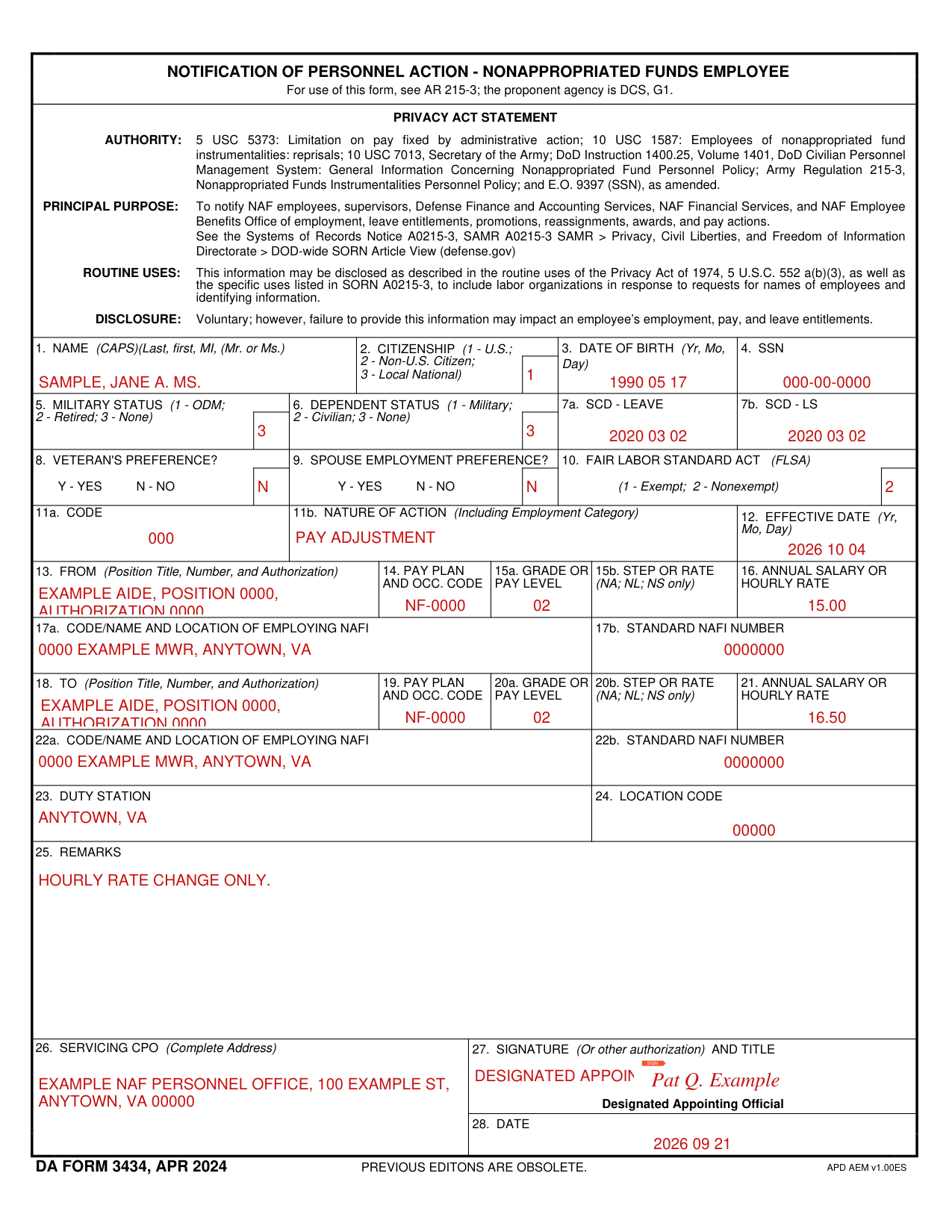
How to fill out DA Form 3434, box by box
Name, citizenship, date of birth and SSN

In box 1, enter the NAME (CAPS) as Last, first, MI, (Mr. or Ms.).
In box 2, CITIZENSHIP, enter 1 for U.S., 2 for Non-U.S. Citizen, or 3 for Local National.
In box 3, enter the DATE OF BIRTH as Yr, Mo, Day.
In box 4, enter the SSN.
Military status, dependent status and SCD

In box 5, MILITARY STATUS, enter 1 for ODM, 2 for Retired, or 3 for None.
In box 6, DEPENDENT STATUS, enter 1 for Military, 2 for Civilian, or 3 for None.
Enter the SCD - LEAVE in box 7a and the SCD - LS in box 7b.
Veteran's preference, spouse employment preference and FLSA

Enter Y - YES or N - NO in box 8, VETERAN'S PREFERENCE?, and in box 9, SPOUSE EMPLOYMENT PREFERENCE?; in box 10, FAIR LABOR STANDARD ACT (FLSA), enter 1 for Exempt or 2 for Nonexempt.
Code, nature of action and effective date

Enter the CODE in box 11a and the NATURE OF ACTION (Including Employment Category) in box 11b.
In box 12, enter the EFFECTIVE DATE as Yr, Mo, Day.
FROM: position, pay and employing NAFI

In box 13, FROM, enter the Position Title, Number, and Authorization.
For FROM, enter the PAY PLAN AND OCC. CODE in box 14, the GRADE OR PAY LEVEL in box 15a and the ANNUAL SALARY OR HOURLY RATE in box 16.
Enter the STEP OR RATE in box 15b (NA; NL; NS only).
Enter the CODE/NAME AND LOCATION OF EMPLOYING NAFI in box 17a and the STANDARD NAFI NUMBER in box 17b.
TO: position, pay and employing NAFI

In box 18, TO, enter the Position Title, Number, and Authorization.
For TO, enter the PAY PLAN AND OCC. CODE in box 19 and the GRADE OR PAY LEVEL in box 20a.
Enter the ANNUAL SALARY OR HOURLY RATE in box 21; box 20b is STEP OR RATE (NA; NL; NS only).
Enter the CODE/NAME AND LOCATION OF EMPLOYING NAFI in box 22a and the STANDARD NAFI NUMBER in box 22b.
Duty station, location code and remarks
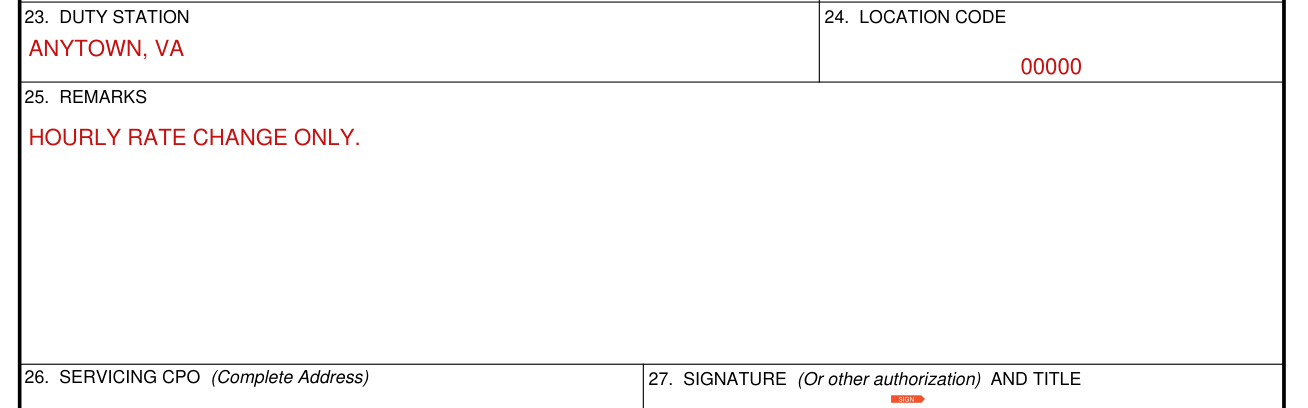
Enter the DUTY STATION in box 23, the LOCATION CODE in box 24 and the REMARKS in box 25.
Servicing CPO, signature and date

Enter the SERVICING CPO (Complete Address) in box 26.
At SIGN in box 27, the Designated Appointing Official enters the SIGNATURE (Or other authorization) AND TITLE.
Enter the DATE in box 28.
More rules for DA Form 3434
Providing this information is voluntary; however, failure to provide it may impact an employee's employment, pay, and leave entitlements.
The form is to notify NAF employees, supervisors, Defense Finance and Accounting Services, NAF Financial Services, and NAF Employee Benefits Office of employment, leave entitlements, promotions, reassignments, awards, and pay actions.
Common questions about DA Form 3434
What is a DA form 3434?
DA Form 3434 is the Notification of Personnel Action for a Nonappropriated Funds employee. For use of this form, see AR 215-3; the proponent agency is DCS, G1.
Sources
[1] DA Form 3434 (APR 2024), Notification of Personnel Action - Nonappropriated Funds Employee, Department of the Army (the Official source link on this page).