
DA Form 4833 at a glance
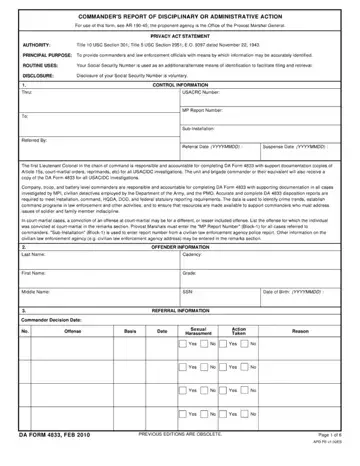
What it is: DA Form 4833 is the Commander's Report of Disciplinary or Administrative Action.
Where and when to file: If you selected "No" for ALL offenses, go directly to "Commander's Remarks" (Block-10), sign, date, and return the form to the agent specified in "Referred By" (Block-1).
Company, troop, and battery level commanders are responsible and accountable for completing DA Form 4833 with supporting documentation in all cases investigated by MPI, civilian detectives employed by the Department of the Army, and the PMO.
The first Lieutenant Colonel in the chain of command is responsible and accountable for completing DA Form 4833 with support documentation (copies of Article 15s, court-martial orders, reprimands, etc) for all USACIDC investigations. The unit and brigade commander or their equivalent will also receive a copy of the DA Form 4833 for all USACIDC investigations.
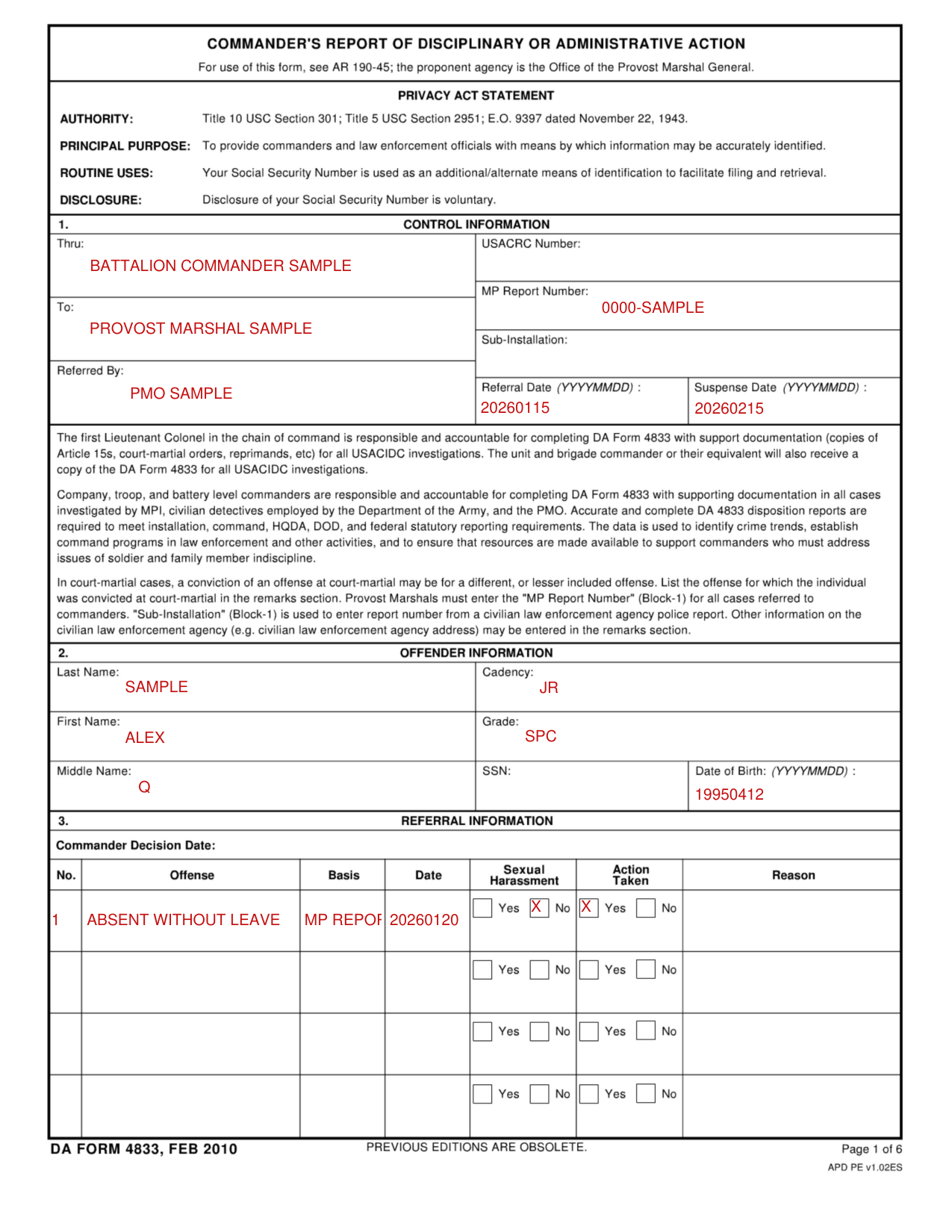
A filled-in DA Form 4833 example: a company commander reports one offense
How to fill out DA Form 4833, box by box
Control information
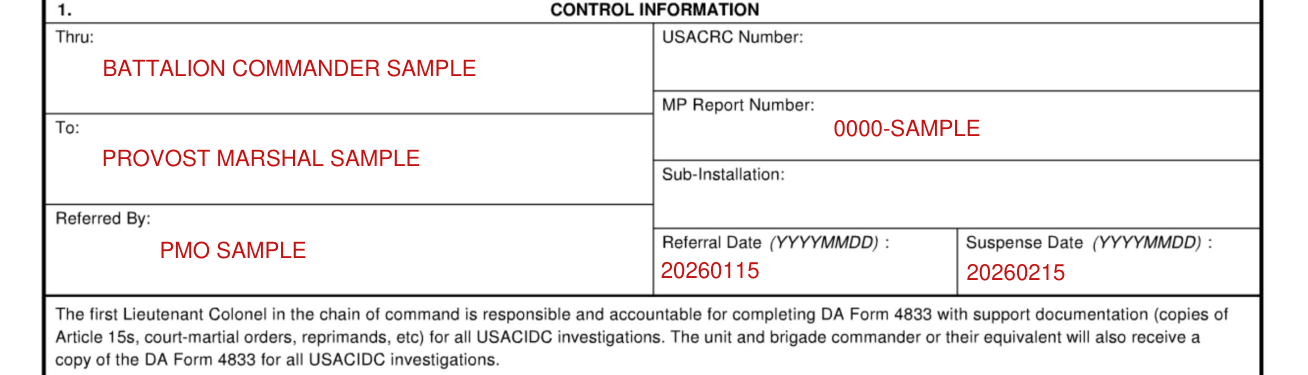
Enter Thru, To, USACRC Number, MP Report Number, Sub-Installation, Referred By, Referral Date (YYYYMMDD) and Suspense Date (YYYYMMDD).
In court-martial cases, a conviction of an offense at court-martial may be for a different, or lesser included offense. List the offense for which the individual was convicted at court-martial in the remarks section. Provost Marshals must enter the "MP Report Number" (Block-1) for all cases referred to commanders. "Sub-Installation" (Block-1) is used to enter report number from a civilian law enforcement agency police report. Other information on the civilian law enforcement agency (e.g. civilian law enforcement agency address) may be entered in the remarks section.
Offender information
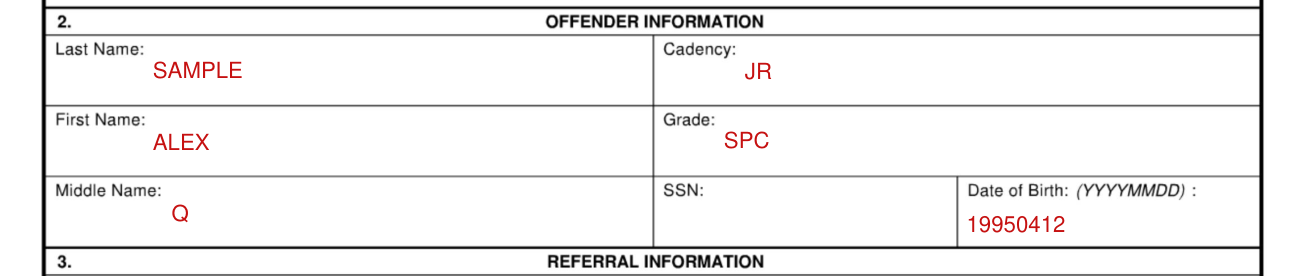
Enter Last Name, Cadency, First Name, Grade, Middle Name, SSN and Date of Birth (YYYYMMDD).
Referral information
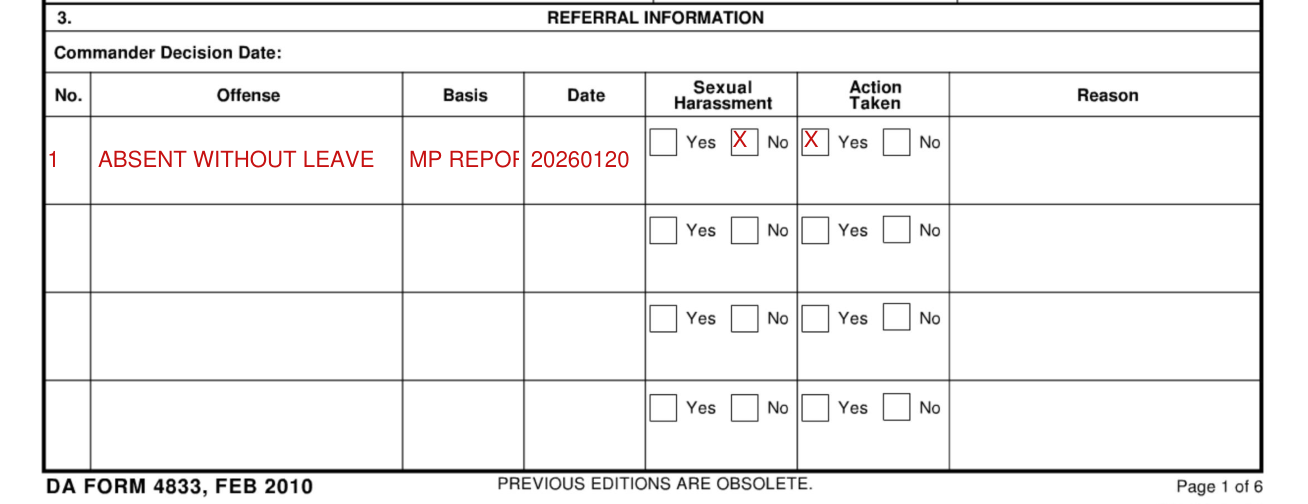
Enter Commander Decision Date. For each offense enter No., Offense, Basis, Date, Sexual Harassment, Action Taken and Reason, and mark Yes or No for Sexual Harassment and for Action Taken.
NOTE: For each offense marked NO for action taken, you must supply a reason.
If you selected "Yes" for any offense, continue to "Action Taken" (Block-4).
More rules for DA Form 4833
Accurate and complete DA 4833 disposition reports are required to meet installation, command, HQDA, DOD, and federal statutory reporting requirements.
Under Action Taken, mark Administrative, Non-Judicial (Article 15) or Judicial. Non-Judicial Punishment Authority (select one) and Judicial Punishment Authority (select one) list Summarized, Company Grade, Field Grade, Principal Assistant, GCMCA Imposed, General Officer Imposed, Summary Court Martial, General Court Martial, Special Court Martial and Civilian Criminal/Magistrate.
Enter No., Charged Offense, Plea, Finding Offense and Trial Finding.
Enter the PLEA as G=Guilty, C=No Contest, N=Not Guilty or D=Pre-Trial Diversion, and the TRIAL FINDING as DCV=Dismissed (Civil), DCR=Dismissed (Criminal), P=Finding for Plaintiff, F=Finding for Respondent, G=Guilty, C=No Contest, N=Not Guilty or S=Settlement.
Under Non-Adverse, enter Agency, Date Referred (YYYYMMDD), Date Responded (YYYYMMDD), Date Imposed (YYYYMMDD) and Type of Action Oral Written Local OMPF. Do so for Family Advocacy, Drug/Alcohol Abuse, Special Referral, Equal Opportunity, Legal Office, Mental Health and Relief Agency, with Counseling/Concern, Reprimand, Censure and Admonition.
Under Adverse, enter the Date Imposed (YYYYMMDD) and Description: Withholding of Privileges, Adverse Performance Evaluation (OER/NCOER/Academic Report), Relief for Cause (OER/NCOER), Mandatory Reassignment, Transfer (such as rehabilitative), Adverse Record Entry - Flag, Denial of Reenlistment or Continued Service, Withholding of Promotion, Delay of Promotion, Promotion Revocation, Clearance Revocation, Control Roster (downgrade of clearance, PRP reclassification), Resignation, Retirement, Retirement at Lower Grade From, Transfer to Inactive Reserve, Military Occupational Specialty Reclassification, Debarment, Job Termination, Job Suspension, Leave Without Pay, Loss of Warrant, Voluntary Disclosure, Restitution (to US Government), Restitution (to third party Non-US Government), Civil-Civil Action Initiation, Other (return to states, etc.), Contract Suspension, Contract Termination, Cost Adjustment, Bid Rejection, Recoupment, Denial of Continuation or Other Contract Action.
Under DETAILS OF ADMINISTRATIVE SEPARATION, enter Date Imposed (YYYYMMDD), Regulation, Chapter, Characterization and Effective Date (YYYYMMDD).
NOTE: Proceed to Commander's Remarks (Block-10) if you chose Administrative Action.
Under NON-JUDICIAL/JUDICIAL SANCTIONS, enter Date Adjudged (YYYYMMDD) and Sanction: Fine, Forfeiture, Extra Duty, Restriction, Confinement, Correctional Custody, Bad Conduct Discharge, Dishonorable Discharge, Reduction in Grade, Probation, Special Assignment, Total Forfeiture (all pay/allowance), Death, Civil Recovery or Civil Award.
Mark Were Any Sanctions Suspended? Yes or No.
NOTE: If no sanctions were suspended, proceed to "Commander's Remarks" (Block-10).
Under Suspended Sanction Information, enter Date Suspended, Suspension Duration, Suspended Portion, Suspended Portion Time and Suspension Conditions for Fine, Forfeiture, Extra Duty, Restriction, Correctional Custody, Confinement, Reduction in Grade, Probation, Special Assignment, Total Forfeiture, Civil Recovery and Civil Award.
Enter the Commander's Remarks, the USASCRC Number and the Sanction.
Under COMMANDING OFFICER, mark Was a DNA sample collected from the offender? Yes or No, and enter Name, Grade, AKO e-Mail Address, Signature and Signature Date (YYYYMMDD).
Common questions about DA Form 4833
What is DA form 4833?
DA Form 4833 is the Commander's Report of Disciplinary or Administrative Action. For use of this form, see AR 190-45; the proponent agency is the Office of the Provost Marshal General.
Sources
[1] DA Form 4833 (FEB 2010), Commander's Report of Disciplinary or Administrative Action, U.S. Army (the Official source link on this page).
