

DA Form 7372 at a glance
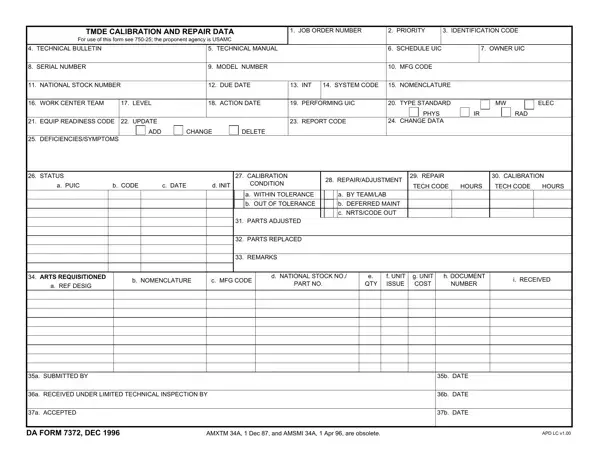
What it is: DA Form 7372 is the TMDE Calibration and Repair Data form; for use of this form see 750-25.
Who signs: Enter who submitted the form in box 35a and the Date in box 35b. Box 36a is Received Under Limited Technical Inspection By, with the Date in box 36b. Box 37a is Accepted, with the Date in box 37b.
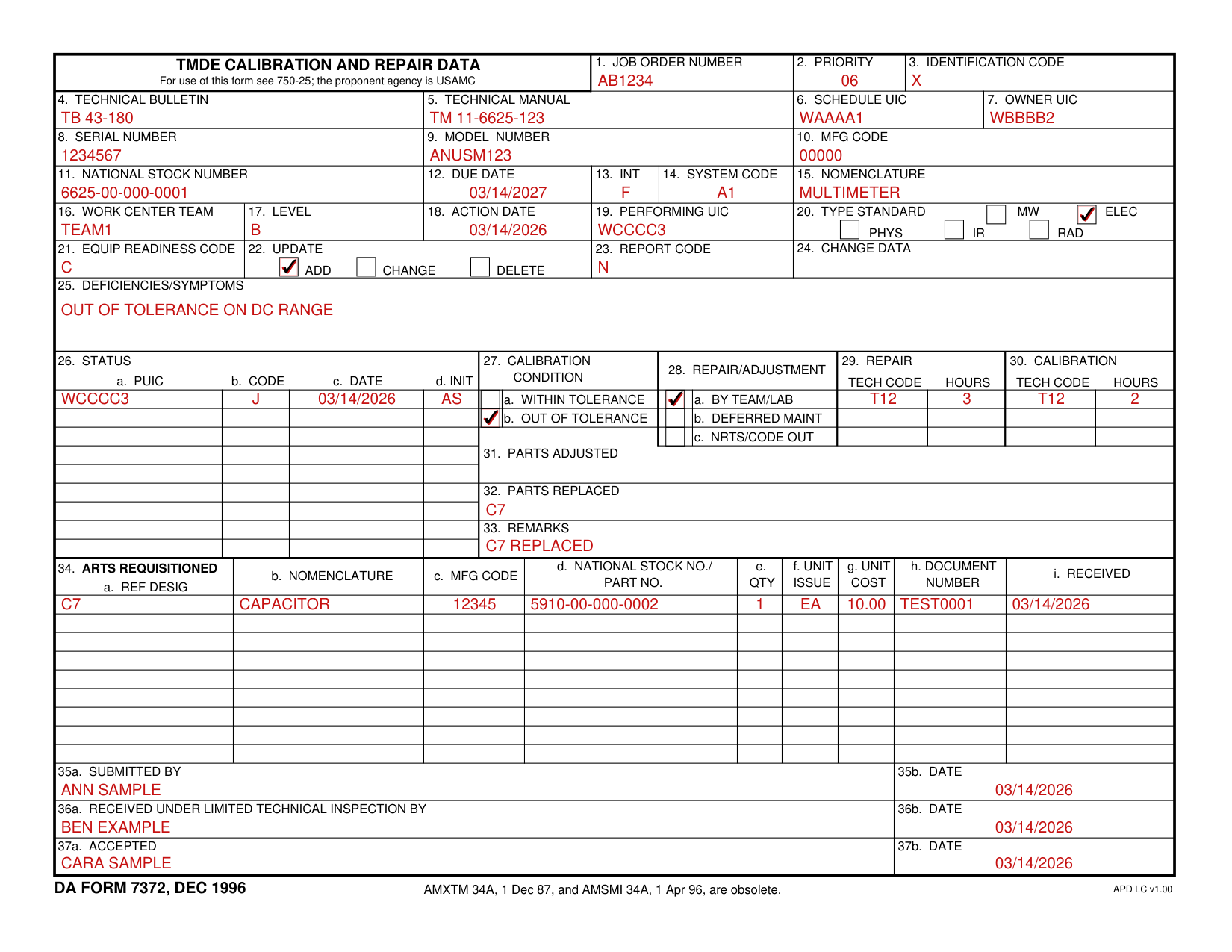
A filled-in DA Form 7372 example: a team calibrates and repairs a multimeter
How to fill out DA Form 7372, box by box
Job order number, priority and identification code

Enter the Job Order Number in box 1, the Priority in box 2 and the Identification Code in box 3.
Technical bulletin, technical manual, schedule UIC and owner UIC

Enter the Technical Bulletin in box 4, the Technical Manual in box 5, the Schedule UIC in box 6 and the Owner UIC in box 7.
Serial number, model number and mfg code

Enter the Serial Number in box 8, the Model Number in box 9 and the MFG Code in box 10.
Box 8, Serial Number, must have an entry. Do not precede it with zeros. If it is longer than ten digits, delete from the left side.
Use the joint electronics type designator system (JETDS) serial number. The manufacturer's serial number will be used for non-JETDS items. Do not include special characters, e.g., "/", "-", or "@", etc. Box 9, Model Number, must have an entry. JETDS numbers must be used if applicable. The manufacturer's model number is used if the item is non-JETDS.
Box 10, MFG Code, must have an entry. See TB 43-180 or SB 708-43 and SB 708-48. The entry will be five zeros if the item is JETDS, or where no MFG CODE is known.
National stock number, due date, int, system code and nomenclature

Enter the National Stock Number in box 11, the Due Date in box 12, the INT in box 13, the System Code in box 14 and the Nomenclature in box 15.
Work center team, level, action date and performing UIC

Enter the Work Center Team in box 16, the Level in box 17, the Action Date in box 18 and the Performing UIC in box 19.
Type, equip readiness code, update, report code and change data

Box 20 is TYPE: STANDARD, MW, ELEC, PHYS, IR, RAD, and box 22 is UPDATE: ADD, CHANGE, DELETE.
Enter the Equip Readiness Code in box 21, the Report Code in box 23 and the Change Data in box 24.
Reference AR 220-1, Appendices B and C.
Deficiencies/Symptoms

Enter the Deficiencies/Symptoms in box 25.
Status
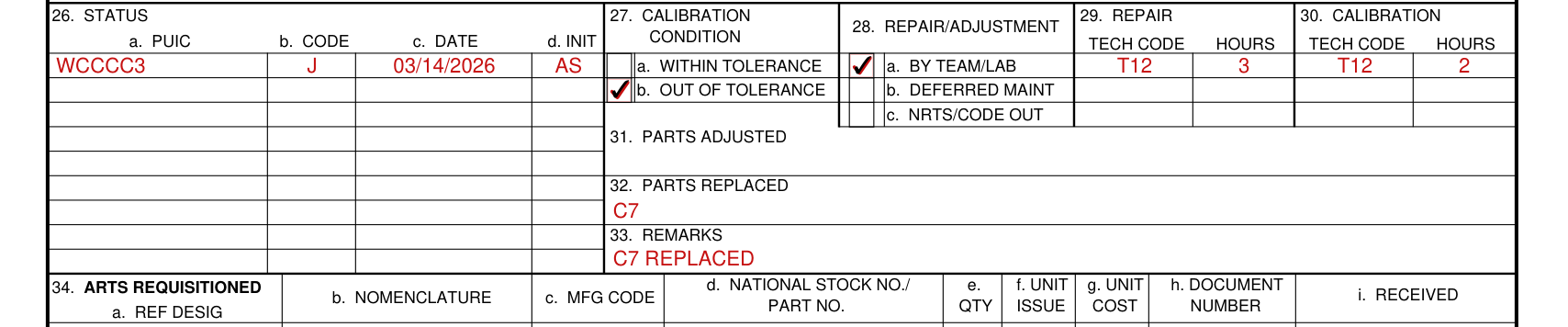
Box 26, Status, has a. PUIC, b. Code, c. Date and d. Init.
Calibration condition

Box 27, Calibration Condition, is a. Within Tolerance or b. Out of Tolerance.
Repair/adjustment, repair and calibration

Box 28, Repair/Adjustment, is a. By Team/Lab, b. Deferred Maint or c. NRTS/Code Out.
Box 29 is Repair and box 30 is Calibration, each with a Tech Code and Hours.
Parts adjusted, parts replaced and remarks

Enter the Parts Adjusted in box 31, the Parts Replaced in box 32 and the Remarks in box 33.
Parts requisitioned

Box 34, Parts Requisitioned, has a. Ref Desig, b. Nomenclature, c. Mfg Code, d. National Stock No./Part No., e. Qty, f. Unit Issue, g. Unit Cost, h. Document Number and i. Received.
Submitted by, limited technical inspection and accepted

Enter who submitted the form in box 35a and the Date in box 35b.
Box 36a is Received Under Limited Technical Inspection By, with the Date in box 36b.
Box 37a is Accepted, with the Date in box 37b.
More rules for DA Form 7372
When completing this form, see TB 750-25.
Sources
[1] DA Form 7372 (DEC 1996), TMDE Calibration and Repair Data, Department of the Army (the Official source link on this page).