
Dbpr Hr 7025 Form PDF Details

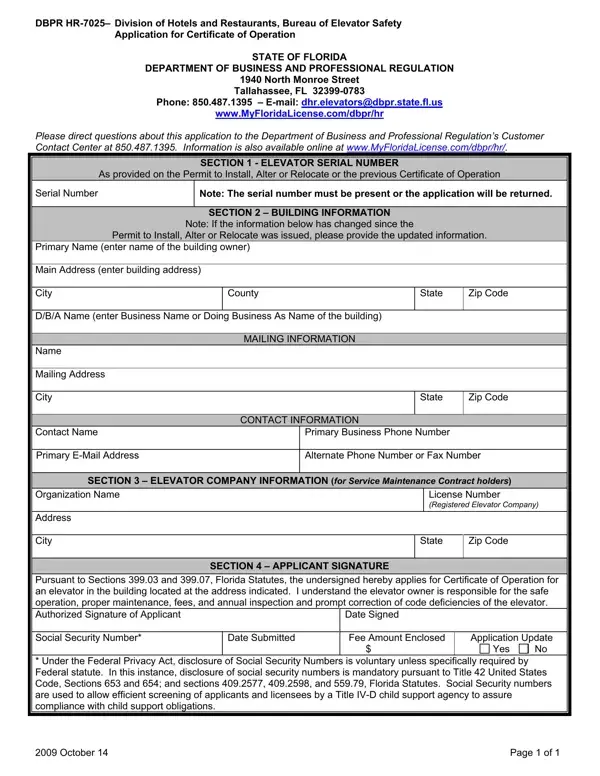
In the State of Florida, the proper operation and maintenance of elevators are regulated to ensure public safety and compliance with established standards. The Division of Hotels and Restaurants, Bureau of Elevator Safety, facilitates these regulations through various forms, with the DBPR HR-7025 form playing a crucial role in the process. This particular form serves as an Application for Certificate of Operation, a necessary step for anyone seeking authorization to operate an elevator within the state. It covers essential details, including the elevator's serial number, building information, the responsible elevator maintenance company's details, and the applicant's signature to attest to understanding their obligations towards the elevator's safe operation and upkeep. Additionally, it mentions the legal ramifications for failing to adhere to these responsibilities, including the requirement to disclose a social security number for the purpose of assuring compliance with child support obligations, shedding light on the intertwining of public safety and social responsibilities. The form is available through the Department of Business and Professional Regulation, highlighting the procedural steps and contact information for applicants seeking further assistance.

QuestionAnswer
Form NameDbpr Hr 7025 Form
Form Length1 pages
Fillable?No
Fillable fields0
Avg. time to fill out15 sec
Other namesE-mail, dhr, dhr elevators myfloridalicense, myfloridalicence com

How to Edit Dbpr Hr 7025 Form Online for Free

If you would like to fill out myfloridalicense com, you won't have to download any programs - simply try our PDF tool. Our tool is consistently evolving to give the very best user experience attainable, and that's due to our dedication to continuous improvement and listening closely to user opinions. To get the ball rolling, go through these basic steps:

Step 1: Simply click on the "Get Form Button" above on this webpage to see our form editor. There you will find all that is necessary to fill out your document.

Step 2: With our handy PDF tool, you may accomplish more than just fill in blanks. Edit away and make your documents seem sublime with customized text added in, or modify the original input to perfection - all that supported by the capability to insert any kind of photos and sign the document off.

This PDF form requires some specific information; to guarantee accuracy, please bear in mind the guidelines further down:

1. To start off, while completing the myfloridalicense com, beging with the part containing subsequent blank fields:

Filling in part 1 of myfloridalicence

2. Once this part is complete, you're ready to add the necessary details in Name Mailing Address City, Contact Name Primary EMail Address, CONTACT INFORMATION, State, Zip Code, Primary Business Phone Number, SECTION ELEVATOR COMPANY, Organization Name Address City, License Number Registered Elevator, State, Zip Code, SECTION APPLICANT SIGNATURE, Pursuant to Sections and Florida, Date Submitted, and Date Signed so you can go further.

myfloridalicence conclusion process shown (part 2)

Regarding Contact Name Primary EMail Address and SECTION ELEVATOR COMPANY, ensure you double-check them in this section. The two of these are surely the most important ones in this form.

Step 3: Immediately after rereading your fields, hit "Done" and you're all set! Right after setting up a7-day free trial account here, it will be possible to download myfloridalicense com or send it through email right off. The document will also be readily accessible via your personal account menu with all your changes. FormsPal ensures your information confidentiality by using a protected method that never records or distributes any sort of personal data involved in the process. Feel safe knowing your files are kept protected when you work with our services!