
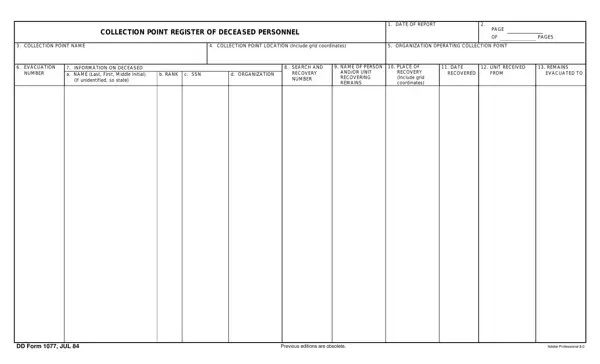
DD Form 1077 can be opened and reviewed using the FormsPal online PDF editor. Click the "Get Form" button at the top of this page to open the document and begin entering information directly into the form fields. No software download is required.
How to complete the form step by step
Step 1. Enter the date the register entry is being prepared in the "Date of Report" field at the top of the form.
Step 2. Record the collection point designation. This is the number or code assigned to the field collection point that received the remains.
Step 3. Complete the personal data section for the deceased. Enter the individual's full name, grade or rank, Social Security Number, and military branch or component.
Step 4. Record the parent unit or organization the individual was assigned to at the time of death.
Step 5. Document the circumstances of death, including the date, time, and location. Note the cause of death if known at the time the report is prepared.
Step 6. Describe the condition of remains as received at the collection point. Note any personal property recovered with the individual.
Step 7. Enter evacuation data, including the destination of remains and the name and rank of the responsible mortuary affairs officer or NCO.
Step 8. The certifying officer signs and dates each entry. Mortuary affairs officers and graves registration officers are authorized to certify completed register entries.
Related Department of Defense forms
Mortuary affairs personnel who work with this register commonly also use the following forms:
DD Form 1300 (Report of Casualty) - The official form used to report military fatalities and initiate next-of-kin notification and benefits processing. Filed through the chain of command upon confirmation of death.
DD Form 93 (Record of Emergency Data) - Completed by each service member to designate beneficiaries for death gratuity, unpaid pay, and other benefits payable upon death. Kept on file and reviewed at regular intervals.
DD Form 149 (Application for Correction of Military Record) - Used when errors or omissions in official military records, including casualty and personnel records, require formal correction after the fact.
Military Power of Attorney Form - Grants a designated representative authority to manage personal and financial affairs on behalf of a service member who is unavailable or incapacitated.
Frequently asked questions
What does DD stand for on Department of Defense forms?
DD stands for Department of Defense. All DD forms are official DoD administrative documents used across the Army, Navy, Air Force, Marine Corps, and Coast Guard. Each form is assigned a number and managed through the DoD forms management program.
Who is required to complete this register?
Mortuary affairs officers, graves registration officers, and trained NCOs assigned to designated collection points complete each register entry. Every entry must be certified with the authorizing officer's signature before the record is considered complete.
What is the difference between this form and a Report of Casualty?
This register is a field-level document used to track deceased individuals at the collection point. The Report of Casualty is submitted on DD Form 1300, which initiates formal next-of-kin notification and military benefits processing through the casualty affairs office.
What edition of this form is currently in use?
The current edition is dated July 1984. Use the button at the top of this page to open the current version. The FormsPal editor allows you to view, complete, and download the form directly in your browser.
