Please rate Dd Form 1300

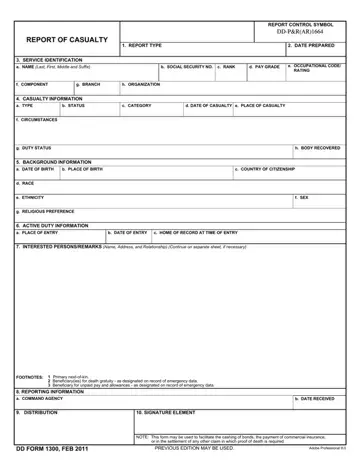
The DD Form 1300 Report of Casualty records the official circumstances of an active-duty service member's death or injury. Issued by designated casualty notification officers, it initiates the benefits, notification, and administrative processes that follow a service member's casualty.
Several parties may request or use this document after a service member's passing. Eligible survivors and next-of-kin named in military records are the primary recipients. Life insurance providers, including Servicemembers Group Life Insurance (SGLI), require a certified copy to process death benefit claims. The Department of Veterans Affairs relies on it to verify eligibility for survivor benefit plans and dependency and indemnity compensation (DIC). Estate attorneys and financial institutions may also request it to settle accounts, transfer assets, or cash savings bonds held in the service member's name.
The document captures essential identifying data: the service member's full name, Social Security number, military branch, rank, and pay grade. It records the exact date and location of the casualty, the type and status of the casualty event, and any known circumstances. A dedicated section covers date and place of birth, race, ethnicity, and religious preference. Additional fields document active-duty period, interested persons or beneficiaries, supplemental remarks, and the signature of the authorizing commanding officer.
Beyond official notification, this casualty report unlocks several benefit processes for surviving family members. It serves as evidence of death for commercial life insurance policies, federal survivor annuities, and pension continuation applications. Families pursuing burial allowances, accrued pay, and unpaid allotments through the Defense Finance and Accounting Service (DFAS) will typically need a certified copy. The document also supports claims under the Traumatic Servicemembers' Group Life Insurance (TSGLI) program for survivors of severe injuries.
After receiving the casualty report, surviving family members often need additional documents to complete financial and administrative processes. The DD Form 2656 (Data for Payment of Retired Personnel) helps beneficiaries update payment records. The military funeral form covers arrangements for burial with military honors. The DD Form 149 allows families to petition a Board for Correction of Military Records if any information needs amending. A military power of attorney form is commonly needed when a designated representative handles these matters on behalf of the surviving next-of-kin.
| Question | Answer |
|---|---|
| Form Name | DD Form 1300 |
| Form Length | 1 page |
| Fillable? | No |
| Fillable fields | 0 |
| Avg. time to fill out | 15 min |
| Other names | dd1300, Report of Casualty, dd1300 form, military casualty report |
Dd Form 1300 isn’t the one you’re looking for?
Please rate Dd Form 1300
