
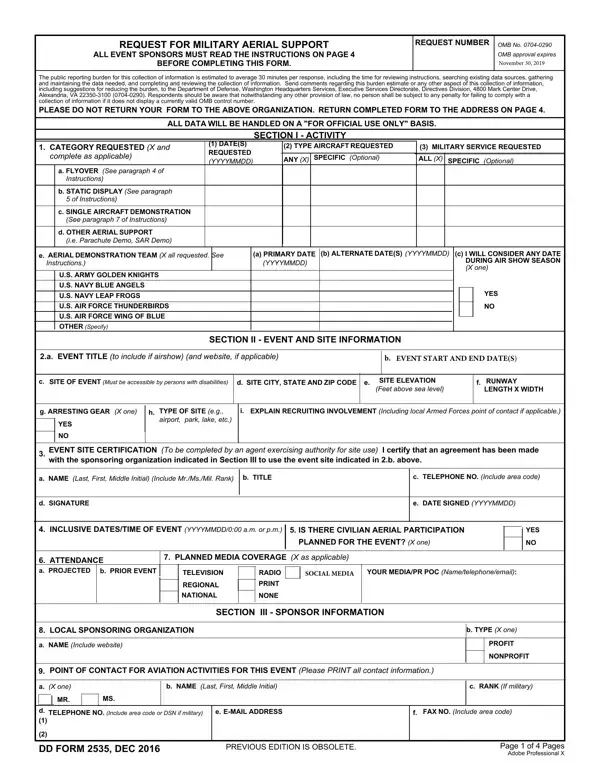
To edit or complete the DD 2535 document on your computer, use the online PDF editor provided by FormsPal. The editor supports full document editing functionality, including text input and digital signature. No Adobe Acrobat installation is required. Follow the steps below to get started.
Step 1: Click the "Get Form Button" at the top of this page to open the PDF editor in your browser.
Step 2: The editor allows you to modify the PDF using a range of tools. Add your text, adjust existing content, and apply a signature. The functionality is available directly in your browser with no additional software needed.
To complete the document accurately, enter the required information in each section:
1. The first section of the DD 2535 requires specific details. Ensure the following fields are complete:
2. In the next section, fill in details for US ARMY GOLDEN KNIGHTS US NAVY, YES NO, SECTION II EVENT AND SITE, event title, site location, event date, site elevation, runway details, and recruiting involvement before moving forward.
3. This section covers TELEVISION RADIO PRINT REGIONAL, LOCAL SPONSORING ORGANIZATION, SECTION III SPONSOR INFORMATION, and POINT OF CONTACT FOR AVIATION, including name, type, rank, telephone, email, and fax fields.
Pay close attention when entering the fax number and page fields, as these are common areas where errors occur.
4. The fourth section covers IS EVENT OFFICIALLY SUPPORTED BY, WILL YOU PROVIDE A POSTEVENT, DOES SPONSORING ORGANIZATION, WILL THE EVENT BE OPEN TO THE, and SECTION IV FEDERAL AVIATION fields. Check each response carefully before continuing.
5. Complete the final section by entering: COORDINATION HAS BEEN, show line, crowd line, airspace details, DEMONSTRATION SITE FEASIBILITY, and any associated notes.
Step 3: Before finalizing, review all fields to confirm accuracy. Click "Done" when complete. Create a free account at FormsPal to download, save, or share the finished document. FormsPal keeps all personal data secure and confidential.
Frequently Asked Questions
Who needs to submit DD Form 2535? Event organizers and sponsors who want to include military aerial demonstrations, flyovers, or static displays at a public event must submit this document to the appropriate DoD authority.
How do I check eligibility? Review the DoD criteria in the official guidelines to understand whether your event qualifies. Key factors include event date, location, type of aerial support requested, and organizer compliance with non-discrimination requirements.
What knowledge do I need before submitting? Understanding the scope of aerial support available, the FAA coordination requirements, and the post-event reporting obligations is essential. Refer to DoD resources and program documentation for full details.
Can I avoid errors when filling out the document? Yes. Use FormsPal's online PDF editor to fill out DD 2535 step by step. The editor flags required fields and allows you to review your input before submitting.
For additional military documents and related resources, explore these pages on FormsPal:
- DD Form 1351-2 – Travel voucher for military personnel
- DD Form 2656 – Data for payment of retired personnel
- Military power of attorney – Grant legal authority to a representative
