
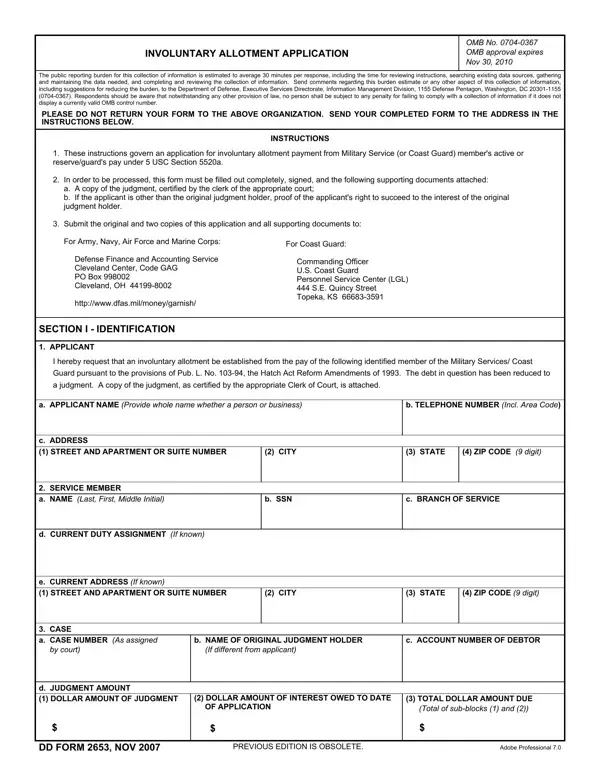
Handling PDF documents online is always a piece of cake using our PDF tool. Anyone can fill out allotment application number here effortlessly. To make our editor better and easier to work with, we constantly come up with new features, considering suggestions coming from our users. To start your journey, consider these basic steps:
Step 1: Click the orange "Get Form" button above. It's going to open up our pdf editor so that you can start filling out your form.
Step 2: The editor will let you modify PDF forms in many different ways. Transform it by including personalized text, adjust what's already in the PDF, and add a signature - all at your fingertips!
So as to fill out this PDF document, be certain to type in the necessary details in each and every blank field:
1. The allotment application number involves certain details to be entered. Ensure the next fields are completed:
2. After the previous section is finished, you should include the essential details in d JUDGMENT AMOUNT DOLLAR AMOUNT, DOLLAR AMOUNT OF INTEREST OWED TO, TOTAL DOLLAR AMOUNT DUE Total of, DD FORM NOV, PREVIOUS EDITION IS OBSOLETE, and Adobe Professional so you're able to go to the third stage.
3. Completing The judgment has not been amended, If the judgment has been paid in, b X as applicable, The judgment was issued while the, If the judgment was issued while, If the member was not present or, c The members pay could be, d To the best of my knowledge the, and e I will promptly notify you to is essential for the next step, make sure to fill them out in their entirety. Don't miss any details!
Regarding c The members pay could be and If the member was not present or, be certain you double-check them in this section. Both of these could be the most significant ones in this form.
4. To go ahead, this next stage requires filling in a handful of fields. Examples include I make the foregoing statement as, a TYPED NAME Last First Middle, b TELEPHONE NO Include area code, c SIGNATURE, d DATE SIGNED YYYYMMDD, and DD FORM BACK NOV, which you'll find vital to carrying on with this particular PDF.
Step 3: Just after proofreading your form fields you have filled in, hit "Done" and you are good to go! Join us now and immediately get allotment application number, prepared for download. All changes you make are preserved , which enables you to modify the document at a later stage when necessary. FormsPal ensures your information confidentiality by having a protected method that in no way saves or shares any sort of private information involved. You can relax knowing your files are kept safe every time you work with our tools!
Common Mistakes When Submitting DD Form 2653
These errors are the most common reasons for application delays or rejections:
Submitting an uncertified judgment copy. You must include a certified copy of the court judgment. A plain photocopy is not acceptable and will result in rejection of your application.
Missing transfer documentation. If the original judgment was assigned to you by another party, include all documents proving the full chain of transfer from the original holder to you.
Sending to the wrong office. For Army, Navy, Air Force, and Marine Corps members, submit to DFAS. Coast Guard members require a separate submission to the Commanding Officer of the U.S. Coast Guard Personnel Service Center.
Related Forms
Other forms you may need when handling military pay allotments or debt collection:
- Change Allotment Form - update an existing military pay allotment
- DD Form 2656 - military retirement benefit designation form
- Quash Writ of Garnishment - contest a garnishment order in court
- Wage Garnishment Worksheet - calculate withholding amounts for garnishment
