
DD Form 2675 PDF Details

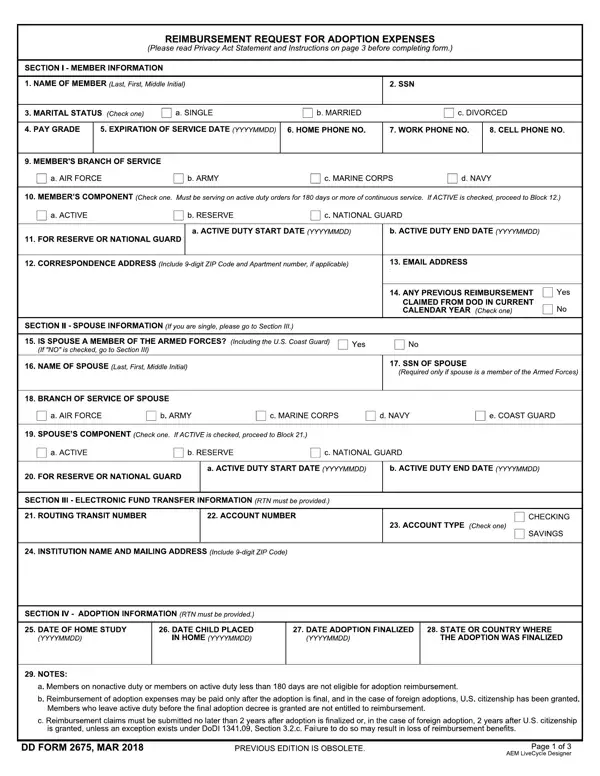
DD Form 2675, titled Reimbursable Adoption Expenses, is an official Department of Defense form used by military service members to request reimbursement for qualified adoption-related costs. Active-duty and reserve component personnel pursuing adoption may use this form to apply for support through the DoD Adoption Reimbursement Program, which provides financial assistance to eligible military families.

Who Is Eligible to Submit

Active-duty service members across all branches of the military - Army, Navy, Air Force, Marine Corps, and Coast Guard - may submit this form. Reserve and National Guard members on qualifying active-duty orders may also be eligible. Both the service member and a qualifying spouse must provide personal information along with adoption documentation. Eligibility is based on the member's active service status at the time of the adoption placement.

What Adoption Expenses Are Covered

Service members may request reimbursement for a broad range of adoption-related expenses, including:

Original receipts and supporting documents must be retained for all claimed expenses. Amounts already reimbursed by private insurance, a federal tax credit, or another government program cannot be claimed again on this form.

Reimbursement Limits and Processing

The Department of Defense sets limits on the total reimbursement amount per adoption. Service members should contact their personnel support resources or unit finance department to verify current reimbursement caps, submission instructions, and required supporting documentation. Processing times may vary by branch, command, and installation.

Related Military Forms

Other forms relevant to military benefits and personnel records include DD Form 2648 (Pre-Separation Counseling Checklist) and DD Form 214 (Certificate of Release or Discharge from Active Duty). Service members managing benefit elections may also need DD Form 2656-6 for survivor benefit plan changes.

QuestionAnswer
Form Name DD Form 2675
Form Length 3 pages
Fillable? No
Fillable fields 0
Avg. time to fill out 45 sec
Other names 2675, dd2675, da form 2675 form, dd form 2675 sample

How to Edit DD Form 2675 Online for Free

Use FormsPal's free online PDF editor to complete your adoption expense reimbursement application without downloading any software. Follow these instructions to fill out your form accurately and submit it to your military personnel office:

Step 1: Click the "Get Form" button at the top of this page to open the PDF in the editor. The form will load with interactive fields ready for input.

Writing section 1 in dd form request get

Step 2: Fill in Section 1 with the service member's personal information. This includes full legal name, Social Security Number, military branch, pay grade and rank, and current duty station address. Include the unit designation and a contact phone number. Double-check all personal details carefully, as errors in this section can delay processing of your reimbursement request.

Tips on how to complete dd form request get stage 2

Step 3: In Section 2, enter information about the child being adopted. This includes the child's full name, date of birth, and country or state of adoption. Indicate whether the adoption is through a public agency, private agency, or an independent adoption. For international adoptions, note the country and type of visa or immigration status involved. Attach a copy of the adoption placement agreement or court decree where required by your branch's submission instructions.

Section 3 inside dd form request get

Step 4: In Section 3, list all qualified adoption expenses you are requesting reimbursement for. For each expense, provide the date of payment, a description of the service received, the name of the payee, and the total amount paid. Allowable expenses include legal fees, court filing fees, home study costs, agency placement fees, and adoption processing costs. Keep original receipts for every entry - your finance department may request these documents during the review process.

dd form request get writing process explained (part 4)

Step 5: In Section 4, disclose any adoption-related payments you have already received for this adoption. This includes insurance reimbursements, federal tax credits claimed on your tax return, state adoption assistance payments, or any prior DoD reimbursements. Failing to disclose prior payments is a documentation error that can result in reimbursement denial or require repayment. Be thorough and accurate when completing this section.

Writing segment 5 in dd form request get

Step 6: Review the entire form for completeness and accuracy. Sign and date the certification statement to confirm that the information provided is true and correct. Where required by your branch, have your commanding officer or an authorized official countersign the form. Submit the completed form and all supporting documents to your unit's military personnel office or finance department. Contact your personnel resources office for current processing timelines and any branch-specific submission requirements.

After submitting, keep copies of all documents for your personal records. FormsPal is committed to keeping all personal information secure during your editing session. For other military-related forms, see our Military Pay Stub form or explore the DD Form 2293 for DoD payment requests.