
Dd Form 2697 PDF Details

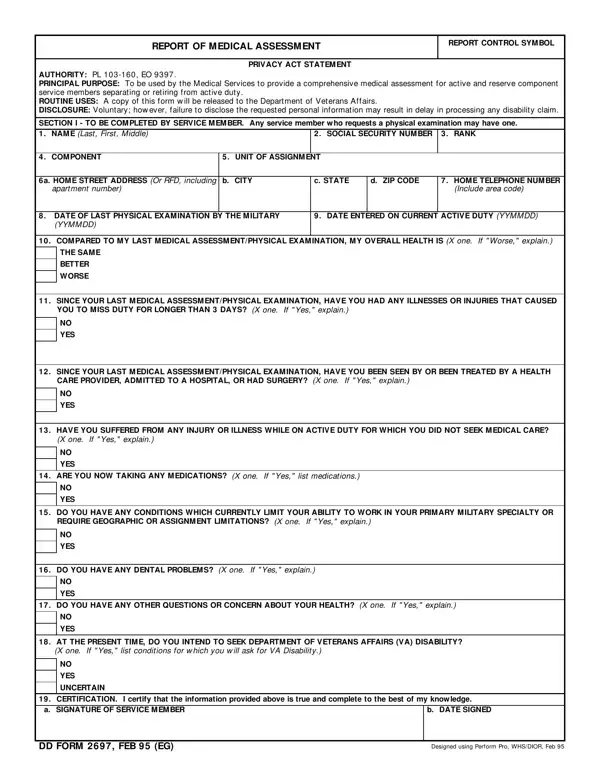
The DD Form 2697, known as the Report of Medical Assessment, plays a crucial role in the transition process for service members separating or retiring from active duty, including those in the reserve components. Authorized under PL 103-160 and Executive Order 9397, this comprehensive form serves multiple purposes, primarily to ensure a service member's health is thoroughly evaluated before their departure from military service. By providing a detailed medical assessment, it not only aids in the smooth transition of individuals back into civilian life but also facilitates any claims with the Department of Veterans Affairs (VA) for disabilities incurred during service. The form requires service members to disclose their health status, any illnesses, injuries, medication use, and whether they intend to seek VA disability, among other health-related questions. Health care providers complete a section of the form as well, documenting any physical findings and recommending further evaluation if necessary. Essentially, this form is a vital step in ensuring that the health concerns of service members are addressed before they leave active duty, and it assists in establishing a clear medical record for future reference.

QuestionAnswer
Form NameDd Form 2697
Form Length2 pages
Fillable?No
Fillable fields0
Avg. time to fill out30 sec
Other namesassessment any last sample, medical assessment physical form, report of medical assessment form, medical assessment physical template

How to Edit Dd Form 2697 Online for Free

In case you need to fill out medical assessment physical, you won't need to download and install any kind of programs - simply use our PDF editor. Our team is relentlessly working to enhance the tool and help it become even faster for people with its multiple functions. Enjoy an ever-evolving experience now! With some simple steps, you can start your PDF editing:

Step 1: First, open the pdf editor by clicking the "Get Form Button" in the top section of this site.

Step 2: With this state-of-the-art PDF editor, you're able to do more than simply complete blank fields. Try all the functions and make your docs seem sublime with custom text added, or optimize the file's original input to excellence - all comes along with the capability to incorporate your personal photos and sign the document off.

Pay attention when completing this form. Make certain all necessary blank fields are filled out correctly.

1. To begin with, while completing the medical assessment physical, beging with the section that contains the subsequent fields:

The right way to prepare report of medical assessment portion 1

2. Just after filling out this step, go to the next part and enter the essential particulars in all these blanks - SINCE YOUR LAST MEDICAL, YES, SINCE YOUR LAST MEDICAL, YES, HAVE YOU SUFFERED FROM ANY INJURY, YES, ARE YOU NOW TAKING ANY, YES, DO YOU HAVE ANY CONDITIONS WHICH, YES, DO YOU HAVE ANY DENTAL PROBLEMS X, and YES.

YES, YES, and YES of report of medical assessment

3. Completing DO YOU HAVE ANY OTHER QUESTIONS, YES, AT THE PRESENT TIME DO YOU INTEND, YES, UNCERTAIN, CERTIFICATION I certify that the, b DATE SIGNED, DD FORM FEB EG, and Designed using Perform Pro WHSDIOR is essential for the next step, make sure to fill them out in their entirety. Don't miss any details!

How to complete report of medical assessment part 3

4. Now fill in this next section! Here you've got all these HEALTH CARE PROVIDER COMMENTS All fields to complete.

The best ways to complete report of medical assessment step 4

Always be extremely mindful while filling out HEALTH CARE PROVIDER COMMENTS All and HEALTH CARE PROVIDER COMMENTS All, because this is where many people make a few mistakes.

5. Finally, the following final portion is precisely what you will need to finish prior to submitting the form. The fields at issue are the next: WAS PATIENT REFERRED FOR FURTHER, YES, PURPOSE OF ASSESSMENT X one If, SEPARATION Includes discharge from, RETIREM ENT, OTHER, M EDICAL FACILITY, DATE OF ASSESSMENT YYMMDD, HEALTH CARE PROVIDER a NAME Last, b GRADERANK, c SIGNATURE, and DD FORM FEB BACK.

b GRADERANK, SEPARATION Includes discharge from, and OTHER inside report of medical assessment

Step 3: Once you have looked over the details you given, click "Done" to complete your document generation. Go for a free trial account at FormsPal and gain instant access to medical assessment physical - download, email, or edit inside your personal account page. FormsPal guarantees protected document tools without data recording or any sort of sharing. Feel at ease knowing that your information is in good hands here!