
Dd Form 2680 PDF Details

What Is DD Form 2680?

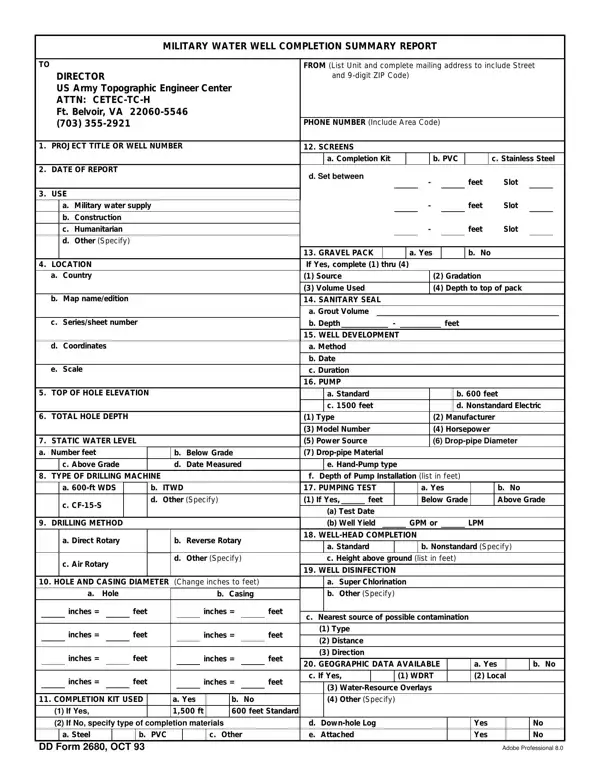
DD Form 2680 is the US Army's Military Water Well Completion Summary Report. This detailed document covers a wide array of information, from the project title or well number to intricate details about the well's construction, including the type of drilling machine used, the hole and casing diameter, and the material used for the well's completion kit. It also covers the well's geographic location, materials encountered during drilling, and water quality specifics.

Key Data Fields

The form provides vital data on:

Tailored to the US Army Topographic Engineer Center's standards, this document serves military water supply, construction, and humanitarian use.

Related Military Forms

Army personnel may also need the DD Form 1351-2, DD Form 2656, or the well completion report form.

QuestionAnswer
Form NameDd Form 2680
Form Length2 pages
Fillable?No
Fillable fields0
Avg. time to fill out30 sec
Other namesPVC, ITWD, dd 2680, Belvoir

How to Edit Dd Form 2680 Online for Free

Handling PDF documents online is definitely very simple with our PDF editor. You can fill out Belvoir here in a matter of minutes. The editor is continually maintained by our team, acquiring cool features and turning out to be better. This is what you would want to do to begin:

Step 1: Open the PDF Form

Access the PDF file inside our tool by clicking the 'Get Form Button' above on this page.

Opening the DD Form 2680 PDF editor

Step 2: Complete the Main Section Fields

After you open the editor, you will get the document prepared to be filled out. Aside from filling in different blanks, you may as well do many other things with the form, specifically putting on your own text, modifying the original textual content, inserting graphics, putting your signature on the form, and a lot more.

With regards to the blank fields of this specific form, here's what you want to do:

1. While filling in the Belvoir, make certain to include all of the needed fields in the associated area. It will help hasten the work, allowing your details to be processed fast and accurately.

Completing Section A of DD Form 2680

2. Right after completing the previous part, go on to the subsequent step and enter all required particulars in all these fields - c Seriessheet number, d Coordinates, e Scale, TOP OF HOLE ELEVATION, TOTAL HOLE DEPTH, STATIC WATER LEVEL a Number feet, c Above Grade, TYPE OF DRILLING MACHINE, b Below Grade d Date Measured, a ft WDS, c CFS, b ITWD d Other Specify, DRILLING METHOD, a Direct Rotary, and b Reverse Rotary.

Step 3: Enter Hole and Casing Dimensions

3. This part is normally straightforward - complete all the blanks in HOLE AND CASING DIAMETER Change, a Hole, b Casing, a Super Chlorination b Other, inches, inches, inches, inches, feet, feet, feet, feet, inches, inches, and inches to complete this segment.

Entering hole and casing data on DD Form 2680

Step 4: Document Well Sketch and Materials

4. This subsection arrives with these particular blank fields to fill out: SKETCH OF WELL AND PUMP, OVERBURDEN MATERIALS, a Unconsolidated c Limestone e, AQUIFER MATERIALS a Sand and, MARKER BEDS Describe, b Sandstone d Igneous, b Sandstone d Igneous, at at at at, feet feet feet feet, WATER QUALITY a Tested, Yes, Date, b Fresh, c Brackish, and d Saline.

Documenting well materials on DD Form 2680

When it comes to b Fresh and b Sandstone d Igneous, ensure you don't make any mistakes in this section. Both these are the most important fields in the document.

Step 5: Sign and Submit the Form

5. To conclude your document, this particular part features a couple of additional fields. Typing in SCALE, REMARKS, a SUBMITTED BY Type or print name, b GRADERANK, c UNIT, SIGNATURE OF PROJECT OFFICIAL, and DATE OF SIGNATURE will certainly conclude everything and you'll surely be done in the blink of an eye!

Signing and submitting DD Form 2680

When done, press 'Done' to complete your form at FormsPal. FormsPal guarantees your information confidentiality via a secure system that never records or distributes your private information. Rest assured knowing your files are kept protected every time you use our services!